
Completing an assignment is a common part of your daily routine as a student. It is essential to have the required knowledge, effort, and work to do it correctly and successfully. Are you engaged with a time-consuming and challenging assignment? Chegg can support you in this scenario by giving you the information you need. You do not have a Chegg subscription yet. Is the subscription fee too expensive?
Don’t worry; this post will explain the process of getting free Chegg answers from Chegg. Step by step, we will explain the process of finding online resources that will support you in completing your assignment on time. You could get educational support without owning a Chegg membership if you followed these steps.
Get Free Chegg Answers
As every college and university turns to online learning, it’s becoming more difficult to find solutions to completing homework assignments during this quarantined time. Unfortunately, some students are now undergoing this difficult phase, which is the most critical period of their lives to establish a professional identity. Chegg provides individuals with professional help, and it has been designed to meet virtually every need of students all over the world.
Chegg is an American academic online tutoring service that assists students with their education outside of the classroom by providing them with excellent tools, services, and cutting-edge technological advances. In addition, it offers physical and virtual material rental services and online tutorials, homework assistance, and scholarships opportunities.

From a mathematics issue to a chemical formula, you can quickly discover answers for any subject matter. Just ask for questions on the Chegg platform, and you will get a solution from one of the many online instructors. Chegg simplifies the student’s work and makes it easily understandable.
Because Chegg solutions are not accessible for free, those who do not have financial resources have difficulties. However, it will cost $14.95 each month and allow you to ask questions to the Chegg experts at any time of day or night, search billions of assignment answers, and get step-by-step solutions for 9,000 different books, among other things. But don’t worry; we have put up a comprehensive tutorial on how to get Chegg answers for free on this page.
These are the identical methods that could be used to unblur Chegg’s answers found online as described above. So Let’s start.
How To Unblur Chegg Answers For Free
1. Try Chegg Study for Free
To get Chegg answers for free, I strongly suggest registering for a Chegg Study membership. It will only cost $14.95 per month, and you can easily cancel at any time for no additional charges.
So you would not have to be focused on money since you can easily cancel your Chegg Study membership for free, and you would not have to charge the $14.95 cancellation fee because you will receive the money refunded.
Described below is the method for signing up for Chegg Study for Free.
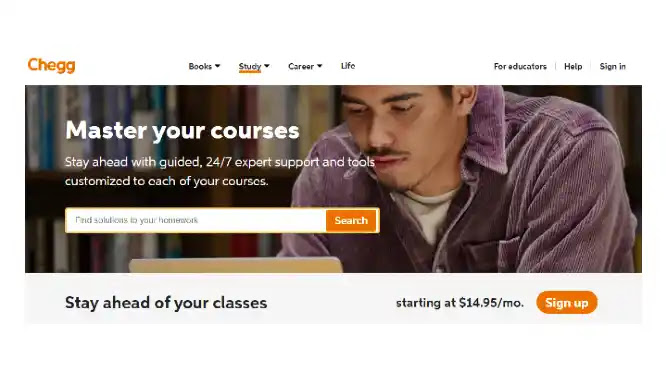
- Visit the Chegg Study webpage.
- To start, click on the Try Chegg Study button.
- Fill out the registration form with your email address and password.
- There are two options available; choose one for $14.95 or $19.95 plus tax.
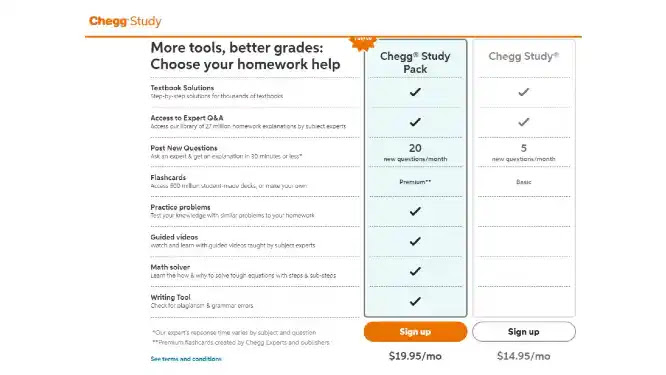
- You can cancel your Chegg Study subscription anytime for free in one month, and you will not be charged the $14.95 cancellation fee.
2. Get Free Chegg Answers by WikiTechLibrary
You can access a free answer on Chegg by simply opening Free Chegg Answers by WikiTechLibrary, entering your questions, and pressing the Submit button. After submitting your Chegg question or link, we will send you the answer to your Chegg question within 30 min to 2 hours.
Here’s how to go about it:
- First, open the WikiTechLibrary for Free Chegg Answers.
- Then, search for the Chegg questions you need to get a solution.
- Now enter your name
- Enter the link or the Chegg question and your email address.
- Click on Submit button.
- You will get free Chegg answers within 30 min to 2 hours of submitting your request.
Submit Your Chegg Question
Submit your question to get Chegg-free answers.
For your comfort, we have ordered a Chegg Study premium membership so that we can give you answers at no cost. You will no longer be required to pay for premium subscriptions to finish your assignment. Ask your question, and our staff will review it and answer you through the email address you provided.

3. Chegg Trial Account for Free
For new users, Chegg offers a 1-month free trial membership, during which time you can receive free answers and study the features of the service. This provides you with enough time to determine whether or not you want to purchase a membership to the service.
During the free trial membership, you can avail full advantage of answering your problems by receiving free answers to your questions. You may decide whether or not you would like to continue with the membership based on your ability to pay for it.
You may also contact an instructor to get answers to all of your questions, but you will not be able to receive free books since they are only provided for rent or purchase. Remember that you must purchase the stated price for these books to buy or rent, even if you use them for a free trial membership.
- Visit the Chegg Study webpage.
- It provides you with the ability to get free Chegg answers.
- You will be able to get an answer to any question for free.
- Enter your email address and password for signup.
- Choose the “I am a student” option and enter the name of your academic institution.
- When you click on your profile picture at the top right corner.
- Add a payment method by selecting it from the payment details section.
- Enter your payment method information, and you will get a free trial subscription Chegg account for one month.

4. Join Reddit Groups to get Chegg Answers for Free
Get Free Chegg Answers through Reddit Groups are another excellent resource for finding free Chegg answers. Nothing more than posting your question in the group and waiting for someone to reply with an answer is required of you. Answers may sometimes take longer than 24 hours, but you will almost always get a solution.
Here’s how to go about it:
- Open the Reddit website.
- To Signup in, the upper right corner button.
- After clicking on the Signup button, your account will be registered automatically.
- Then, in the search box, enter Chegg Answers to start.
- Choose the “Chegg Answers” group with over 20,000 individuals as your objective.
- Join the group and submit the question you’re looking for answers to.
- Someone in the group will be able to provide you with the solution.

5. Best Chegg Alternatives
Even though Chegg is a reliable source of additional help, many other sites may offer you the same Chegg answers. These websites will provide direct support with getting the appropriate paperwork or getting to an online library, among other things. Many of them could also help you get papers or answers from Chegg at no cost to you.
1. CourseHero

Coursehero is the perfect option for Chegg since it provides access to many resources covering almost any topic or area of study. It, like Chegg, offers help in the form of books, papers, short notes, or online instructor support to individuals who require guidance. In addition, Chegg answers relevant solutions will be made available to you via their database and extensive library, which will make your life easier.
2. Slader

Chegg’s free answers are available on the Slader website, accessed here. You need to visit this site on your smartphone and enter your query into the search box to get the answer you are searching for. For example, the following question, which you may either extract from the textbooks or create yourself, will be answered when you put it into the search box on Slader. It would help if you also got selected answers to the queries you have submitted in this section of the website.
3. StudyLib

There is another site called StudyLib that you should check out. However, to start using Studylib, you must go to the website.
You will notice a search bar just on the website’s primary page after being displayed. You may enter your desired query into the search box, and you will be presented with the finest potential responses that are relevant to the topic you sought. As a result, the site is more dependable in answering your questions.
3. Bookfinder

On Bookfinder, you could search the book that Chegg has supplied for you to use to get answers or keys to your questions. Access to publications that may offer you correct answers and assistance in completing assignments, studying for quizzes, and preparing for examinations may be made simple by your location.
4. Skooli

Online teaching service Skooli is dedicated to assisting students in completing their work and projects and being prepared to put them in a timely and effective manner. This website helps students obtain high marks while also showing a solid knowledge of the topics.
Frequently Asked Questions
How to Get Free Chegg Answers?
- Open the WikiTechLibrary for Free Chegg Answers.
- Search for the Chegg questions for which you need to get a solution.
- Now enter your name
- Enter the link or the Chegg question and your email address.
- Click on Submit button.
- You will get free Chegg answers within 30 min to 2 hours of submitting your request.
Is using Chegg answers cheating?
If students use Chegg to get answers to tests and quizzes or duplicate their classmates’ writings for assignments, it is termed cheating. Students who do not learn get unfair advantages over their friends. If you are used to getting quick solutions without studying, you are cheating.
Is Chegg free for students?
To browse textbook rentals or sales at no cost, students may benefit from 30 minutes of free tuition via Chegg Study by registering with the service.
Does anyone have a free Chegg account?
You do not get a Chegg account for free to receive unlimited support throughout your subject. To get free help, you must pay a monthly subscription plan of $14.95. Chegg could be the preferred place for any student who requires help with academics.
Conclusion
We hope you found this post on WikiTechLibrary to be informative and that you have gained an understanding of the best methods for gaining access to the Chegg papers. We think that you will be able to get efficient help and have no regrets about your decision by selecting us.
In addition, you may provide us with comments and ask for assistance using our comments section, and you can also check out our service.


A little discussion goes a long way.
Ask a question, share your experience, or help someone find an answer.
Your blog post resonated with me on so many levels. It's comforting to know that others share my perspective on this topic.
Your voice belongs here
Keep it useful. Keep it kind.