
I switched my Instagram active status off for one reason. I was tired of people knowing when I was online and expecting instant replies. When I opened Instagram, I was under pressure. Messages would be received, and when I did not reply immediately, it was awkward.
After testing Instagram’s privacy settings on both Android and iPhone, I was surprised at how simple it is to hide your active status. Once disabled, no one knows when you are online or even when you were last active. Even better, Instagram also stops showing you the activity status of other people.
Here’s how to easily turn off active status on Instagram, why it matters, and what changes happen after you disable it.
- What is Active Status on Instagram?
- Why You Might Want to Turn Off Active Status
- How to turn off Active status on Instagram (Android and iPhone)
- How to turn off Active Status on Instagram Web
- Does turning off Active Status affect message delivery?
- Can you hide Active Status from specific people?
- Is it safe to turn off active status?
- Frequently Asked Questions
What is Active Status on Instagram?
Instagram’s active status shows to other people whether you are currently online or when you were last active. It appears in two places.
- Your Direct Messages inbox
- Chat threads under profile pictures
You will find messages like active now or active 10 minutes ago.
If your active status is enabled, others can see yours. When you disable it, Instagram hides your status and also stops you from seeing others’ statuses.
Why You Might Want to Turn Off Active Status
Based on personal use, here are the main reasons why people disable it.
- Less pressure to reply quickly
- More privacy while browsing
- Avoid awkward conversations
- Better work-life balance
- Control over who sees your activity
When you use Instagram professionally or scroll without chatting, it is a smart idea to turn it off.
How to turn off Active status on Instagram (Android and iPhone)
I tested these steps on both Android and iOS. The process is the same for both.
- Open the Instagram app
- Tap your profile icon in the bottom right
- Tap the three lines in the top right corner
- Scroll down and tap Messages and story replies
- Tap Show activity status
- Turn off Show activity status
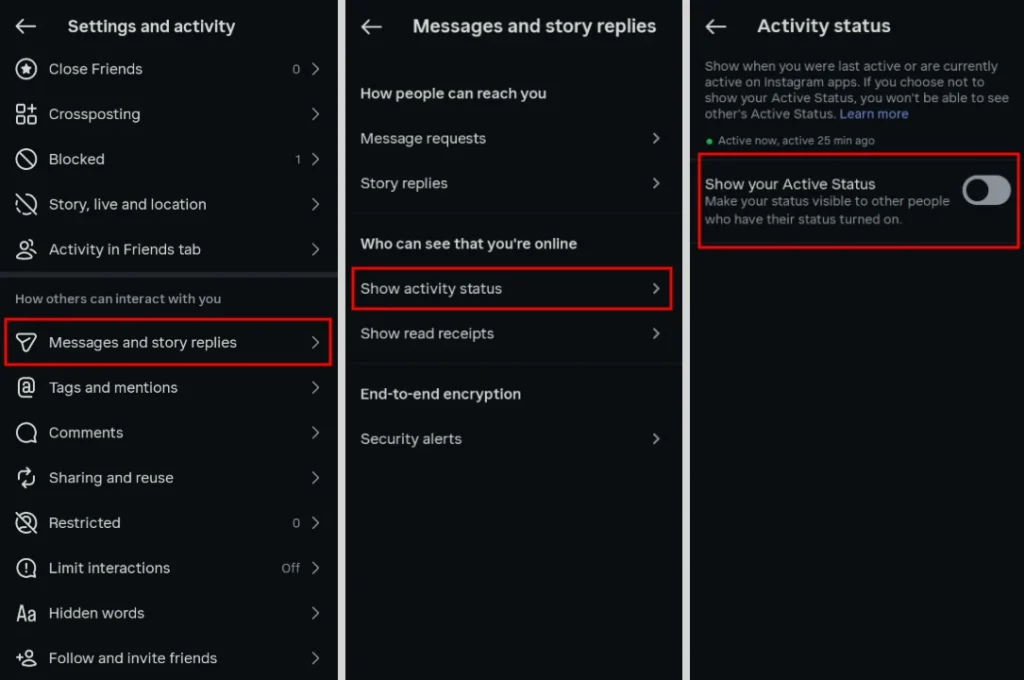
Once toggled off, Instagram will hide your online status from others.
How to turn off Active Status on Instagram Web
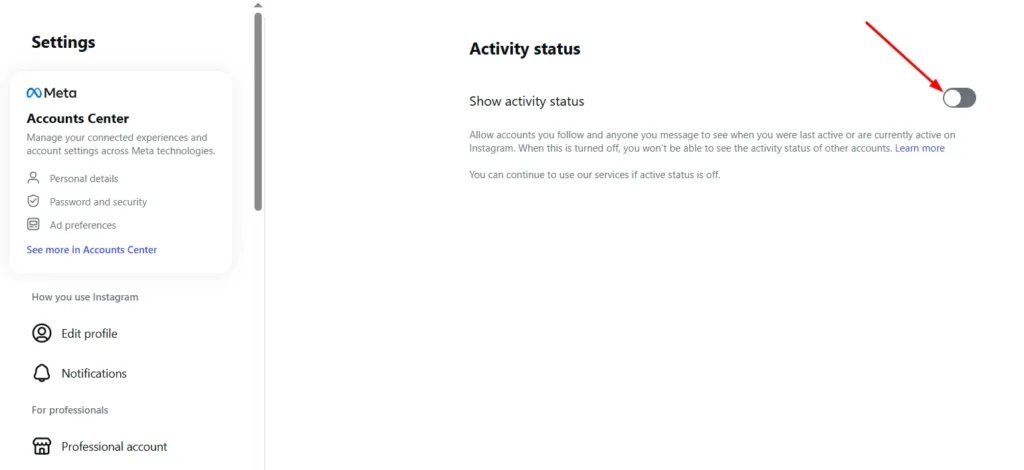
If you use Instagram on a browser, you can disable your active status as follows.
- Go to instagram.com and log in
- Click More in the bottom left
- Select Settings
- Click Messages and story replies
- Open Messages
- Turn off Show activity status
Does turning off Active Status affect message delivery?
No. You will still receive your messages instantly. Read receipts, reactions, and replies work as normal. Only your online status will change.
Personally, it made Instagram easier and more relaxed.
Can you hide Active Status from specific people?
Currently, Instagram does not allow users to hide their active status from selected users only. It is either on for everyone or off for everyone.
If you need more control, you can restrict or mute these specific accounts.
Is it safe to turn off active status?
Yes. This is a built-in Instagram privacy feature. It does not violate any Instagram policies and does not affect your account reach, visibility, or algorithm performance.
Instagram designed this feature for users who value privacy.
Frequently Asked Questions
Can someone still tell if I’m online after turning off Active Status?
No. Once you disable Show activity status, Instagram hides your current online status and your last active time from other users.
Will people know that I turned off my Active Status?
No. Instagram does not notify anyone when you enable or disable your Active Status. The change is completely private.
Can I turn my Active Status back on later?
Yes. You can enable your Active Status at any time by returning to the same privacy setting and turning Show activity status back on.
Does turning off Active Status affect story views or profile visits?
No. Active Status only controls whether others can see when you’re online. It does not affect Story views, profile visits, likes, comments, or Direct Messages.
Is Active Status enabled by default on Instagram?
Yes. Active Status is turned on by default for new Instagram accounts. You can disable it at any time from your privacy settings.
Can I hide my Active Status from only one person?
No. Instagram does not currently let you hide your Active Status from specific people. You can only turn it on or off for everyone. If needed, you can restrict or mute individual accounts.






A little discussion goes a long way.
Ask a question, share your experience, or help someone find an answer.
There is room for your perspective.
No discussions match this view yet.
Your voice belongs here
Keep it useful. Keep it kind.