
Over time, all Android phones start to slow down due to storage issues, outdated software, or too many background processes. The good news is that you do not need any “booster apps” or cleaners to fix it. Here’s how you can speed up your Android phone manually using simple and safe methods.
1. Restart your phone regularly
Restart your phone to clear temporary files and refresh background processes.
- Hold the Power button and select Restart.
- Restart your device at least once a week.
2. Clear cached data
Cached data can slow down your phone. To clear it manually
- Go to Settings > Storage.
- Tap Cached data or Other apps.
- Select specific apps and clear the cache.
Avoid using third-party cleaner apps.
3. Disable unused apps
Many pre-installed apps are active in the background even when you are not using them. To disable them
- Go to Settings > Apps.
- Choose the app you do not need.
- Tap Disable or Uninstall updates.
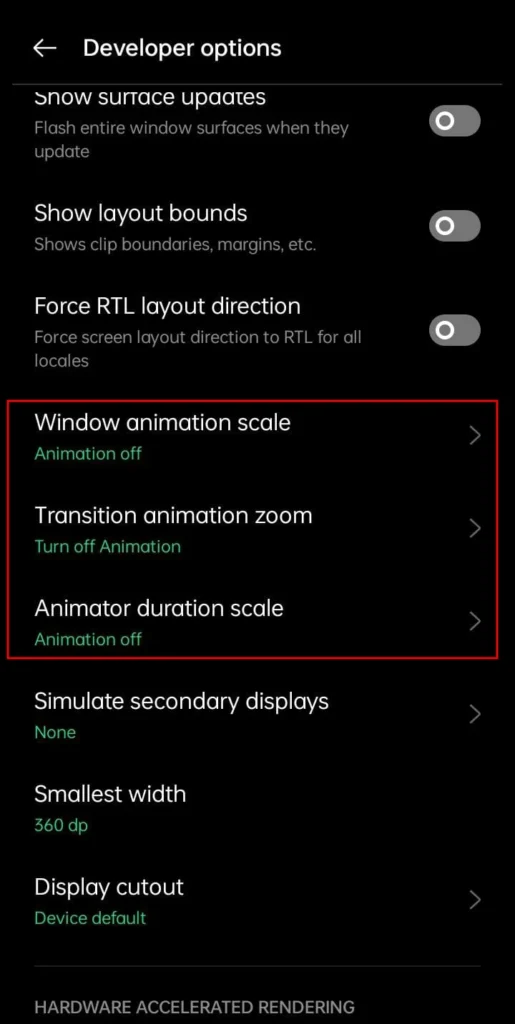
4. Reduce animations
Animations will make your phone look smooth, but they also use system resources. To disable or reduce them
- Enable Developer Options (tap Build number seven times in About Phone).
- Go to Settings > Developer Options.
- Set Window animation scale, Transition animation scale, and Animator duration scale to 0.5x or Off.
5. Free up storage space
If your storage is full, your device performance will drop. To fix it
- Delete unnecessary photos, videos, or downloads.
- Move files to Google Drive or an SD card.
- Use Files by Google to identify large or duplicate files.
6. Update Your System Software
System updates improve performance and security. To check for updates
- Go to Settings > System > Software update.
- Download and install the latest version.
7. Limit background processes
Some apps may run in the background, that can drain memory and slow your phone. You can
- Go to Settings > Battery > Battery usage and restrict heavy apps.
- Turn on Battery Saver mode when needed.
8. Use lite versions of apps
If you have an older device, try lite apps like
- Facebook Lite
- Messenger Lite
- YouTube Go
They will use less data and RAM.
You do not need to use fancy cleaner apps to make your Android faster. You can easily increase your phone’s speed and extend its lifespan by clearing up the cache, disabling unwanted apps, and adjusting animations.
Frequently Asked Questions
Why is my Android phone running slowly?
Android phones can become slower over time because of limited storage, too many background apps, outdated software, and accumulated cache files. Regular maintenance can help restore better performance.
Does clearing cache make an Android phone faster?
Yes. Clearing cached data removes temporary files that may no longer be needed. It can free up storage and resolve performance issues in certain apps without deleting your personal data.
Should I use Android cleaner or booster apps?
In most cases, no. Modern Android devices already include tools for managing storage and memory. Many third party cleaner or booster apps provide little benefit and may even consume additional system resources.
Does reducing animations improve Android performance?
Yes. Lowering or disabling animation scales reduces visual effects, making menus and apps appear more responsive, especially on older or entry level Android phones.
How much free storage should I keep on my Android phone?
It’s a good idea to keep at least 10 to 20 percent of your storage free. Having available space helps Android manage temporary files and maintain smoother overall performance.
Can software updates improve phone speed?
Yes. Software updates often include performance improvements, bug fixes, and security patches. Installing the latest available update can help your phone run more efficiently.







A little discussion goes a long way.
Ask a question, share your experience, or help someone find an answer.
There is room for your perspective.
No discussions match this view yet.
Your voice belongs here
Keep it useful. Keep it kind.