
Snapchat has become one of the most popular social networking apps, particularly among teenagers. Snapchat application users are always surprised by stickers, viral emojis, and other available fun features.
Snapchat is a social media platform that provides a wide range of features geared toward helping users build strong relationships with their friends and family.
Unlike so many social media platforms, Snapchat strongly focuses on privacy, and Snapchat does not provide a public friends list, so you cannot view another user’s complete list of friends. However, there are many indirect ways you can try to find out who your contacts might be linked to.
How to see someone’s friends list on Snapchat
Previously, Snapchat provided the ability to look at who others’ best friends are, but that feature has since been removed. However, you can explore the following alternatives:
Use the quick add feature
Snapchat has a Quick Add feature that shows you friends you might know based on your mutual connections and your phone’s contact list. It doesn’t disclose a complete friends list but usually gives people from your friend’s networks.
- Open the Snapchat app.
- Tap the Add Friends (+) icon in the top-right corner.
- Scroll down to the Quick Add section.
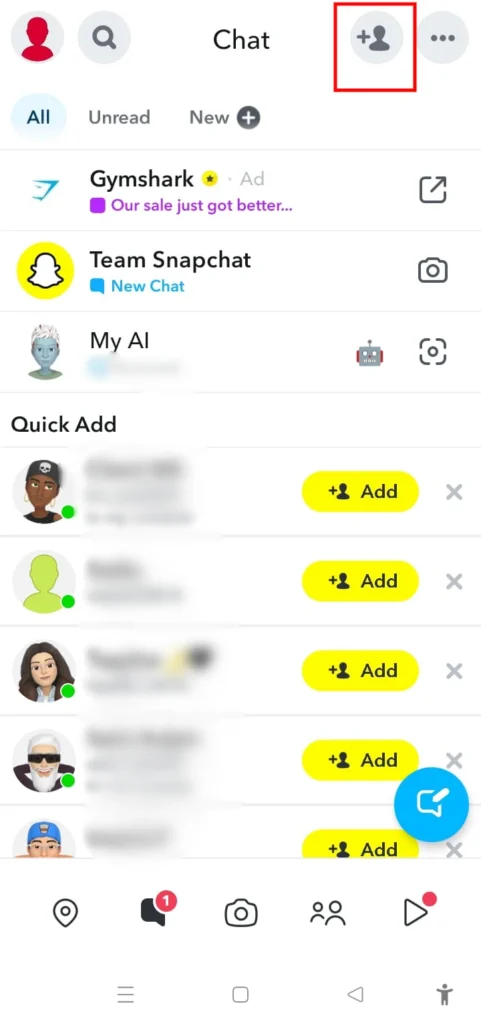
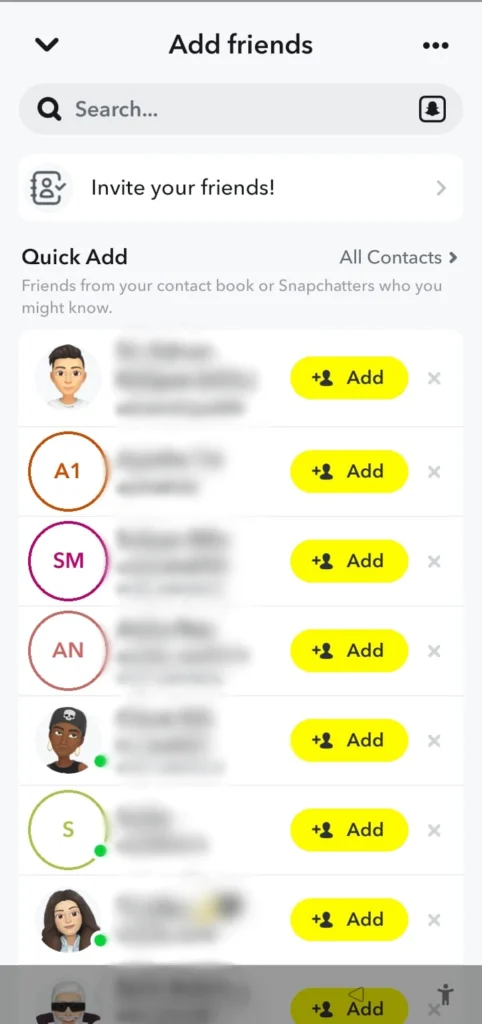
You will find users Snapchat will recommend based on your connections. Tap the Add button next to their name if you know who they are.
Look for the mutual friends tag
Your name on Snapchat may have a Mutual Friend tag next to it, or maybe under their name, when you’re viewing someone’s profile. This means they’re linked to one or more of your friends. Snapchat may indicate that you share mutual friends, but it does not reveal who all of those friends are or provide access to another person’s complete friends list.
Directly ask the person
While this is unconventional, it is the most common way to ask for a person’s friends list. Open communication strengthens trust, and whether you’re widening your network, processing something personal, or watching a child’s activity, you can use it to get the information you need.
Check Shared Groups
If both of you are members of the same Snapchat group, you can see the group participants, but this still doesn’t reveal anyone’s full friends list.
Why Snapchat doesn’t let you see someone’s friends list
Snapchat has designed itself with user privacy. Here’s why the app restricts access to friend lists:
- Enhanced Privacy
- Reduced Harassment
- User Control
Among the things that set it apart from other services is Snapchat’s privacy policies. However, others think having an optional feature for sharing friends lists may increase social network possibilities.




A little discussion goes a long way.
Ask a question, share your experience, or help someone find an answer.
There is room for your perspective.
No discussions match this view yet.
Your voice belongs here
Keep it useful. Keep it kind.