
While Snapchat is a lot of fun, being banned is annoying. There is no official way to lift a ban, but there are a few ways you can get back if you need to. Here, we cover appealing a ban, ensuring you don’t get banned again.
Why Snapchat bans accounts
Users who violate Snapchat’s Terms of Service or Community Guidelines are banned from Snapchat. Common violations include:
- Posting inappropriate content.
- Harassment or spamming.
- Using third party apps or hacks.
Repeated violations can result in permanent bans. Snapchat issues a warning for minor infractions, but repeating other rules gets you into more trouble.

Types of Snapchat Bans
Before trying to recover your account, it’s important to understand which type of Snapchat ban you have. Each ban has different restrictions and possible solutions.
Temporary Ban
Your account is temporarily restricted due to a minor violation or suspicious activity.
- Duration: A few hours to several days.
- Restriction: You cannot log in, send messages, or use Snapchat during the ban.
Permanent Ban
Your account has been permanently disabled because of severe or repeated violations of Snapchat’s rules.
Permanent RestrictionIMEI Ban
Snapchat blocks your device using its unique IMEI identifier, preventing access even if you create another account.
Device Based BanIP Address Ban
Your internet connection is blocked, preventing Snapchat from being accessed through your current IP address.
Network Based BanHow to Get Unbanned from Snapchat
Here’s how you can get unbanned from Snapchat
Appeal the Ban
If you believe the ban was a mistake, submit an appeal:
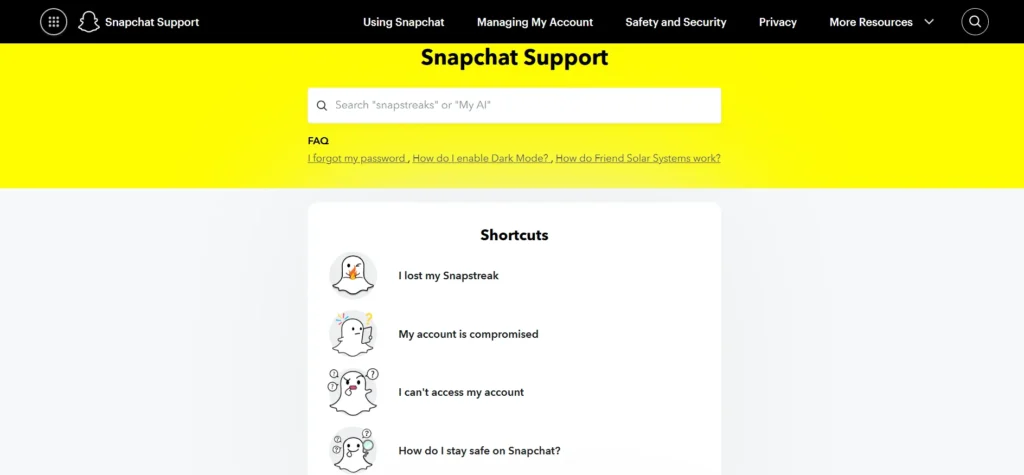
- Visit the Snapchat Support page.
- Click “Contact Us”.
- Select “I can’t access my account.”
- Choose “I see an error message when I log in.”
- Click “Yes” when asked if you need more help.
- Fill in your username and email, and explain your problem.
- Submit the form and wait for Snapchat’s response.
Note: You can also appeal to Snapchat’s policies, but if you can, appeals are less likely to succeed.
Use a VPN
To bypass an IP address ban, use a VPN:
- Uninstall Snapchat from your device.
- Install a VPN.
- Connect to a server from another country.
- Reinstall Snapchat and create a new account.
Switch to a Dynamic IP Address
If your ISP provides dynamic IPs, you can use a new IP that can be given by restarting your router. To ensure success:
- Turn off your router for at least 10 minutes.
- Restart it, and then check if your IP address has changed.
Use a Mobile Hotspot
Connecting through a mobile hotspot can bypass an IP ban:
- Turn on your smartphone’s Personal Hotspot.
- Connect your Snapchat device to the hotspot.
- Open Snapchat.
- Check if the ban is lifted.
Reset Your Device ID
With its IMEI number, Snapchat may block your device. Resetting your device can resolve this:
- Android: Go to Settings > General Management > Reset > Factory Data Reset.
- iOS: Go to Settings > General > Reset and press Erase All Content and Settings.
Warning: All data from your device will be deleted during this process. Backup important files first.

Adjust Date and Time
For temporary bans, changing your device’s date and time may work:
- Uninstall Snapchat.
- Disable Automatic Date & time in your device settings.
- Set the date for a month.
- Reinstall Snapchat and login.
Connect to a Different Wi-Fi Network
If your IP address is banned, switching to another network is the only way out. It’s quick, but it is not necessarily a permanent answer.
How to Avoid Getting Banned from Snapchat
Follow these best practices to stay in Snapchat’s good graces:
- Do not publish offensive or explicit material.
- Follow the Terms of Service of Snapchat.
- Apps like Snapchat++ hacks can trigger bans.
- Do not harass, bully, or spam other people.
- Strong passwords and two-factor auth use.
Disclaimer: Using VPN methods may violate Snapchat’s terms. Good, and proceed at your own risk.
Frequently Asked Questions
How can I get unbanned from Snapchat?
If you believe your account was banned by mistake, submit an appeal through Snapchat Support. If the ban is temporary, waiting until it expires may restore access automatically.
How long does a temporary Snapchat ban last?
A temporary Snapchat ban usually lasts from a few hours to several days, depending on the reason for the restriction.
Can a permanently banned Snapchat account be recovered?
Permanent bans are difficult to reverse. If you believe the action was taken in error, your best option is to contact Snapchat Support and submit an appeal.
Why does Snapchat ban accounts?
Snapchat may ban accounts for violating its Community Guidelines or Terms of Service, including spam, harassment, posting prohibited content, or using unauthorized third party apps.
Can using third party Snapchat apps get my account banned?
Yes. Using unofficial Snapchat apps, plugins, or modified versions of the app can result in temporary or permanent account restrictions.
How can I avoid getting banned on Snapchat?
Follow Snapchat’s Community Guidelines, avoid spam and abusive behavior, never use unauthorized apps, and secure your account with a strong password and two factor authentication.







A little discussion goes a long way.
Ask a question, share your experience, or help someone find an answer.
There is room for your perspective.
No discussions match this view yet.
Your voice belongs here
Keep it useful. Keep it kind.