
One of the most popular web browsers today is Google Chrome, but its default settings compromise your privacy security and down system resources. By blocking some things, you use fewer features but a better experience. Here are five Chrome settings to turn off.
Third-Party Cookies
Third-party cookies follow your online activities for detailed online profiling towards targeted ads. Protecting your privacy is blocking them.
How to disable
- Go to Settings > Privacy and Security > Third-party cookies.
- Select Block Third-Party Cookies.

Why disable it
It stops invasive tracking and keeps you safer online.
Autofill and Passwords
It’s handy to have some stuff saved for autofill on Chrome if you like to keep your email address, passwords, or payment information handy. However, this might be a privacy risk since anyone accessing your device could misuse this information.
How to disable
- Go to Settings > Autofill and passwords > Payment Methods.

- Turn off the toggle of save and fill payment method option.

- Open Google Password Manager, select Settings, and turn off “Offer to Save Passwords and Passkeys.”


Why disable it
Keeping sensitive data out of the browser can improve security, particularly if your device is shared or compromised.
Camera and Microphone permission
Sometimes unnecessarily, websites can request that you access the camera and/or the microphone on your computer. By disabling these permissions, you prevent an accidental privacy breach.
How to disable
- Go to Settings > Privacy and Security > Site Settings.

- Select Camera > Don’t allow sites to use your camera/microphone.


Why disable it
It protects against misuse by guaranteeing that no website can access your hardware unless you permit it.
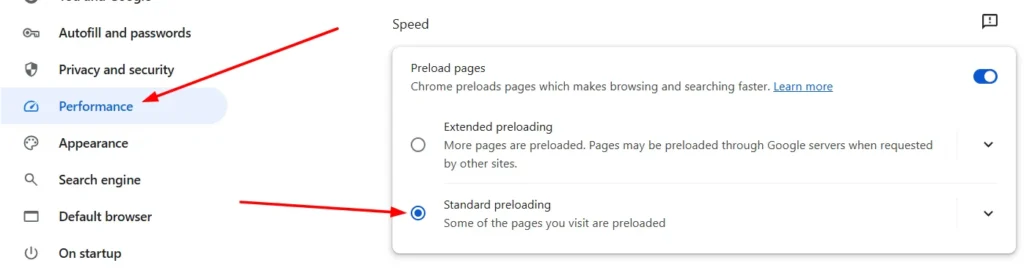
Preload Pages
If you open many tabs in a normal browser (Chrome), pages are preloaded in the background to render faster, but that uses many system resources and bandwidth.
How to disable
- Go to Settings > Performance.
- Turn off the Toggle for Preload Pages.
Why disable it
Not only does it reduce resource consumption with no performance impact on faster systems, but it also improves browser performance on slower systems.
Pop-Ups and Redirects
Pop-ups and redirects can appear when browsing and direct you to malicious sites. Blocking them improves both security and usability.
How to disable
- Go to Settings > Privacy and Security > Site Settings > Pop-Ups and Redirects.

- Select Don’t allow sites to send pop-ups or use redirects.


Why disable it
It keeps you from interruptions, phishing attacks, or spammy ads.
FAQs
Why should I disable autofill in Chrome?
Sensitive information like passwords and payment details can be stolen if someone gets their hands on your device, or there’s a data breach and autofill saves that info first.
What are the risks of enabling third-party cookies?
Third parties can use cookies to track your browsing behaviour on different websites. They can then create detailed user profiles based on which targeted advertising can be shown and from which your privacy can be compromised.
Does disabling preloading affect browsing speed?
Preloading can speed up browsing, but shutting it off conserves resources, leaving it a choice between speed and efficiency.
Can I block pop-ups selectively instead of entirely?
Yes, you can allow exceptions for specific websites while blocking outgoing pop-ups on all other websites. This can all be done in the same Pop-Ups and Redirects settings.


A little discussion goes a long way.
Ask a question, share your experience, or help someone find an answer.
There is room for your perspective.
No discussions match this view yet.
Your voice belongs here
Keep it useful. Keep it kind.