
Close Menu
    Facebook X (Twitter) Instagram Pinterest YouTube Bluesky WhatsApp TikTok Threads RSS
    WikiTechLibrary
    • Converters & Media
    • Web Tools
    • Finance & Tax
    • Utility & Bills
    • Vehicle Tax
    WikiTechLibrary

    Snapchat Adds Harry Potter Lenses for HBO Max Show

    By Muqadas FatimaSeptember 2, 2026No Comments2 Mins Read
    Facebook Twitter WhatsApp Threads Copy Link

    Snapchat has teamed up with HBO Max to bring Harry Potter themed experiences to its platform as part of the promotion for the upcoming Harry Potter and the Philosopher’s Stone series.

    The campaign will feature 12 new AR Lenses based on the Harry Potter universe. These lenses will enable Snapchat users to engage with various magical elements and craft Snaps inspired by Hogwarts.
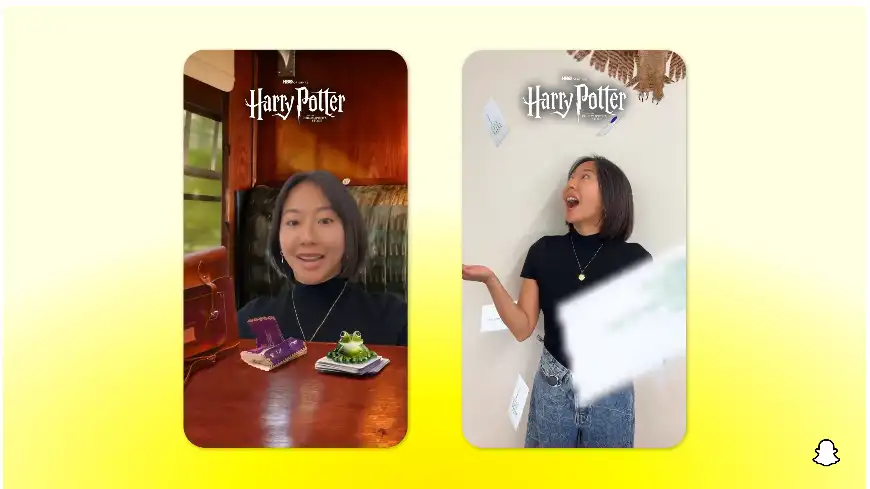
    snapchat harry potter lenses hbo max demo

    Some of the experiences are already available via the official Harry Potter Snapchat account. One of them even has the Sorting Hat so that the user can have fun and find out which Hogwarts House they may fit into.

    The campaign will also feature Harry Potter-inspired Chat Wallpapers and Bitmoji outfits. Users can add Hogwarts-related designs, characters and more to their Snapchat avatars and chats.

    Snapchat is taking the promotion beyond the app as well. AR Mirrors will be available to experience at selected fan events across the US and UK, where guests can try virtual Harry Potter outfits and accessories for their Hogwarts House.

    The partnership follows HBO Max’s upcoming TV adaptation of the Harry Potter series. The first season will be based on Harry Potter and the Philosopher’s Stone and is set to air on December 25, 2026.

    Before the new Harry Potter series hits the airways, Snapchat is offering fans some interaction with the series through the new Lenses and other interactive elements.

    You can check these lenses here.

    Share. Facebook Twitter Pinterest LinkedIn Email WhatsApp Threads
    Muqadas Fatima

      Muqadas Fatima is a dedicated writer at WikiTechLibrary, focusing on creating insightful "how-to" tutorials related to social media, tech, and life hacks. With a keen interest in simplifying the complexities of digital world, she creates content that helps readers improve their social media skills and adopt practical solutions for everyday challenges.

      Related Articles

      TikTok Adds Voice Notes and Image Carousels in Comments

      Google Messages Adds AI Detection to Chat Photos

      Xiaomi Ends Software Support for 10 Devices Across Its Lineup

      Oppo Rolls Out ColorOS 16 Update With New Customization Features

      New Malware Technique Can Hijack Chrome’s Synced Google Passkeys

      Meta’s New App Pocket Lets Users Build and Share AI-Made Games

      JOIN THE CONVERSATION

      A little discussion goes a long way.

      Ask a question, share your experience, or help someone find an answer.

      0 comments
      NewestOldestMost helpfulUnanswered
      ◇

      There is room for your perspective.

      No discussions match this view yet.

      +

      Your voice belongs here

      Keep it useful. Keep it kind.

      Cancel reply

      Your email address will not be published.


      MOST VIEWED

      How to Change Age on Instagram

      By Waqas Amjad

      How to Embed a YouTube Video on Twitter(X)

      By Ahmad Ali

      All Skibidi Toilet Battle Codes

      By Ali Raza

      How To Change Youtube Shorts Thumbnail

      By Muqadas Fatima
      What's New

      AI Video Generator Clips Need a Real Compression Preview

      November 12, 2026

      Made in America and Priced at $7,999: StarBot Launches Spark Humanoid Robot

      November 5, 2026

      TikTok Adds Voice Notes and Image Carousels in Comments

      September 4, 2026

      Google Messages Adds AI Detection to Chat Photos

      September 3, 2026
      © 2026 WIKITECHLIBRARY | All Right Reserved
      • About Us
      • Contact Us
      • Privacy Policy
      • Terms & Conditions
      • Disclaimer

      Type above and press Enter to search. Press Esc to cancel.