

Close Menu

    Subscribe to Updates

    Get the latest creative news from FooBar about art, design and business.

    What's Hot

    250+ Cool Minecraft Names Ideas (Funny & Unique)

    June 4, 2026

    150+ Cute and Funny Nicknames for Boys

    June 4, 2026

    150+ Best Funny WiFi Names – Unique, Cool & Good

    June 4, 2026
    Facebook X (Twitter) Instagram
    Trending
    • 250+ Cool Minecraft Names Ideas (Funny & Unique)
    • 150+ Cute and Funny Nicknames for Boys
    • 150+ Best Funny WiFi Names – Unique, Cool & Good
    • Best WhatsApp Group Names Ideas [Updated]
    • Clever, Private Story Names Ideas For Snapchat Stories
    Facebook X (Twitter) Instagram Pinterest YouTube Bluesky WhatsApp TikTok Threads RSS
    WikiTechLibrary
    • How To
    • Technology
    • Gaming
    • Freebies
    • Reviews
    • Names Ideas
    WikiTechLibrary
    Home»How To»How to Use Flux AI Image Generator [Free]

    How to Use Flux AI Image Generator [Free]

    Muqadas FatimaBy Muqadas FatimaOctober 17, 2024No Comments3 Mins Read
    Facebook Twitter Pinterest Telegram LinkedIn Tumblr WhatsApp Email Bluesky Reddit Threads Copy Link
    flux ai image generator
    Share
    Facebook Twitter LinkedIn Pinterest Telegram Email WhatsApp Threads Copy Link

    Open-source artificial Intelligence model Flux is fast becoming popular for generating realistic human images, much to the level of Midjourney in Photorealism. You are welcome to use this image generator free of charge. We have increased the number of services that can generate AI images via the Flux model to four. With that in mind, it is high time to start.

    flux ai image generator 1
    Table of Contents show
    1 Method 1: Run Flux AI in HuggingFace
    2 Method 2: Get Flux AI on BasedLabs
    3 Method 3: Use Flux AI on Fal.ai
    4 Method 4: Get Flux on NightCafe

    Method 1: Run Flux AI in HuggingFace

    The Flux AI model is freely available for image generation on HuggingFace. Users do not need to register to use the site’s services.

    • Go to Flux. 1 [dev] on HuggingFace and input your prompt. You can also try the Flux .1 [schnell] model.
    • In addition to the prompt, you can set additional settings from the ‘Advanced Settings,’ including image height and width, seed value, and the number of generations the model should make. Once your prompt is prepared, click on Run.
    • It will take some time, depending on the system’s load. The AI image may be created in as few as several seconds.
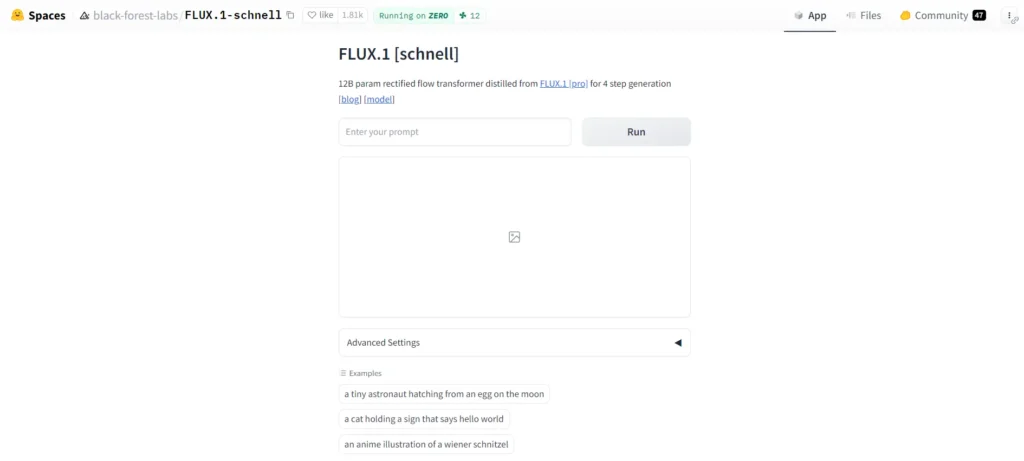
    flux.1 schnell

    Method 2: Get Flux AI on BasedLabs

    • Open the flux.1 tool on BasedLabs in your web browser and then register for a free account.
    • Then, type in your prompt, choose the number of generations and aspect ratio, and, if required, suggest a negative prompt.
    • After your input is prepared, click on the Generate Images button. Your prompt will be processed with the flux by BasedLabs. 1 model will be used to develop the images you asked me to make.
    flux.1 tool on basedlabs

    Method 3: Use Flux AI on Fal.ai

    • Go to fal.ai and sign in with your GitHub account. At the moment, there is no other way to get it.
    • Type a description in the Prompt box to create images using the Flux [dev] model.
    • By clicking ‘see more,’ you can add more settings such as image dimensions, aspect ratio, number of steps, seed, guidance, and quantity of images.
    • When your input is loaded and ready, click the Run button to get your specified images.
    • You can also use the Realism LoRA website or the Flux [schnell] website to try your generations out for a spin.
    fal ai

    Method 4: Get Flux on NightCafe

    Flux is also available on NightCafe, although you initially receive only 5 free credits. One credit can be used to make one AI image.

    • Go to NightCafe for Flux and put in your prompt.
    • In the admin panel, look at the left sidebar, click on Preset under “Style,” and select your image style.
    • Although this option is not highlighted, you can always use the More Settings option to select an aspect ratio and the number of images you want to create.
    • Lastly, click Create, and the image will be created using this AED’s Flux model.
    flux on nightcafe

    This is how you can implement the Flux AI model to generate images for AI for free. Even though the model itself is a PyTorch implementation and is free and open-source software, running such a large AI model requires computing and hardware. That is why services demand users register on the site to form an account or go in for the paid model. That is all from us; as we like to put it, that is how it is.


    READ ALSO:  How to pin someone on Snapchat
    Related Posts
    How to Hide Mutual Friends On Facebook Android and iOS
    How to Hide Mutual Friends On Facebook Android and iOS
    How to Install and Use Microsoft Copilot on Android and iPhone
    caplicot
    How to install WordPress locally on Android
    How to install WordPress locally on Android Smartphone
    How to use Gboard’s AI writing tools on Android
    use gboard ai writing tools on android
    How to Get Wheat Seeds in Palworld
    palworld how to get and use wheat seeds
    How to Watch Videos While on Call on Android
    anirban sarkar zvvwozpcndo unsplash
    Share. Facebook Twitter Pinterest LinkedIn Tumblr Email
    Muqadas Fatima

    Muqadas Fatima is a dedicated writer at WikiTechLibrary, focusing on creating insightful "how-to" tutorials related to social media, tech, and life hacks. With a keen interest in simplifying the complexities of digital world, she creates content that helps readers improve their social media skills and adopt practical solutions for everyday challenges.

    Related Posts

    How to hide your SnapScore on Snapchat

    How to write mobile number in international format

    How to get Canva pro for free

    How to Stop iPhone Screen from Automatically Turning Off

    How to hide and unhide apps on iPhone

    How to watch two YouTube videos at once on Android

    Add A Comment

    Leave a ReplyCancel reply

    Latest Post
    Names

    250+ Cool Minecraft Names Ideas (Funny & Unique)

    By Muqadas Fatima
    Names

    150+ Cute and Funny Nicknames for Boys

    By Muqadas Fatima
    Names

    150+ Best Funny WiFi Names – Unique, Cool & Good

    By Farah Qaiser
    Names

    Best WhatsApp Group Names Ideas [Updated]

    By Farah Qaiser
    Most Viewed

    How to turn off Green Dot on Snapchat: What does it mean

    July 3, 2025

    Hide and Sneak Codes 2024

    September 20, 2024

    TikTok to launch separate app for America on September

    July 7, 2025

    Starlink internet packages for Pakistan

    January 9, 2025

    WikiTechLibrary is the Digital Library covering Content Primarily Related to Tech, How-To, Tips & Tricks, Social Media, Gaming, Education, Business & Finance, Telecom, Crypto, and Much More. We always try to provide new information to our visitors.

    Email: [email protected]

    Facebook X (Twitter) Instagram Pinterest YouTube Bluesky WhatsApp TikTok Threads RSS
    Our Picks

    Anime Crossover Defense Codes 2024 – Free Gems!

    May 13, 2024

    OnePlus 7 Pro price in Pakistan & Specifications

    February 12, 2023

    Social Media Apps Start Recovering in Pakistan

    May 15, 2023
    Top Reviews

    Best AI Photo Enhancers [Free and Paid]

    February 13, 2025

    Tekken 8 Review: The King of the Iron Fist Continues to Shine

    January 24, 2024

    Metadoro Reviews: The Perfect Blend of Trading and Investment Opportunities

    October 15, 2023
    © 2026 WIKITECHLIBRARY | All Right Reserved
    • About Us
    • Contact
    • Disclaimer
    • Privacy Policy
    • Terms
    • Cookies Policy
    • Editorial Policy

    Type above and press Enter to search. Press Esc to cancel.

    Join Now

    Loading Comments...




