

Instagram lets us create global relationships until we choose to block users because of conflicts, spam, or because we need solitude. Unblocking someone becomes straightforward after you restore their friendship or provide another opportunity. You can unblock people on Instagram by following this easy guide.
How to unblock someone on Instagram
There are two easy ways to unblock someone
Method 1: Unblock via Settings
You can view all the users you have blocked in your settings:
- Open the Instagram app.
- Go to your profile.
- Tap the three horizontal lines (hamburger icon) at the top right.
- Scroll down and tap Blocked under Who can see your content.
- Find the user you want to unblock and tap Unblock.
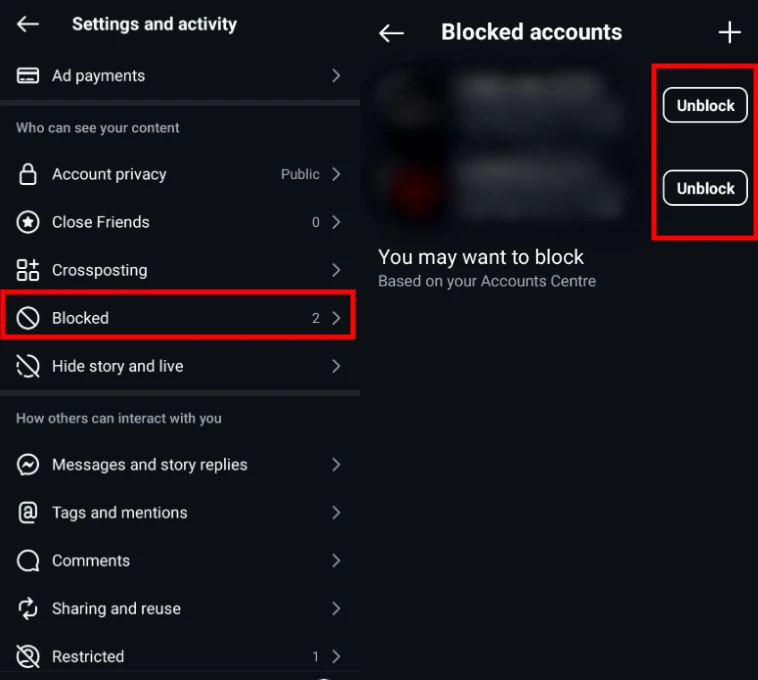
They can now view your content and interact with you again (depending on your privacy settings).
Method 2: Unblock via Direct Messages
If you have previously chatted with the individual you blocked, unblocking through DM:
- Open the Instagram app.
- Tap the home icon.
- Tap the DM icon in the top right.
- Select the conversation with the blocked user.
- Tap the user’s name at the top of the chat.
- Tap Unblock.
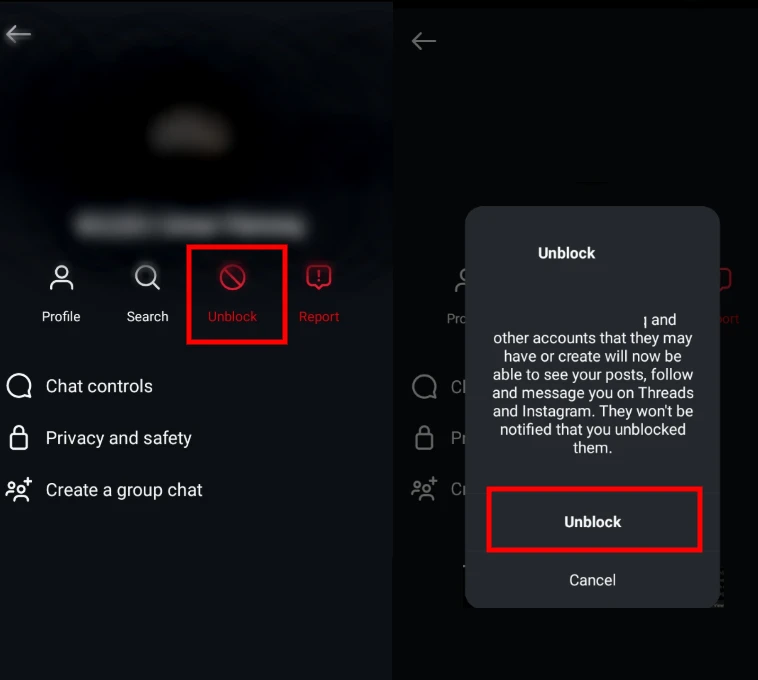
You can easily reconnect with a few quick taps on your device. Unblocking allows you to start new conversations with your friends, family, and former contacts.






A little discussion goes a long way.
Ask a question, share your experience, or help someone find an answer.
There is room for your perspective.
No discussions match this view yet.
Your voice belongs here
Keep it useful. Keep it kind.