

Payoneer is a world-leading payment solution that enables freelancers, telecommuters, online sellers, and global businesses to send and receive cross-border payments. However, if you have stopped using the service or changed the payment provider, you may decide to clear out your Payoneer identity altogether.
In this article, we will proceed to explain how to delete your Payoneer account step-by-step, as well as mention the things to consider before doing so.
- Things to know before deleting your Payoneer account
- How to delete your Payoneer account (Step-by-Step)
- Step 1: Withdraw all funds
- Step 2: Disconnect from marketplaces
- Step 3: Contact Payoneer support
- Step 4: Wait for confirmation
- Sample message for account closure request
- Can you reactivate a deleted Payoneer account?
Things to know before deleting your Payoneer account
Here are the important things to remember before you continue with your account closure:
- Your account should have a $0.00 balance with no pending money transfer.
- All attached bank accounts, cards, and services will be removed.
- Platforms like Fiverr, Amazon, or Upwork should be disconnected before closing.
- You cannot delete the account yourself; a support request must be submitted.
How to delete your Payoneer account (Step-by-Step)
Step 1: Withdraw all funds
- Ensure your Payoneer account has zero balance.
- Before you begin with the closure process, transfer funds to your linked bank account or card.
Step 2: Disconnect from marketplaces
(Optional but Recommended)
- Visit platforms where you used your Payoneer account (e.g., Fiverr, Upwork, Airbnb).
- Remove Payoneer as your payout option.
Step 3: Contact Payoneer support
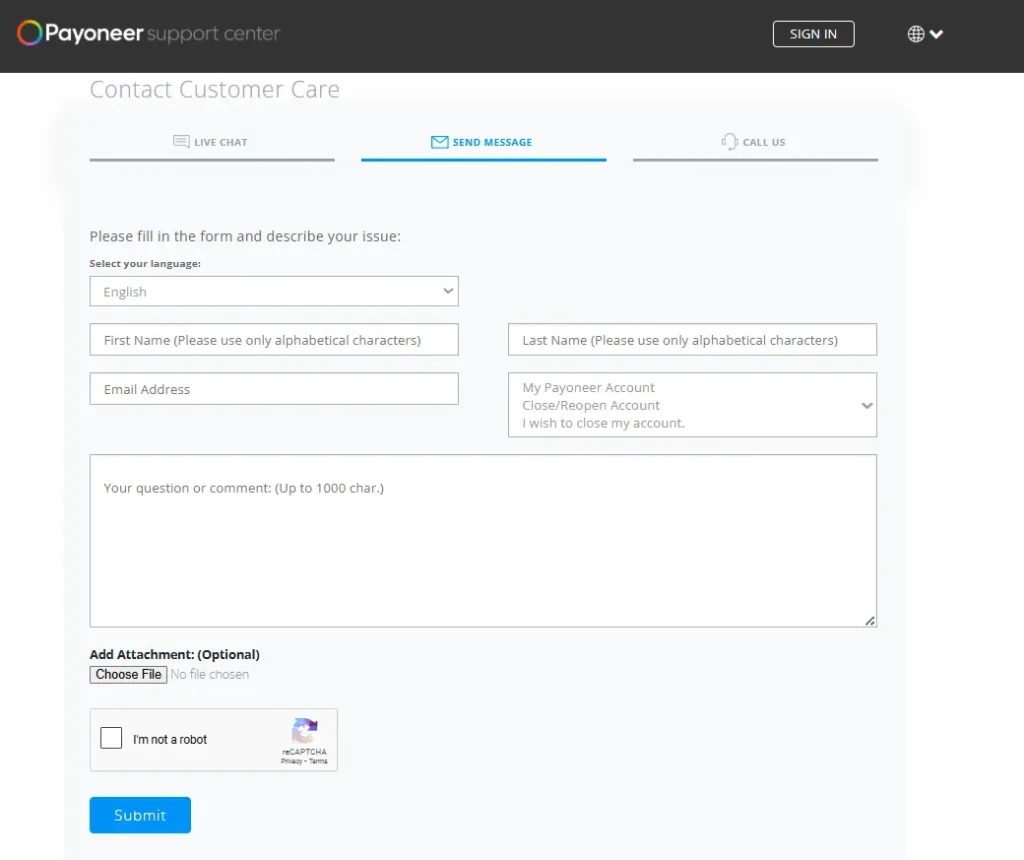
Since Payoneer does not provide a direct account deletion button, you will have to make a closure request manually.
Here’s how:
- Visit the Payoneer Support Center.
- Log in to your account.
- Scroll to the bottom and click “Contact Us.”
- Select:
- Category: My Account
- Topic: Close/Reopen Account
- Choose “Close my account.”
- Explain your reason (optional) and submit the request.
Step 4: Wait for confirmation
Payoneer’s support team will review your request. In case there are no problems (the funds are not available or there are still some unresolved issues), the account will be closed in 2-3 business days. A confirmation email will be sent to your registered email address.
Sample message for account closure request
Here’s a ready-to-use message you can copy and paste:
Subject: Request to Close My Payoneer Account
Dear Payoneer Team,
I want to close my Payoneer account associated with this email permanently. I have withdrawn all funds and removed connections to any third-party platforms.
Kindly proceed with the closure. Thank you.
Regards,
[Your Full Name]
Can you reactivate a deleted Payoneer account?
No. Once your account has been closed permanently, you will not be able to reopen your account. In case you want to access Payoneer once again, this time you will need to create a new account with another email address.
Can I delete my Payoneer account myself?
No. Payoneer does not provide a direct option to delete your account from the account settings. You must submit an account closure request through the Payoneer Support Center. Once your request is reviewed and approved, your account will be permanently closed.
Do I need to withdraw my money before closing my Payoneer account?
Yes. Before requesting account closure, make sure your Payoneer balance is $0.00 and there are no pending transactions. Any remaining funds should be withdrawn to your linked bank account or eligible payment method.
How long does Payoneer take to close an account?
In most cases, Payoneer processes account closure requests within 2 to 3 business days. The exact time may vary if your account has pending payments, verification requirements, or unresolved issues.
Should I disconnect Fiverr, Upwork, or Amazon before deleting my account?
Yes. It is recommended to remove Payoneer as your payout method from platforms such as Fiverr, Upwork, Amazon, Airbnb, and other connected marketplaces before submitting your account closure request.
Can I reactivate my Payoneer account after it has been closed?
No. Once your Payoneer account has been permanently closed, it cannot be reopened. If you wish to use Payoneer again in the future, you’ll need to create a new account using a different email address, subject to Payoneer’s eligibility requirements.
Will I receive a confirmation after my account is deleted?
Yes. After your closure request has been approved and processed, Payoneer will send a confirmation email to your registered email address confirming that your account has been permanently closed.






A little discussion goes a long way.
Ask a question, share your experience, or help someone find an answer.
There is room for your perspective.
No discussions match this view yet.
Your voice belongs here
Keep it useful. Keep it kind.