

Close Menu

    Subscribe to Updates

    Get the latest creative news from FooBar about art, design and business.

    What's Hot

    250+ Cool Minecraft Names Ideas (Funny & Unique)

    June 4, 2026

    150+ Cute and Funny Nicknames for Boys

    June 4, 2026

    150+ Best Funny WiFi Names – Unique, Cool & Good

    June 4, 2026
    Facebook X (Twitter) Instagram
    Trending
    • 250+ Cool Minecraft Names Ideas (Funny & Unique)
    • 150+ Cute and Funny Nicknames for Boys
    • 150+ Best Funny WiFi Names – Unique, Cool & Good
    • Best WhatsApp Group Names Ideas [Updated]
    • Clever, Private Story Names Ideas For Snapchat Stories
    Facebook X (Twitter) Instagram Pinterest YouTube Bluesky WhatsApp TikTok Threads RSS
    WikiTechLibrary
    • How To
    • Technology
    • Gaming
    • Freebies
    • Reviews
    • Names Ideas
    WikiTechLibrary
    Home»How To»How to Fix Snapchat Sound Not Working on the App

    How to Fix Snapchat Sound Not Working on the App

    Ahmad AliBy Ahmad AliMarch 6, 2025No Comments2 Mins Read
    Facebook Twitter Pinterest Telegram LinkedIn Tumblr WhatsApp Email Bluesky Reddit Threads Copy Link
    fix snapchat sound not working on app
    Share
    Facebook Twitter LinkedIn Pinterest Telegram Email WhatsApp Threads Copy Link

    Snapchat is a fast way to send photos and videos. However, many users experience issues with sound. If this is you, here are four simple fixes you can try to restore sound on Snapchat.

    Table of Contents show
    1 1. Turn Off Silent Mode
    2 2. Disable Bluetooth
    3 3. Enable Microphone Permissions
    4 4. Clear Snapchat Cache

    1. Turn Off Silent Mode

    If your mobile phone is in silent or do not disturb mode, Snapchat videos will not have sound. Here is how you can fix it:

    • Press the volume up button on your phone.
    • For iPhone users, switch Silent Mode off using the side button.
    • For Android users, ensure Do Not Disturb is disabled in settings.

    2. Disable Bluetooth

    Snapchat may play audio through a connected Bluetooth device. To fix it:

    • Open Settings on your phone.
    • Go to Bluetooth and turn it off.
    • Restart Snapchat and check if the sound is working.

    snapchat ip address finder

    3. Enable Microphone Permissions

    Snapchat requires access to the microphone to record and playback audio.

    For iPhone

    • Open Settings → Snapchat.
    • Toggle Microphone on.

    For Android

    • Open Settings → Apps → Snapchat.
    • Go to Permissions → Microphone → Select Allow.

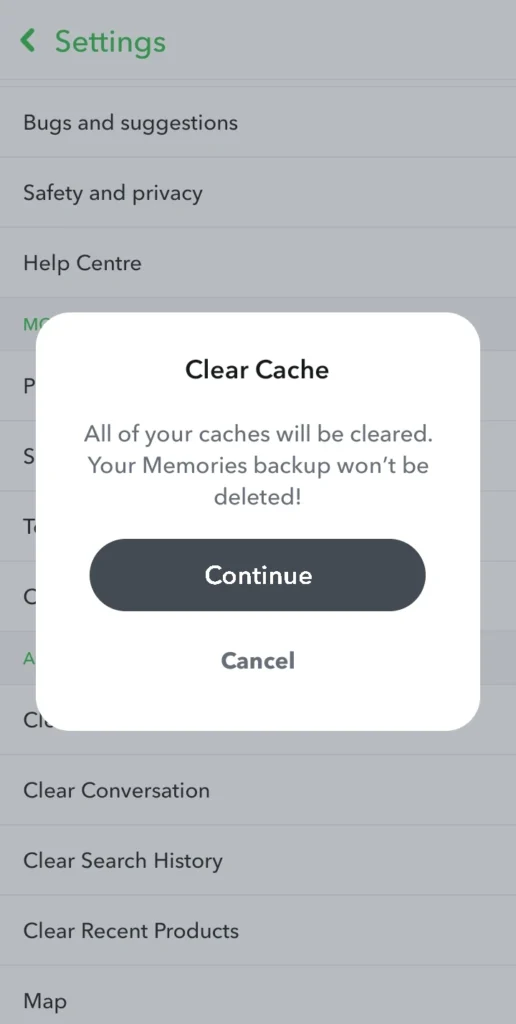
    4. Clear Snapchat Cache

    Cache buildup can cause Snapchat to malfunction. To clear cache:

    • Open Snapchat.
    • Go to your Profile.
    • Tap the Settings icon.
    • Scroll down to Clear Cache under Privacy Controls.
    • Select Clear All and restart Snapchat.
    READ ALSO:  How to Access Your Clipboard on Android
    clear snapchat cache

    You need to try these methods to fix the Snapchat sound issue. If it still does not work, reinstall the app. Let us know how it went.


    Related Posts
    How to Turn off Assistive Touch on iPhone
    apple iphone12pro
    How to Check Body Mass Index – BMI Calculator
    how to check body mass index
    How to Add Someone to a Family Plan on Spotify
    spotify
    How to Know Who Viewed Your Telegram Post
    know who viewed telegram post
    LEGO Fortnite: How to Set Respawn Location
    fortnite village
    How to Block Someone on Google Drive to Stop Unwanted File Sharing
    block someone google drive stop unwanted file sharing
    Share. Facebook Twitter Pinterest LinkedIn Tumblr Email
    Ahmad Ali
    • Website

    Ahmad Ali is a skilled content creator at WikiTechLibrary, specializing in crafting detailed "how-to" tutorials on social media, tech solutions, and daily life hacks. With a passion for simplifying complex processes, he also delivers honest and insightful reviews of the latest tools, gadgets, and platforms.

    Related Posts

    How to hide your SnapScore on Snapchat

    How to write mobile number in international format

    How to get Canva pro for free

    How to Stop iPhone Screen from Automatically Turning Off

    How to hide and unhide apps on iPhone

    How to watch two YouTube videos at once on Android

    Add A Comment

    Leave a ReplyCancel reply

    Latest Post
    Names

    250+ Cool Minecraft Names Ideas (Funny & Unique)

    By Muqadas Fatima
    Names

    150+ Cute and Funny Nicknames for Boys

    By Muqadas Fatima
    Names

    150+ Best Funny WiFi Names – Unique, Cool & Good

    By Farah Qaiser
    Names

    Best WhatsApp Group Names Ideas [Updated]

    By Farah Qaiser
    Most Viewed

    Claw Machine Simulator Codes (100% Working)

    March 14, 2025

    Google Pixel 8 and 8 Pro Launch Date Announced

    August 31, 2023

    Apple to Invest $5 Billion to Develop a Rival to ChatGPT

    October 24, 2023

    How to Renew a Driving License in Peshawar

    May 4, 2023

    WikiTechLibrary is the Digital Library covering Content Primarily Related to Tech, How-To, Tips & Tricks, Social Media, Gaming, Education, Business & Finance, Telecom, Crypto, and Much More. We always try to provide new information to our visitors.

    Email: [email protected]

    Facebook X (Twitter) Instagram Pinterest YouTube Bluesky WhatsApp TikTok Threads RSS
    Our Picks

    How to fix ‘Instagram post could not be shared’ error

    December 5, 2024

    Meta AI rolls out Voice Translation for Facebook and Instagram videos

    August 21, 2025

    How To Setup VPN On Xbox One

    May 3, 2023
    Top Reviews

    MGID Review: Native Advertising Marketplace

    November 15, 2023

    Paraphrasetool.ai Review – Is it a Good Tool for Authors?

    May 3, 2024

    Best Cheap Web Hosting in Pakistan with Free Domain

    May 3, 2026
    © 2026 WIKITECHLIBRARY | All Right Reserved
    • About Us
    • Contact
    • Disclaimer
    • Privacy Policy
    • Terms
    • Cookies Policy
    • Editorial Policy

    Type above and press Enter to search. Press Esc to cancel.

    Join Now

    Loading Comments...




