
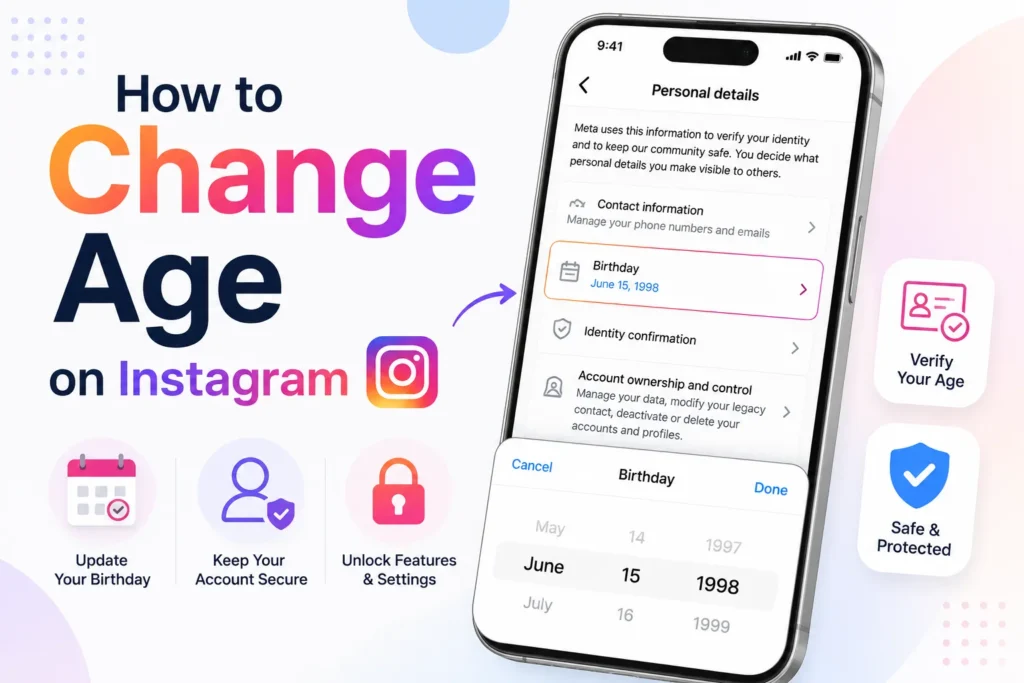
The first problem with Instagram age I noticed when one of my posts suddenly showed limited reach, and some features, such as ads and branded content tools, disappeared. I have checked my account details and found that my date of birth was not correct. Instagram uses age to control features, privacy, and content visibility, so even a small mistake can cause restrictions.
After personally experiencing Instagram’s age update process on both Android and iPhone, I learned what works, what does not, and what Instagram actually allows.
Here’s how to change your age on Instagram.
- Can you change your age on Instagram?
- How to change age on Instagram (Android and iPhone)
- What if you can’t edit your age?
- How to verify age on Instagram (If editing is locked)
- Age verification methods that Instagram uses
- How to verify your age
- Change age on Instagram via Facebook (Meta accounts)
- How to update via Facebook
- Why Instagram might restrict your account after age change
- Will changing my age affect my account?
- Frequently Asked Questions
Can you change your age on Instagram?
Yes, but with limits.
- You can edit your birthday if your account is not restricted
- If Instagram locks the option, you must verify your age
- Enter a false age can suspend your account
I strongly recommend using your real date of birth.
How to change age on Instagram (Android and iPhone)
I tested these steps on both platforms. The process is the same.
- Open Instagram app
- Go to your Profile
- Tap three lines menu
- Go to Account centre
- Tap Personal details
- Select Birthday
- Edit your date of birth
- Tap Done or Save
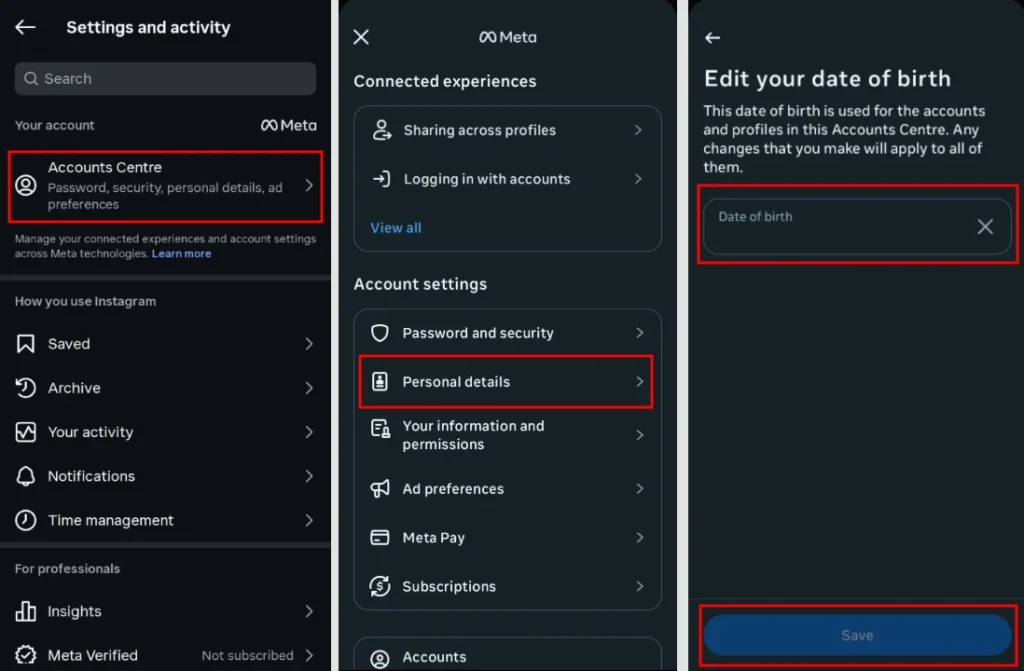
If Instagram accepts the change, your birthday is usually updated immediately. In some cases, Meta may review the change before it appears.
What if you can’t edit your age?
In some cases, Instagram locks the birthday field. This happens if
- Your account was created as a teen account
- You recently changed your age
- Instagram flagged your account for age verification
- The account was created using Facebook, where the birthday is managed.
I faced this once on a test account.
How to verify age on Instagram (If editing is locked)
If you cannot change your age manually, Instagram will ask for verification.
Age verification methods that Instagram uses
- Uploading a government issued ID
- Submitting a video selfie
- Confirming age through Meta support
How to verify your age
- Go to Settings
- Tap Account
- Select Personal Information
- Tap Birthday
- Follow the on-screen verification steps
- Submit required proof
- Wait for review (usually 24 to 72 hours)
Once approved, Instagram updates your age automatically.
Change age on Instagram via Facebook (Meta accounts)
If your Instagram and Facebook accounts are linked through Accounts Center, changing your birthday on Facebook may also update it on Instagram. However, this does not happen for every account.
How to update via Facebook
- Open Facebook
- Click on three lines menu
- Go to Settings
- Tap Personal details
- Edit Date of Birth
- Save changes
- Restart Instagram
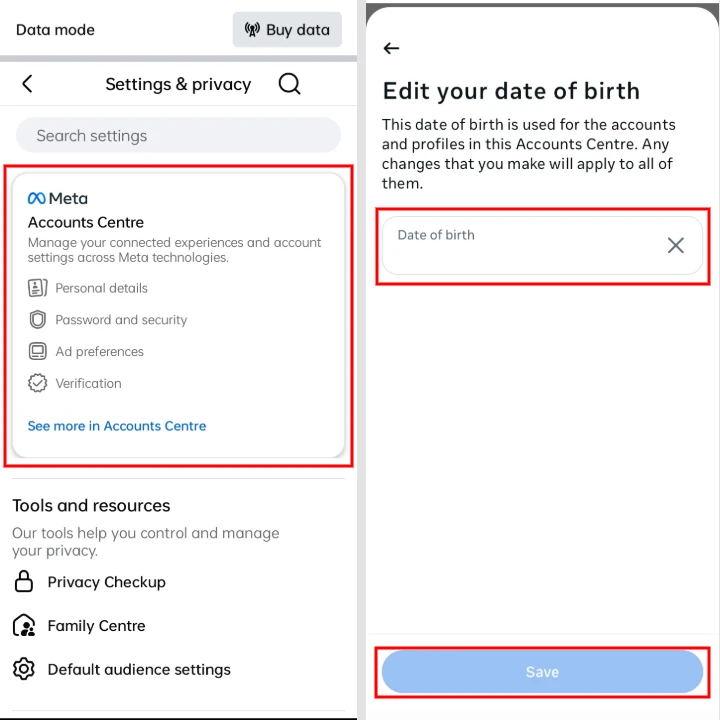
This worked for me on one linked account, but it does not work in all cases.
Why Instagram might restrict your account after age change
Sometimes users report temporary issues due to:
- System verification checks
- App cache issues
- Delayed Meta sync
Logging out and back in usually fixes this.
Will changing my age affect my account?
Yes. If your birthday shows that you are under 18, Instagram may automatically apply Teen Account protections, including stricter privacy settings, messaging restrictions, and content controls.
Frequently Asked Questions
Can I change my age on Instagram without ID?
Yes. If the birthday edit option is available, you can change your age without submitting an ID. Instagram usually asks for identity verification only when the birthday field is locked or additional verification is required.
How many times can I change my age on Instagram?
Instagram does not publish a fixed limit for birthday changes. However, making repeated changes within a short period may trigger an age verification request or temporarily prevent further edits.
What happens if I change my age to under 18?
If your updated birthday shows you are under 18, Instagram may automatically apply Teen Account protections, including stricter privacy settings, messaging restrictions, and content controls.
Can Instagram ban me for changing my age?
No. Changing your birthday itself will not ban your account. However, providing false information or violating Instagram’s policies could lead to account restrictions or additional verification.
How long does Instagram age verification take?
Most age verification requests are reviewed within 24 to 72 hours, although some cases may take longer depending on the information provided and Instagram’s review process.
Why can’t I change my birthday on Instagram?
Your birthday may be locked because you recently changed it, your account requires age verification, or your birthday is managed through a linked Facebook account in Accounts Center.
Can I hide my birthday on Instagram?
No. Instagram requires your date of birth for age verification and safety features. Your birthday is not normally visible to other users unless you choose to share it publicly.






A little discussion goes a long way.
Ask a question, share your experience, or help someone find an answer.
There is room for your perspective.
No discussions match this view yet.
Your voice belongs here
Keep it useful. Keep it kind.