Close Menu

    Subscribe to Updates

    Get the latest creative news from FooBar about art, design and business.

    What's Hot

    250+ Cool Minecraft Names Ideas (Funny & Unique)

    June 4, 2026

    150+ Cute and Funny Nicknames for Boys

    June 4, 2026

    150+ Best Funny WiFi Names – Unique, Cool & Good

    June 4, 2026
    Facebook X (Twitter) Instagram
    Trending
    • 250+ Cool Minecraft Names Ideas (Funny & Unique)
    • 150+ Cute and Funny Nicknames for Boys
    • 150+ Best Funny WiFi Names – Unique, Cool & Good
    • Best WhatsApp Group Names Ideas [Updated]
    • Clever, Private Story Names Ideas For Snapchat Stories
    Facebook X (Twitter) Instagram Pinterest YouTube Bluesky WhatsApp TikTok Threads RSS
    WikiTechLibrary
    • How To
    • Technology
    • Gaming
    • Freebies
    • Reviews
    • Names Ideas
    WikiTechLibrary
    Home»Tech»What are CROSH Commands in Chromebook? Complete Guide

    What are CROSH Commands in Chromebook? Complete Guide

    Waqas AmjadBy Waqas AmjadMay 12, 2026No Comments3 Mins Read
    Facebook Twitter Pinterest Telegram LinkedIn Tumblr WhatsApp Email Bluesky Reddit Threads Copy Link
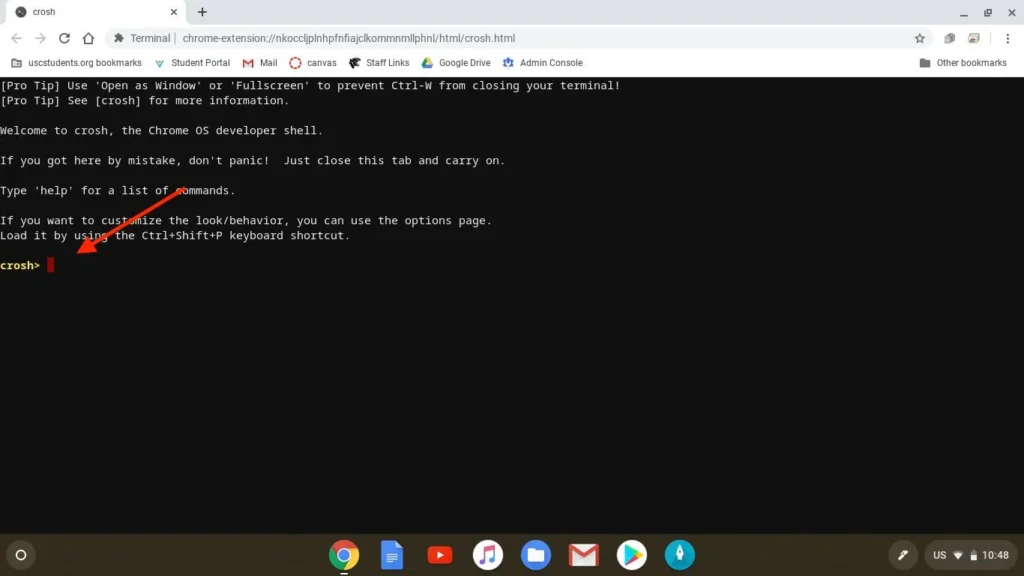
    crosh commands in chromebook
    Share
    Facebook Twitter LinkedIn Pinterest Telegram Email WhatsApp Threads Copy Link

    Most people use a Chromebook only for web browsing, online classes or daily tasks. But very few users know that there is also a secret tool inside Chrome OS called CROSH.

    This tool, apart from the usual Settings, provides features with which you can check the system, find network problems and easily understand many technical errors.

    If you have ever heard of “CROSH Commands” and did not understand what they are, then this guide is for you.

    Table of Contents show
    1 Basic CROSH Commands
    2 Important System Checking Commands
    3 Network and WiFi Commands
    4 Linux and Developer Commands
    5 Bluetooth and Storage Related Commands
    6 Caution when using CROSH Commands
    7 Conclusion

    Basic CROSH Commands

    There are some commands that are useful for almost every user.

    For example, typing help gives you a list of basic commands. If you want to close CROSH, exit is used.

    Similarly, uptime tells you how long the Chromebook has been running, while help_advanced shows more advanced commands.

    These commands are very helpful for new users.

    Important System Checking Commands

    If you want to see the performance or hardware information of the Chromebook, there are several useful options in CROSH.

    The command called top shows all the running processes. This shows which apps are using more resources.

    READ ALSO:  What is an archive? How to use it in WhatsApp, Gmail, and Instagram

    Similarly, memory_test is used to check the system memory, while battery_test gives information about the battery status and performance.

    Some users also use rollback, through which they can go back to the old Chrome OS version. However, caution is necessary while using this option because sometimes data can be deleted.

    Network and WiFi Commands

    Many Chromebook users face internet or WiFi issues. CROSH is also quite useful in this regard.

    For example, you can check the internet connection through ping. If there is a problem accessing a website, tracepath shows the network route.

    Similarly, network_diag generates a complete network report and helps in understanding the root cause of the problem.

    The dns command is used to check DNS information.

    Linux and Developer Commands
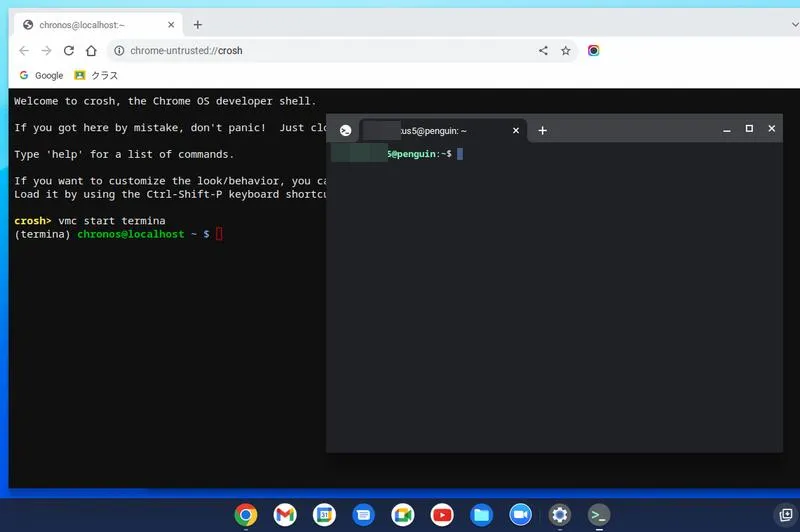
    crosh commands in chromebook 1

    CROSH is also very important for users using Linux on Chromebook.

    vmc start termina is used to start a Linux Container while vmc stop termina stops it.

    If the Chromebook is in Developer Mode, more advanced features can be accessed through the shell.

    These features are more useful for Developers and Advanced Users than ordinary users.

    Bluetooth and Storage Related Commands

    CROSH is not limited to just network or system information. It also has Bluetooth and Storage Related Commands.

    bt_console is used for Bluetooth Diagnostics while storage_status provides information about storage health and errors.

    READ ALSO:  Apple iPhone 12 Pro Price in Pakistan & Features

    If your Chromebook is running slow, these commands can be very helpful.

    Caution when using CROSH Commands

    Not all commands are safe. Some commands can change system settings while some can also delete data.

    Therefore, if you are a beginner, use only basic and safe commands. Using an unknown command without understanding it can be harmful.

    Conclusion

    CROSH is a powerful hidden tool of Chromebook that provides many useful features to ordinary users as well.

    If you want to solve your Chromebook problems yourself or want to learn more about the system, learning CROSH Commands can be very beneficial for you.


    Related Posts
    GTA 6 Price: How Much Will Highly Anticipated GTA 6 Cost?
    rockstar games gta 6
    Why Tech That’s ‘Good Enough’ Might Be the Smarter Choice in 2025
    why tech thats good enough might be the smarter choice in 2025
    Xiaomi 12 Lite NE price in Pakistan & specs
    xiomi 12 lite ne
    Samsung Galaxy S7 Price in Pakistan and features
    samsung ga;axy s7
    Threads Surpassing 100 Million Sign-Ups and Shaking Up Twitter Traffic
    threads
    Android 12 New Update Makes Apps Run Faster
    android12
    Chromebook
    Share. Facebook Twitter Pinterest LinkedIn Tumblr Email
    Waqas Amjad
    • Website
    • Facebook
    • X (Twitter)
    • Instagram

    Wikitechlibrary is written by Waqas Amjad, a full-time Passionate Blogger. With years of experience, he simplifies complex topics to help readers navigate the digital world. Waqas is committed to delivering accurate, user-friendly, and engaging content for audiences worldwide.

    Related Posts

    Build Custom Business Apps with Power Apps for Your Specific Needs

    Best Snapchat Lenses in 2026

    PICO Unveils new operating system PICO OS 6 for early access to developers 

    OpenAI to retire GPT 4o and other older models from ChatGPT on february 13

    Google Photos adds AI prompts and audio to Photo to video

    Elon Musk questions WhatsApp security as new lawsuit challenges encryption claims

    Add A Comment

    Leave a ReplyCancel reply

    Latest Post
    Names

    250+ Cool Minecraft Names Ideas (Funny & Unique)

    By Muqadas Fatima
    Names

    150+ Cute and Funny Nicknames for Boys

    By Muqadas Fatima
    Names

    150+ Best Funny WiFi Names – Unique, Cool & Good

    By Farah Qaiser
    Names

    Best WhatsApp Group Names Ideas [Updated]

    By Farah Qaiser
    Most Viewed

    How to Delete Contacts on Your iPhone

    November 8, 2022

    Zong Good Night Offer | Zong Good Night Internet Package

    August 13, 2023

    Pakistan Unveils Tax-Free Mobile Registration for Visitors: A 120-Day Relief

    July 18, 2023

    How to Check Telenor SIM Number

    August 15, 2023

    WikiTechLibrary is the Digital Library covering Content Primarily Related to Tech, How-To, Tips & Tricks, Social Media, Gaming, Education, Business & Finance, Telecom, Crypto, and Much More. We always try to provide new information to our visitors.

    Email: [email protected]

    Facebook X (Twitter) Instagram Pinterest YouTube Bluesky WhatsApp TikTok Threads RSS
    Our Picks

    How To Get Twitch Drops Instantly For Any Game (Guide)

    July 31, 2023

    How to load Zong Card easily – 3 Ways

    August 15, 2023

    How to Change Frame Rate on iPhone Camera

    January 6, 2023
    Top Reviews

    7 Best FREE AI Art Generators

    December 26, 2025

    AIPoem-Generator.com Review: A tool that augments but can’t replace human poets

    March 27, 2024

    ChatSonic vs ChatGPT: Which is Better?

    October 20, 2023
    © 2026 WIKITECHLIBRARY | All Right Reserved
    • About Us
    • Contact
    • Disclaimer
    • Privacy Policy
    • Terms
    • Cookies Policy
    • Editorial Policy

    Type above and press Enter to search. Press Esc to cancel.

    Join Now

    Loading Comments...