
I have personally tested this many times because it is also one of the most common questions that Instagram users ask. The answer is yes, but only in some cases. Instagram does let you see who views your Highlights, but there are limits, time rules, and privacy requirements that most users do not understand.
In this article, I will explain how Instagram Highlights views work and when you can see the viewers.
Can you see who views your Instagram highlights?
Yes, you can see who is viewing your Instagram Highlights, but just in a limited time.
In most cases, Instagram lets you see Highlight viewers only for a limited period after the original Story is posted, typically up to 48 hours.
After that period, Instagram no longer shows the list of viewer names.
How to see who viewed your Instagram highlights
I tested this on both Android and iPhone. Follow these steps.
- Open Instagram
- Go to your profile
- Tap the Highlight you want to check
- Swipe up on the screen
- You will see a list of viewers, but only if it is within 48 hours
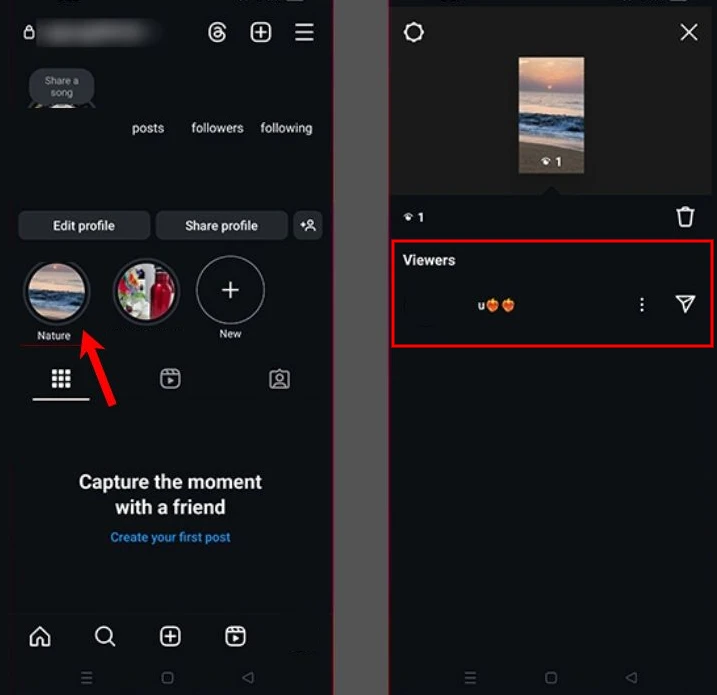
If you do not see any names, it means the time period has passed.
What happens after 48 hours?
After the viewer list expires, Instagram no longer lets you see who viewed the Highlight. Depending on your account and app version, you may also no longer see view counts.
You will see a number like Seen by 243
However, you will not see usernames, profile photos, or any details. Now, Instagram does not restore viewer data.
Can others see that you viewed their highlights?
Yes. If you view someone’s Highlight within the first 48 hours of the original Story, your name will appear in his viewer list.
After 48 hours, your name disappears from their view list, even if the Highlight remains active.



A little discussion goes a long way.
Ask a question, share your experience, or help someone find an answer.
There is room for your perspective.
No discussions match this view yet.
Your voice belongs here
Keep it useful. Keep it kind.