

The Individual plan charges $0.99 per item with no monthly fee. Past roughly 40 units a month that costs more than the $39.99 Professional plan.
Identity verification runs anywhere from minutes to a 24-hour review window, and a login that works but lands on a half-empty dashboard usually means the review is still open.
Most lockouts are not outages. They are a stale two-step device, a session pinned to the wrong marketplace, or an account that was never finished.

You typed the right password. The page reloaded and put you back where you started, or it let you in and showed you a dashboard with most of the panels missing. Either way the instinct is to check whether the service is down. It rarely is.
Seller Central is the portal where Amazon sellers manage inventory, orders, payments and performance metrics, and it sits on top of an account that has several independent states. Registration can be complete while verification is not. Verification can be complete while the plan is wrong. The plan can be right while your session is pointed at a marketplace you never registered for. Each of those produces a different symptom, and only one of them looks anything like an outage.
Here are the five causes, ordered by how often they actually turn out to be the problem.
One: the account is registered but not verified
This is the most common by a wide margin, and it is the one most likely to be misread, because the login itself succeeds. You get in. The dashboard is just missing things.
Amazon runs identity verification after registration rather than during it. The check can clear within minutes or it can sit in a 24-hour review window, and while it sits, the account exists in a partial state. Listing tools may be greyed out. Disbursement settings may refuse to save. Nothing tells you plainly that the cause is a pending review.
The way through this is dull: complete every field the registration flow asked for, including the ones marked optional, and then wait out the window before concluding anything is broken. A step-by-step walk through the registration and first-login sequence is set out in this Amazon Seller Central login guide, which covers the dashboard setup that follows verification as well as the access problems that precede it.
Two: the business details do not match
Verification compares what you typed against what exists in public records. Mismatches stall the review without generating a useful error.
The usual culprit is the tax identifier. If you registered as a business rather than an individual, the name on the account has to match the name attached to your Employer Identification Number exactly, including punctuation and legal suffix. Sellers who registered as sole proprietors and later incorporated frequently carry the old name forward and cannot work out why the check keeps failing.
If you do not have an EIN, the IRS issues one free and online in minutes, and it is worth noting the agency’s own warning on that page that you never have to pay a fee for one. Third-party sites charging for EIN registration are selling you a form you can file yourself.
Three: the wrong plan, which is a money problem wearing a login costume
This one does not block access. It quietly takes money, which is worse.
Amazon offers two selling plans. The Individual plan has no monthly fee and charges $0.99 per item sold. The Professional plan charges $39.99 a month regardless of volume. New sellers pick Individual because zero monthly cost sounds like the cautious option.
Run the arithmetic. Forty sales a month on the Individual plan costs $39.60. Forty-one costs $40.59, which is more than the Professional plan charges for unlimited units, and the Professional plan is also the one that unlocks bulk listing, most report exports and advertising placement. The break-even sits at roughly forty units, and a seller who crosses it without noticing pays more for fewer features every month afterwards.
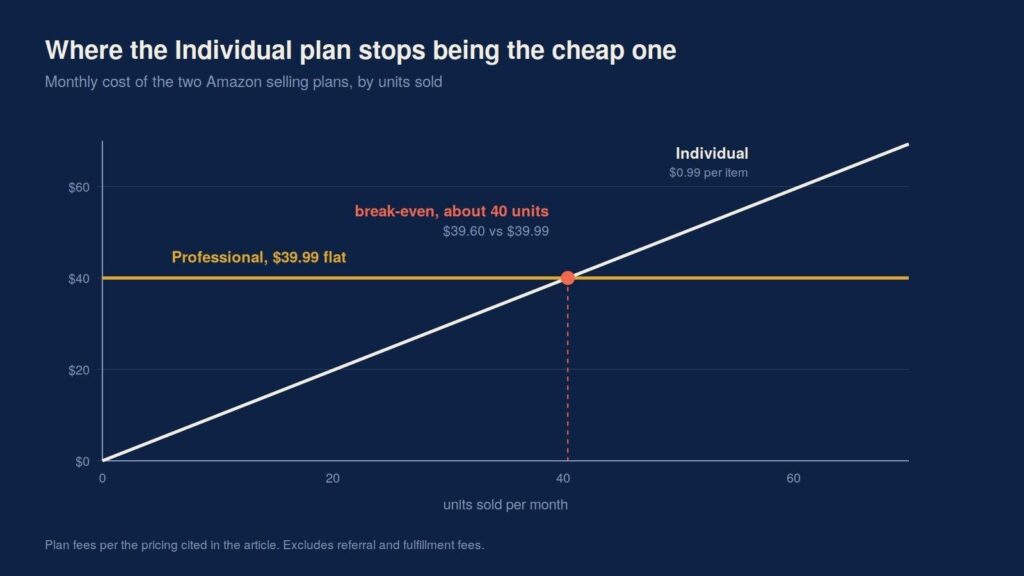
The two lines cross at about forty units. Past that point the plan with no monthly fee is the more expensive one.
Check which plan you are on before you decide the platform is being unhelpful. A surprising number of “Seller Central will not let me do X” complaints are plan restrictions rather than faults.
Four: two-step verification pointed at a device you no longer have
Amazon requires a second factor on seller accounts, and the recovery path is deliberately slow because the alternative is a marketplace where accounts get stolen at scale.
CISA describes multi-factor authentication as a layered approach in which a compromised credential is not enough on its own to get in. That is exactly the property you want protecting a payout account, and it is also why a changed phone number turns into a multi-day problem rather than a two-minute one.
The fix is preventative. Register a backup method now, while you still have access to the primary one, and use an authenticator app rather than SMS so that a lost number does not lock you out of your own revenue.
Five: the marketplace mismatch
Amazon runs separate regional accounts. A login built for the North America region will not open a European seller account, and the failure looks like a bad password rather than a wrong destination.
If you registered on amazon.com, your portal is sellercentral.amazon.com. Sellers who registered in more than one region end up with browser sessions that quietly persist against the wrong one, which is why the same credentials work in a private window and fail in the main one.
The setting most people leave until it matters
Getting in is the trivial part. Getting paid is the part that stalls quietly, because disbursement settings sit behind the same verification gate as everything else and nobody checks them until a payout is due.
Linking a receiving account to a marketplace is its own small ordeal, and the pattern is consistent wherever you do it: the name on the receiving account has to match the name on the selling account, currency has to be selected deliberately rather than left on a default, and a verification step usually sits between setup and the first successful transfer. Anyone who has worked through a comparable flow, such as linking a Payoneer account to JazzCash, will recognize all three friction points, because they are properties of financial account linking generally rather than of any one platform.
Set it up on the day the account clears verification, not on the day the money is supposed to arrive.
Work the list in order the next time you are locked out. Verification, then business details, then plan, then second factor, then region. The outage you were about to check for sits well below all five.





A little discussion goes a long way.
Ask a question, share your experience, or help someone find an answer.
There is room for your perspective.
No discussions match this view yet.
Your voice belongs here
Keep it useful. Keep it kind.