
As the number of individuals using Instagram grows, this social platform takes all the required measures to protect their interests and offer them a secure and fair environment. Even if you’re a regular social media user, you could be interested in the date a specific user first started using the site.
An account setup date would be helpful if a brand wants to impact marketing and business. However, many people purchase fake followers to give the impression that they are authorized.
The best part is that identifying a person’s Instagram account creation date is no longer difficult. With the About It on this Account Option, users can determine when their account was registered or created within the app.
The platform has implemented this option to prevent fraud. It enables everyone to know the date the account was created, the country where it was created, and the previous usernames, and it prevents individuals from creating fake accounts.
This option is only available to famous and well-known persons with many followers and verified accounts.
Instagram explicitly permits users to acquire the account information of these verified accounts to avoid fraud as possible for all users.
What about the more traditional profiles?
If you want to know if somebody’s Instagram account was created, you could use our Insta Age Checker by WikiTechLibrary tool (provided below).
Find the Instagram Account Age
There is a way to determine an Instagram account’s age. First, go to a person’s profile and click on the three dots next to About This Account. After selecting “About This Account,” you can view the account’s start date on the “Date Joined” page.
However, his option is only available to famous and popular users with verified accounts.
Here’s how to go about it:
- Open the Instagram application.
- Open the user profile.
- Click on the three dots.
- To learn more about this account, go to About this Account.
- It can show the date when the Instagram account was created.
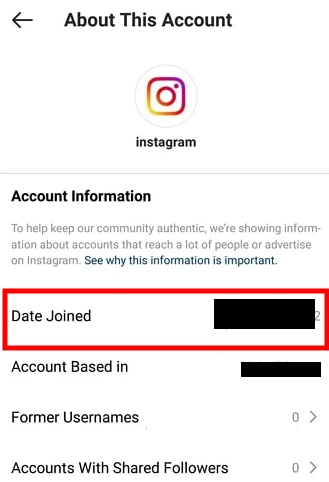
This section also contains other data, such as the country’s name, previous usernames, and profiles with mutual followers.
Other Ways to Find the Instagram Account Age
Instagram Age Checker
Start by using the Insta Age Checker by WikiTechLibrary to find out when someone creates an Instagram account. Then, enter the Insta username and use the “find age” button to find out. The specific date on which the Instagram profile was created will be shown.
Analyze Instagram Profile
People mainly use Instagram to share images of their daily lives with their friends and family. In other words, users will likely share their posts immediately within a few days of setting up their accounts.
Scroll down your profile until you reach the first post, and follow the instructions. First, you will find the date on which the specific image was posted by its owner. That is most probably the date on which the individual created their account.
Users can go months without posting content to their accounts. In addition, our Insta Age Checker can determine an individual’s Instagram profile age.
Conclusion
The steps mentioned above will help to find the age of an Ig account, providing insight into the validity of the account’s owner.
No influencer can be successful on this network in less than 2-3 days. They must keep a stable stream of high-quality and exciting material on the site to maintain the interest of their intended audience.
Suppose a user has been active on the platform for an extended period. In that case, there is a strong probability that they have real followers and extensive expertise in marketing and advertising.

A little discussion goes a long way.
Ask a question, share your experience, or help someone find an answer.
There is room for your perspective.
No discussions match this view yet.
Your voice belongs here
Keep it useful. Keep it kind.