

Customers of PTCL’s DSL Broadband/Landline EVO Bills, Duplicate / PTCL duplicate bill Print Out, Check, and Online Download should go to the PTCL exchange and fill out an application. A PTCL lineman will come to their home to connect their broadband service within a few days.
Pakistan Telecom Limited (PTCL) is widely used in Punjab province, with divisions and districts spread across the state. This modern department provides services for private and public businesses equally.
In 1947, the Department of Telephone and Telegraph was created to ensure that the whole people of our country had access to high-quality communications.
PTCL Duplicate Bill Check Online
Since the launch of Evo wireless for prepaid and postpaid subscribers and Vfone sets for offices, an increasing number of individuals are connected to the most significant foundation, which provides high-speed internet service. You can find the PTCL online bill and the PTCL bill duplicates for free by visiting this website.
To check your PTCL bill online, you can follow these steps:
- Visit the PTCL official website at ptcl.com.pk.
- Click on the “Bill Online” button on the top menu bar.
- Enter your PTCL phone number in the “Phone Number” field.
- Enter your account ID in the “Account ID” field (you can find it on your physical bill).
- Solve the Captcha puzzle and click on the “Submit” button.
- You will be able to view and download your latest PTCL bill.
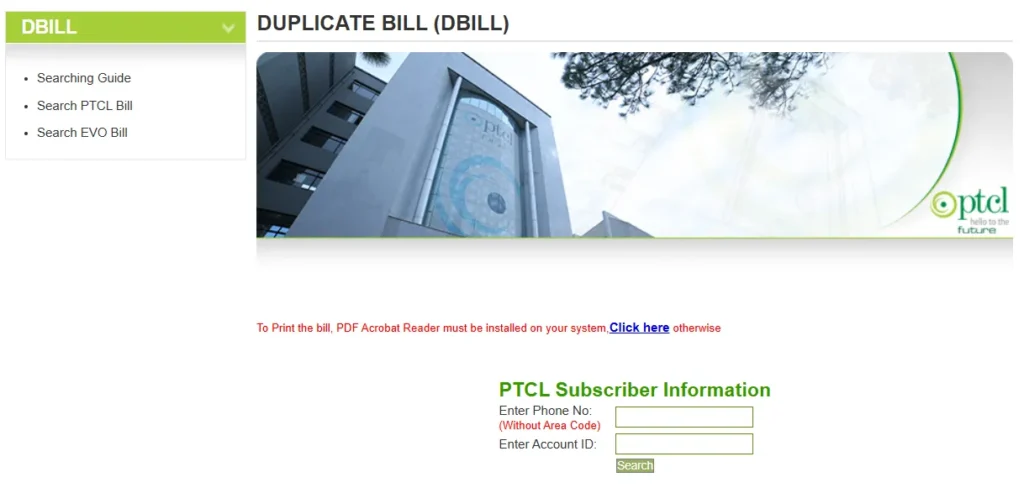
Note: If you have multiple PTCL phone numbers, you can repeat the process for each number to view and download the corresponding bill.
Since there is no fast broadband service in the entire country, Pakistan Telecommunication Company Limited is the only provider of DSL (Digital Subscriber Lines) for the public network. The primary goal is to connect people to one computer desktop screen globally in seconds.
In addition, some social networking sites and messengers, such as Whatsapp, IMO, and Facebook, are available for this purpose.
Check PTCL Bill Online DSL Broadband/EVO Bills
PTCL subscribers in Khyber Pakhtunkhwa, Gilgit Baltistan, Balochistan, Sindh, Karachi, and Azad Jammu Kashmir have faster DSL Broadband speeds.
PTCL Broadband has now completed its seventy-year goal of offering new-age facilities to the public. The PTCL DSL Broadband Bill EVO Online can be seen and printed by visiting the company’s official website, which is available via the link provided on this page. It is now possible to check your EVO PTCL Broadband / Telephone Bill online without visiting the PTCL exchange.
How to Pay PTCL Bill Online
You can pay your PTCL bill online through the following methods:
- Online Banking: You can pay your PTCL bill using your online banking account with various banks such as UBL, HBL, MCB, Standard Chartered, and more.
- Credit/Debit Cards: You can pay your PTCL bill using your credit or debit card. PTCL accepts MasterCard, Visa, and UnionPay.
- Easypaisa/JazzCash: You can pay your PTCL bill using the Easypaisa/JazzCash mobile app or by visiting an Easypaisa/JazzCash shop.
To pay your PTCL bill online, follow these steps
- Visit the PTCL official website at ptcl.com.pk.
- Click on the “Bill Online” button on the top menu bar.
- Enter your PTCL phone number in the “Phone Number” field.
- Enter your account ID in the “Account ID” field (you can find it on your physical bill).
- Solve the Captcha puzzle and click on the “Submit” button.
- You will be able to view your latest bill and the available payment options.
- Choose your preferred payment method and follow the instructions to complete the payment.
There may be a processing fee for online bill payment, so make sure to check the details before making a payment.
CHECK ALSO



A little discussion goes a long way.
Ask a question, share your experience, or help someone find an answer.
There is room for your perspective.
No discussions match this view yet.
Your voice belongs here
Keep it useful. Keep it kind.