

Pakistan’s PTA mobile tax system continues to play a crucial role in regulating imported mobile devices and making sure that unregistered phones would never use the local networks indefinitely. This article will guide you how to check the PTA mobile tax list, verify your device’s IMEI, calculate the applicable tax, and pay it using trusted methods.
- How to Check the PTA Mobile Tax List Online
- Find Your IMEI Number
- Use the DIRBS PTA Portal
- Use a PTA Tax Calculator
- Review Model-Specific Tax Rates
- How to Pay Your PTA Mobile Tax
- Common Questions (FAQs)
- Q: What happens if I don’t pay the PTA tax?
- Q: Do the taxes differ for different phones?
- Q: Can I calculate the tax before importing?
- Q: Is the PTA tax payment online safe?
How to Check the PTA Mobile Tax List Online
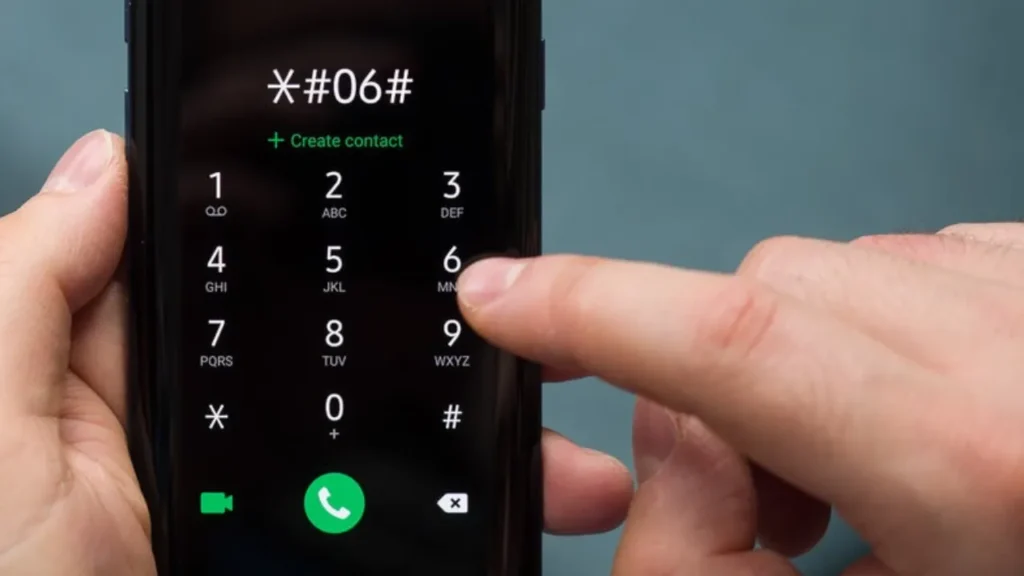
Find Your IMEI Number
Dial *#06# on your phone. Your IMEI (International Mobile Equipment Identity) will be displayed on your phone screen. Write down or copy this number for verification process.
Use the DIRBS PTA Portal
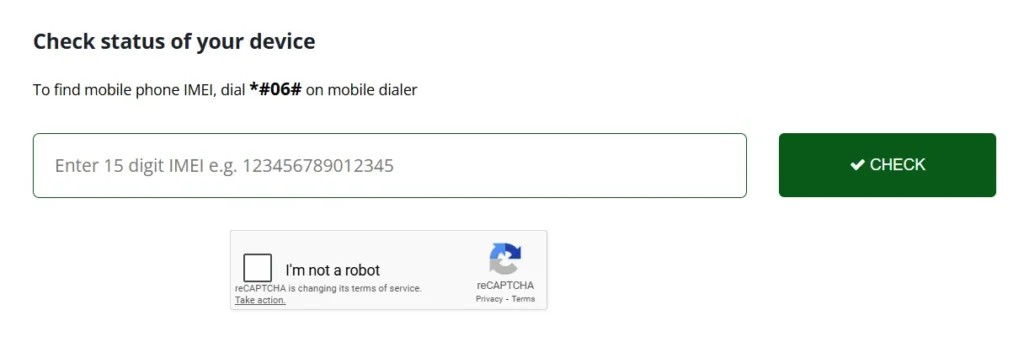
- Go to the official PTA DIRBS website.
- Enter your IMEI number into the “Device Verification” section.
- Click on CHECK button.
- The portal will show whether your device is registered, blocked, or pending.
Use a PTA Tax Calculator
You can use online tools (like PTA tax calculators) to estimate how much mobile tax that you will have to pay depend on your phone model and import method.
For example, the PTA tax calculator website lets you choose a brand, model, and enter your phone’s price to get a tax estimate.
Review Model-Specific Tax Rates
- For big brands like Samsung, PTA tax is publicly listed.
- For iPhones, there is a detailed guide of PTA tax for different models.
These prices depend on whether you register via passport or CNIC.
How to Pay Your PTA Mobile Tax
- Once you know the tax amount, generate a Payment Slip ID (PSID) from the DIRBS portal.
- You can pay your tax via
- JazzCash
- Easypaisa
- HBL Mobile / Online Banking
These methods are accepted for paying your PTA tax.
- Make sure you complete payment in the PTA’s deadline to avoid your phone being blocked.
Tips to Ensure Compliance
- Always use official PTA or DIRBS websites to check and pay tax.
- Keep a record of your IMEI, PSID, and payment receipt.
- If you are buying a used phone, check its PTA tax status before purchase.
- Use a PTA tax calculator first to estimate your cost.
Common Questions (FAQs)
Q: What happens if I don’t pay the PTA tax?
Answer: If you fail to pay, PTA can block your device via DIRBS, especially after the grace period.
Q: Do the taxes differ for different phones?
Answer: Yes. PTA tax depends on your device’s model and how it is registered (passport vs CNIC).
Q: Can I calculate the tax before importing?
Answer: Yes. Using online calculators (like PTA Tax Calculator) helps you estimate the cost.
Q: Is the PTA tax payment online safe?
Answer: Yes, if you use the official DIRBS portal to generate PSID and pay via trusted payment channels like JazzCash, Easypaisa, or bank.




A little discussion goes a long way.
Ask a question, share your experience, or help someone find an answer.
There is room for your perspective.
No discussions match this view yet.
Your voice belongs here
Keep it useful. Keep it kind.