

In recent years, vehicle tax payment was a manual system in Sindh, Pakistan. It was a hectic task as the vehicle holder had to wait in a queue for his number. But now, vehicle tax is available online in Sindh. Also, they can verify vehicle tax and registration online in Sindh, Pakistan.
Vehicle holders who want to know about paying vehicle taxes online in Sindh can also register and verify vehicles online in Punjab and Sindh. Here are all the details about paying vehicle tax online in Sindh.
How to Pay Vehicle Tax Online In Sindh
If you do not know how to pay vehicle tax online in Sindh, here is the help. Follow the following step-by-step guidelines for how to pay your vehicle tax online in Sindh.
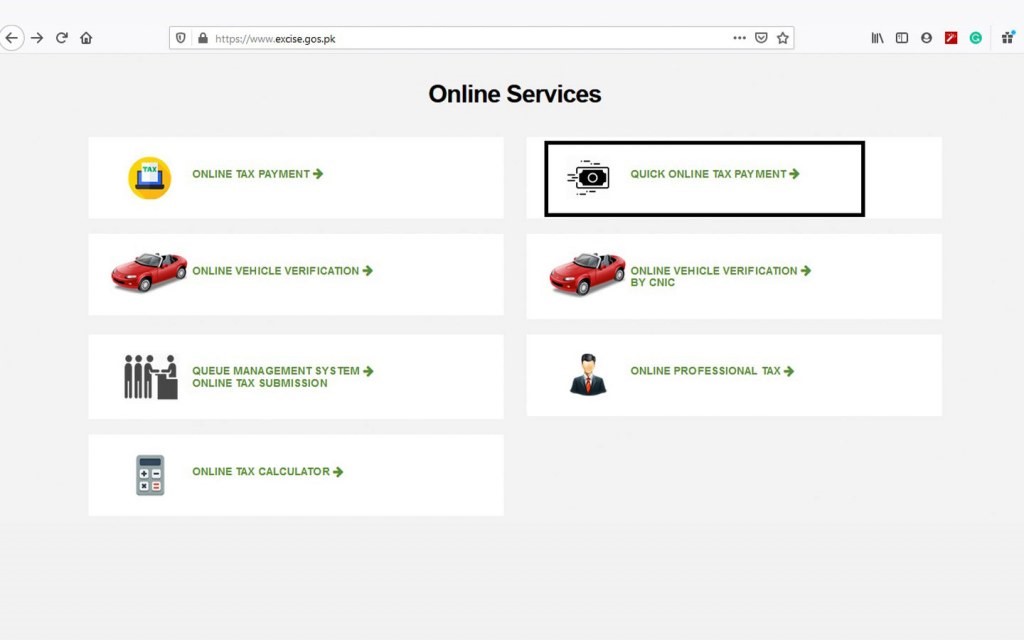
- In the first step for online vehicle tax payment, visit the Sindh ETD official website.
- Visit the ETD official website and choose ‘quick online tax payment’.
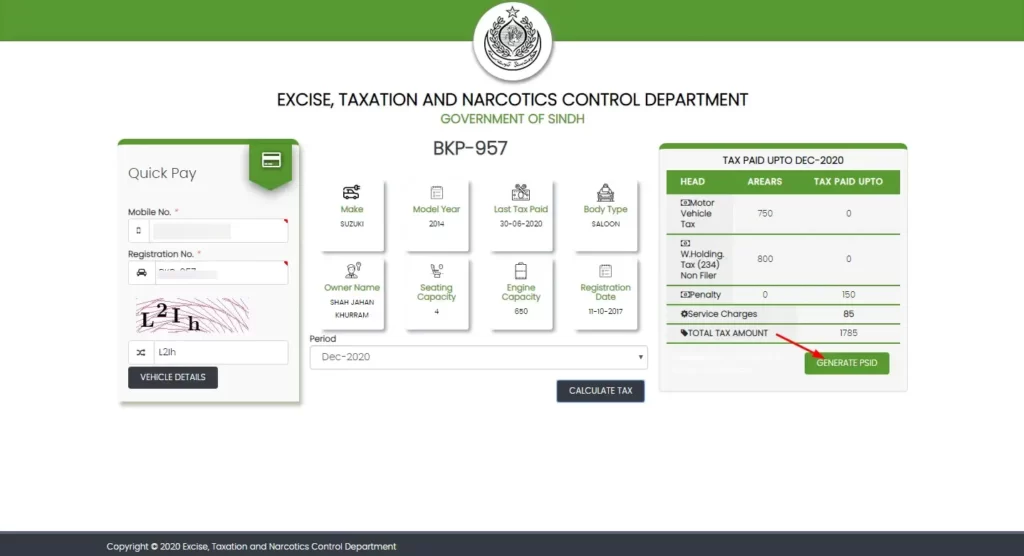
- The next step will require your phone number and vehicle registration Number. Enter the information correctly and click next.
- To calculate the payable tax, select the taxation time phase.
- In the next step, you must generate the public safety identification (PSID). After verifying the details, click on “generate PSID.”
Methods for Vehicle Tax Payment
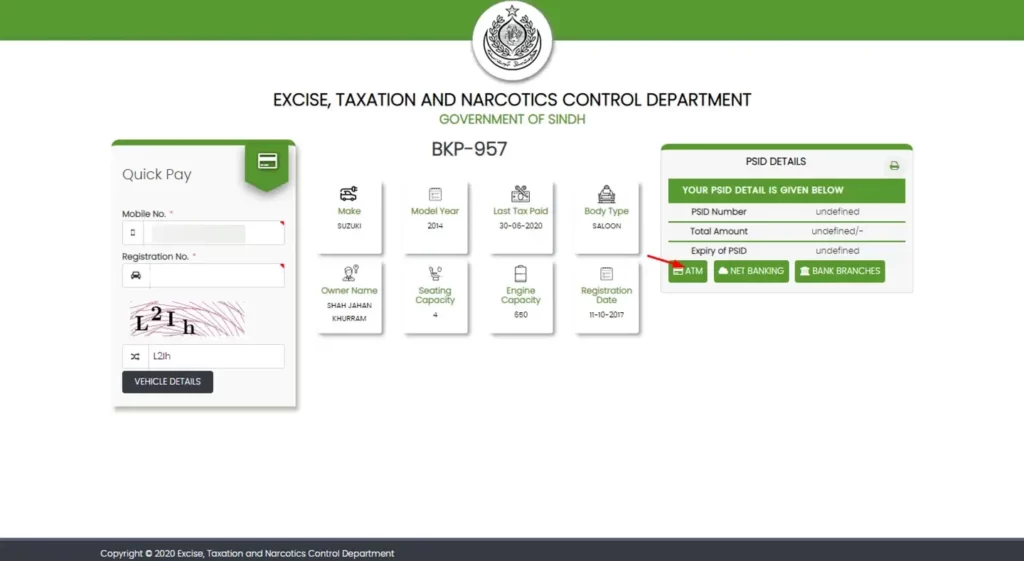
After completing the above steps, Sindh uses the following methods for online vehicle tax payment.
ATM
- Visit your nearest ATM facilitating 1Link service.
- After entering the PIN code, select the bill payment option and then go for tax payment.
- Click on “Excise and Taxation.” For verification, enter a 6-digit vehicle PSID.
- After entering the PSID, your payable TAX BILL amount will appear automatically.
- Now, make payment of your vehicle tax.
- You are now done with vehicle tax payments through ATM.
Internet banking
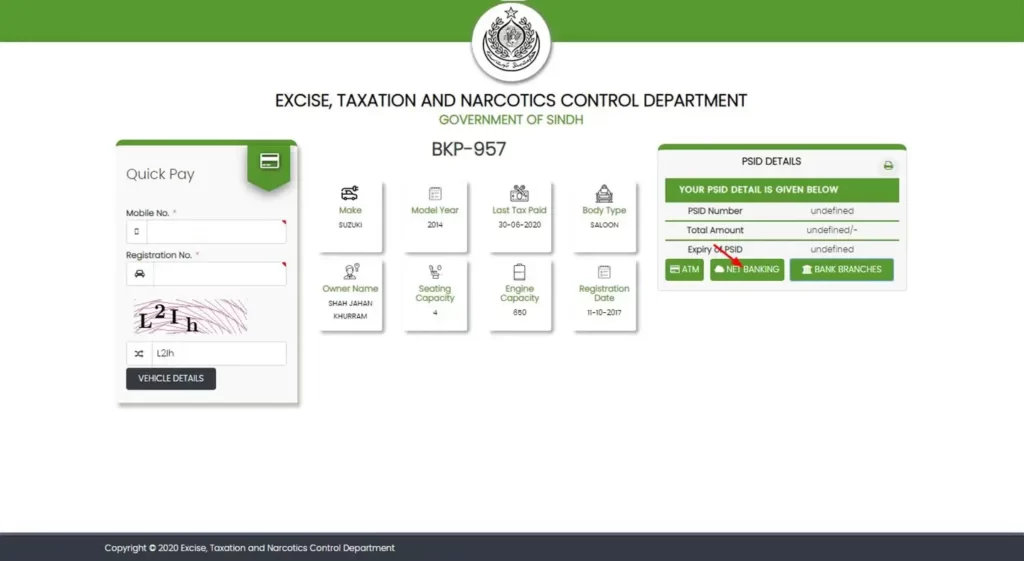
Internet banking is another method for vehicle tax payment online. Follow the following instructions for successful process completion.
- In the first step, sign in to the banking portal by using a desktop internet browser or mobile app.
- In the bill payment, select the Tax payment and then select the ‘Excise and Taxation.
- Enter a 6-digit PSID no. that will retrieve your vehicle’s data and tax amount.
- After verifying the payable amount, go for a payment.
- After a successful transaction notification, you will be done with your vehicle tax payment via Internet banking.
Designated bank branch
Vehicle tax can be paid by visiting the designated bank branch. The following instructions should be followed for this method.
- Print out the PSID that was generated from the EDT official website.
- Visit your nearest bank branch, which provides a 1Link facility.
- Go to the cashier’s cabin and give your vehicle’s PSID printed form.
- Deposit the check or cash amount of your payable tax. The cashier will follow some steps and complete the vehicle tax payment. All is done now, and you can leave the bank.
Mobile App
Mobile apps are also being used to make online vehicle tax payments. The Sindh excise and Taxation Department app is available on the Google Play Store and iOS Play Store. Easypaisa and JazzCash apps are also available.
Vehicle Online Tax Verification
Vehicle tax is applicable for both two- and four-wheel vehicles and can vary from vehicle to vehicle. It depends on the type of engine, its capacity, and the type of vehicle.
For online verification of vehicle tax, customers should visit the official website of the Excise, Taxation, and Narcotics Control Department. Here, they should go for online vehicle verification. A new screen will be open that will require the vehicle registration no. Enter the required details and check the tax status.





A little discussion goes a long way.
Ask a question, share your experience, or help someone find an answer.
There is room for your perspective.
No discussions match this view yet.
Your voice belongs here
Keep it useful. Keep it kind.