
- What a DMARC Report Is and Why It Matters
- How DMARC Works with SPF and DKIM to Stop Spoofing
- SPF Monitoring
- DKIM Monitoring
- DMARC’s Role in Stopping Spoofing
- Types of DMARC Reports: Aggregate vs. Forensic
- Aggregate Reports
- How Aggregate Reports Facilitate Domain Protection
- Forensic Reports
- Choose Your Reporting Frequency
- How to Read Key Fields in a DMARC Report
- Essential Fields
- Example: Parsing a DMARC Aggregate XML Report
- Report Parsing and Analysis Tools
- Best Practices for Using DMARC Reports to Strengthen Domain Protection
- 1. Set Up Comprehensive DMARC Reporting
- 2. Regular Report Review and Failure Analysis
- 3. Leverage Report Generator Tools
- 4. Enforce and Update Authentication Protocols
- 5. Ensure Scalable & Secure Data Handling
What a DMARC Report Is and Why It Matters
DMARC report is key to modern email security and domain protection. DMARC (Domain-based Message Authentication, Reporting, and Conformance) is a protocol designed to give domain owners a lot of insight and control into how their emails are handled by recipients. These reports can provide valuable data about any messages that originate from your domain, helping you to monitor for phishing, spoofing, and other malicious activities.
These reports can help domain managers detect unwanted emails or problems in their email infrastructure. This is critical not only to comply with regulations, but to ensure that the delivery of emails remains intact and that business is not compromised. There are several free plan options among the various services available, such as EasyDMARC, AWS-based services, and MXToolbox, that allow organizations of all sizes to take action to prevent harmful email threats.
How DMARC Works with SPF and DKIM to Stop Spoofing
Email authentication involves various protocols; however, DMARC distinguishes itself by managing and providing insights into the performance of foundational technologies such as SPF (Sender Policy Framework) and DKIM (DomainKeys Identified Mail).
SPF Monitoring
SPF checking ensures that only emails originating from servers approved by the domain’s DNS configuration are accepted. An SPF Record is a list of whitelisted IP addresses of the email senders. If there is a message that arrives claiming to be from you, with your domain name in the From field, the receiver checks to see if the IP address from which the mail was sent matches any you’ve whitelisted in the SPF record.
DKIM Monitoring
DKIM monitoring is simply the addition of a cryptographic signature to each outgoing message, complementing SPF. This signature can be authenticated by recipients with the public DKIM key published to DNS, in order to establish that the message has not been altered during transit. Using a DMARC Tool alongside DKIM and SPF provides additional visibility into authentication results and helps organizations detect and address email security issues.
DMARC’s Role in Stopping Spoofing
A DMARC record combines the oversight of SPF and DKIM, providing a set of policies to instruct mail receivers on the actions they should take if the email is unable to pass either of the filters. DMARC provides detailed analysis of each email’s authentication results, which then can be used to implement these set policies, drastically reducing the risk of phishing and spoofing attacks. Furthermore, DMARC reporting offers domain owners insights via reports on message senders, message frequency and report success or failure.
Types of DMARC Reports: Aggregate vs. Forensic
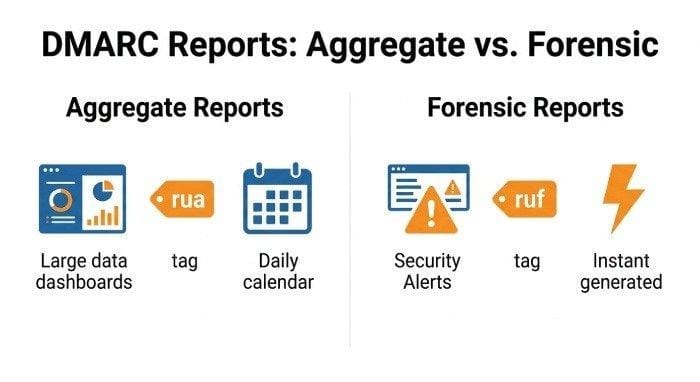
DMARC reports are important for assessing your organization’s vulnerability to harmful emails. They come in two primary formats, each fulfilling distinct roles within the monitoring system.
Aggregate Reports
The aggregate report collects authentication data for large volumes of messages, typically on a daily basis. These reports, usually given in XML format, provide detailed numbers (successes, failures) of SPF and DKIM, and analysis according to sender IP address, number of messages, and authentication results grouped by the reporting period. The rua tag in your DMARC record says where to send these data sets by receiving servers.
How Aggregate Reports Facilitate Domain Protection
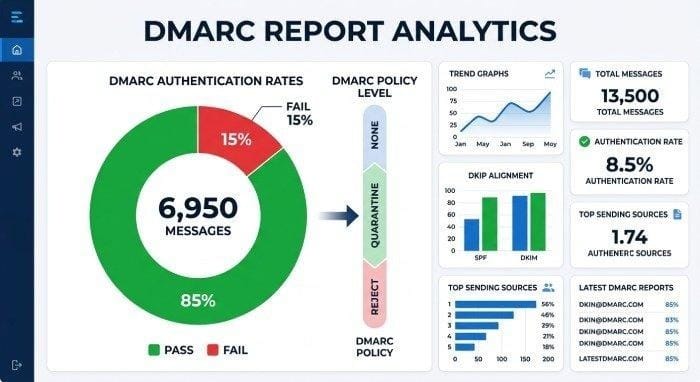
Using a report analysis tool such as EasyDMARC or MXToolbox enables administrators to use the aggregated report information to produce a report or view it through a dashboard. This helps identify trends, mass e-mail activities, and potential activities of an unauthorized sender in global data centers quickly.
Forensic Reports
Forensic reports, also known as forensic reports, provide detailed reports about messages that fail to meet authentication requirements. These reports, triggered by the ruf tag in your DMARC configuration, contain example headers, parts of your message and a detailed explanation of the reason the message was not authenticated. They are issued in far smaller numbers than aggregates but are very significant indicators of the potential for malicious emails, spoofing, or variations in policy compliance.
Choose Your Reporting Frequency
Some services provide different reporting time periods. Reports to be generated daily are usually aggregate reports, while forensic reports are generated on the spot when incidents are identified. This reporting difference allows companies to match detailed insights with their business needs.
How to Read Key Fields in a DMARC Report
To effectively analyze a DMARC report, it’s essential to grasp the key components of its main fields. Regardless of whether you have a raw XML report or utilize a parsing tool that provides output in JSON format, the following data points are vital for safeguarding your domain.
Essential Fields
- Source IP / Sender IP Address: This is the IP address from which the message is being sent. If you’re receiving a lot of messages from an unknown IP address, this can indicate that someone is abusing your domain.
- Authentication Status: This indicates the success or failure of SPF and DKIM checks. Any ongoing failures from a legitimate sender can be a sign of possible misconfigurations.
- Domain Alignment Settings: It determines whether the domain (from the “From” field) aligns with the domain approved by SPF/DKIM, and is crucial for getting a DMARC pass/fail result.
- Message Volume: Number of emails processed by specific IPs, domain or sending sources over a reporting period of time. Volume spikes could indicate bulk email or malicious campaigns.
- Policy Applied / Enforcement Action: If you have set up a policy, you will see whether the recipient has accepted, quarantined, or rejected the message based on that policy.
Example: Parsing a DMARC Aggregate XML Report
An XML report could contain sections formatted as follows:
<ip>192.0.2.1</ip>
<evaluated>341</evaluated>
<spf>pass</spf>
<dkim>fail</dkim>
<evaluated>quarantine</evaluated>
Services like EasyDMARC, MXToolbox, or duocircle/dmarcreport-mcp can use XML data to generate a user-friendly interface, transform the data into a more readable format, and export it back to JSON for further analysis.
Report Parsing and Analysis Tools
Today’s report generation and analysis tools deliver real-time notifications and real-time insights. Many platforms (such as those listed on G2, Capterra, GetApp and SourceForge) have full reporting capabilities for DMARC, data visualisation, JSON export and API integration.
Best Practices for Using DMARC Reports to Strengthen Domain Protection
Enabling DMARC and using a fully-featured DMARC report analyzer is essential not just for regulatory compliance but also for ensuring stable email delivery and security in the long run. Here are some good practices to keep in mind:
1. Set Up Comprehensive DMARC Reporting
Make sure your DMARC record includes both rua and ruf tags to send aggregate and forensic reports to secure email addresses. Use a trusted monitoring software such as EasyDMARC, MXToolbox, or services that integrate with Microsoft Exchange or Google Workspace to gain convenience in accessing the dashboard and having the information automatically sent via email notifications.
2. Regular Report Review and Failure Analysis
- Regularly review pass and fail rates as well as authentication statuses in all reports. Investigate failures that do not have a clear explanation, such as those related to bulk email, large customers such as Yahoo or Gmail or rare sources of communications.
- As your system develops and compliance strengthens, plan to advance your policies from “none” to “quarantine” or “reject.”
3. Leverage Report Generator Tools
- Use report generation tools to analyze reports, convert XML to JSON and create visually friendly dashboards to better understand and identify trends.
- Simplify reporting procedures, set up thresholds for any activity by an unauthorized sender, and monitor any sudden surge in message volume.
4. Enforce and Update Authentication Protocols
- Continuously monitor SPF and DKIM settings. Update DNS records, validate alignment configurations on all platforms (including AWS, AutoSPF, Claude and ChatGPT) and assess external email senders.
- Apply SOC-2, BIMI and MTA-STS protocols to improve domain security and advanced visualization of message authentication.
5. Ensure Scalable & Secure Data Handling
Organizations can safely and efficiently grow their DMARC reporting with systems that support detailed Role Based Access Control (RBAC), Data Processing Agreement (DPA) compliance and have dependable data center hosting options like AWS or Azure.
The configuration processes need to be consistently evaluated and validated, especially following infrastructure changes and the addition of new monitoring systems.
Proactively managing DMARC records and making use of the complete features of DMARC reports, using automated dashboards, timely notifications, and comprehensive report analysis, enables organisations to successfully defend their domains against risks such as email spoofing, phishing attacks and compliance concerns.





A little discussion goes a long way.
Ask a question, share your experience, or help someone find an answer.
There is room for your perspective.
No discussions match this view yet.
Your voice belongs here
Keep it useful. Keep it kind.