
A failed AI image is rarely “just bad.” One result may have the wrong focal point, another may be crowded, and a third may look fine until it is placed under a headline. Those failures need different repairs.
A platform such as GPT Image 2 gives users both text-to-image creation and uploaded-image editing, but the useful skill is knowing what to change before asking for another result. Instead of adding more adjectives every time something looks wrong, diagnose the visible problem first. That turns prompting into a practical editing process rather than a sequence of guesses.
- Start With the Failure, Not the Prompt
- Case File One: The Prompt Is About a Topic, Not a Picture
- Turn the Topic Into One Observable Moment
- Remove Symbols That Do Not Help the Story
- Case File Two: The Image Is Following Too Many Instructions
- A Repair Session on the Website
- When to Start Again in Text to Image
- When to Upload the Near-Miss Instead
- Case File Three: The Picture Contains Information That Must Be Exact
- Case File Four: The Image Works Until It Reaches the Page
- Check the Image at Its Real Display Size
- Let the Destination Shape the Next Prompt
- What a Better Prompt Log Should Record
- Know When to Stop Repairing
- Conclusion
Start With the Failure, Not the Prompt
Open the disappointing image and describe the problem without mentioning AI. “The subject is too small.” “The background competes with the product.” “The text is wrong.” “The crop removes the action.” This short diagnosis matters because each problem points toward a different correction. If the subject is wrong, background polish is irrelevant. If only one corner is cluttered, throwing away the whole composition is wasteful.
It also helps to separate concept errors from execution errors. A concept error begins before generation: the prompt never decided what the picture should communicate. An execution error appears after a useful concept has already been established: the scene works, but one element needs revision. The first may require a new prompt. The second may be better handled by editing the existing image.
Case File One: The Prompt Is About a Topic, Not a Picture
Imagine asking for “an image about remote work.” That phrase names an idea, not a scene. The model must invent the subject, setting, activity, and composition. The output may contain floating icons, a huge office, or several people with no clear relationship to the article.
Turn the Topic Into One Observable Moment
Choose a moment the viewer can recognize immediately: an independent writer reviewing notes beside a laptop at a small kitchen table. That sentence establishes a person, action, and setting. Add only the details that affect the final use, such as soft daylight and a wide frame for an article header.
Remove Symbols That Do Not Help the Story
AI images often become generic when prompts rely on visual shorthand: glowing charts for business, floating light bulbs for ideas, or endless screens for technology. If those objects are not necessary, leave them out. A concrete everyday action usually communicates the topic more naturally than a collection of symbols.
Case File Two: The Image Is Following Too Many Instructions
A second result may contain the correct subject but feel chaotic. Read the original prompt again. Did it request a laptop, phone, books, plant, coffee, posters, city view, dramatic light, minimalist styling, and several visual effects at once? The image may be accurately reflecting an overcrowded brief.
Cut the prompt down to the elements that carry meaning. If the post is about planning, perhaps the notebook, calendar, and person are enough. If the image is for a product article, let the product remain visually dominant. The fix is often subtraction rather than a stronger quality word.
A Repair Session on the Website
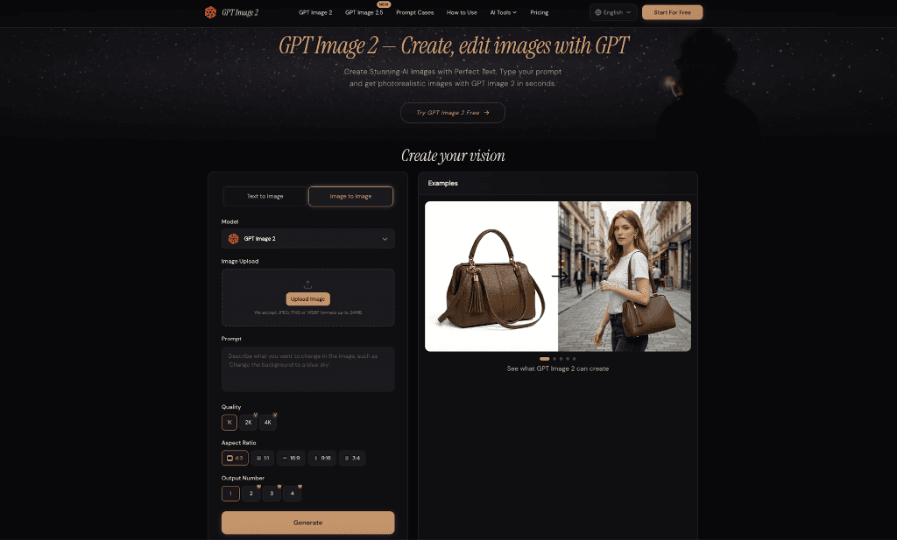
The website is useful here because the repair method can match the problem. Text to Image is appropriate when the original concept itself needs rebuilding. Image to Image is more suitable when the scene is already useful and a local change would preserve more of the work.
When to Start Again in Text to Image
If the main subject, action, and framing are all wrong, return to Text to Image and rewrite the brief around one clear scene. Choose an aspect ratio that fits the destination before generating. The site also shows quality and output-number settings, but those controls do not replace a clear visual decision. A vague prompt with more outputs is still vague.
When to Upload the Near-Miss Instead
Suppose the image is good except for a paper bag behind a product. Upload the source in Image to Image and write a bounded request: “Keep the bottle, printed label, table, camera angle, and shadows unchanged. Replace only the paper bag with the same plain wall.”
GPT Image 2 supports uploaded-image editing, so the strong parts of the source can remain the starting point instead of being recreated from scratch.
After the edit, compare the protected details before admiring the cleaner background. If the label, cap, reflections, or product shape changed, the edit is not finished. Return to the clean source and make the instruction narrower.
Case File Three: The Picture Contains Information That Must Be Exact
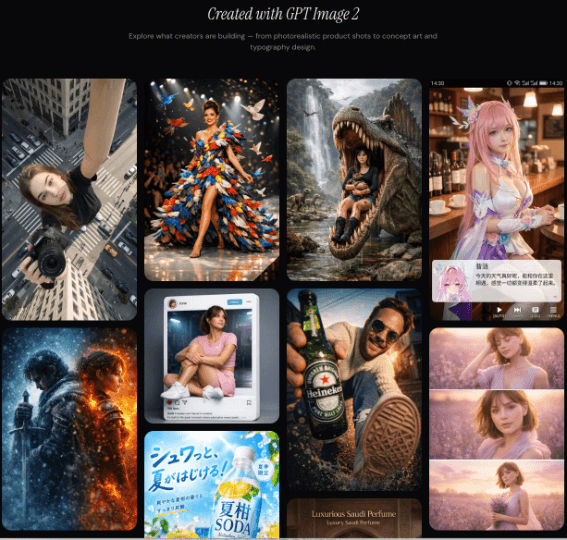
Generated text deserves its own review. A workshop image may include a plausible-looking sign with misspelled words. A product mockup may invent label details. A poster may render a date incorrectly. Read every visible character when the wording matters.
For many content jobs, exact copy is easier to add after generation using a design or publishing tool. Let the image provide atmosphere and composition, while editable text carries the event time, price, address, or headline. That keeps important information easier to correct and prevents a visual revision from forcing a second copy change.
Case File Four: The Image Works Until It Reaches the Page
Some failures appear only after publication layout begins. A subject sits directly behind the headline. A vertical crop removes the key action. Small background objects become visual noise on a phone. These are placement problems, not style problems.
Check the Image at Its Real Display Size
Place the image inside the article, email, or social draft before calling it finished. A composition that feels balanced in a large preview may fail at 400 pixels wide. Ask what the eye notices first and whether the main action survives the crop.
Let the Destination Shape the Next Prompt
If the issue is lack of headline space, the next prompt should specify subject position and negative space. If a mobile crop removes the subject, adjust composition rather than adding more style detail. The final placement should influence generation from the beginning, but it can also guide a focused repair.
What a Better Prompt Log Should Record
A useful prompt log should capture more than the final sentence that produced a good image. Note the original problem, the change you made, and what improved. For example: “subject too small → requested closer framing → headline area still usable.” This makes the log understandable months later. It also prevents a team from copying a prompt that worked for a different format and assuming the wording is universally successful.
If several people create images, these notes can become a lightweight shared reference. One person may discover that a recurring social format needs more negative space; another may learn that a product edit works best when every protected feature is named explicitly. Recording the reason behind the prompt is more valuable than saving a long list of phrases with no context.
Know When to Stop Repairing
Another common mistake is chaining corrections indefinitely. You remove one object, then repair a label that changed, then fix a shadow introduced by the second edit. At some point the newest file is farther from the source than the original was from the goal.
Keep the original and approved intermediate versions. Return to the strongest earlier file when an edit causes broad drift. If exact typography, technical diagrams, or precise product documentation remain the problem, a controlled design tool or real photography may be the better method. The objective is a dependable finished asset, not proving that every visual problem can be solved with another prompt.
Conclusion
AI image mistakes become easier to fix once they are named correctly. A vague topic needs a concrete scene, an overcrowded brief needs subtraction, inaccurate text needs direct verification, and a layout problem needs composition changes rather than more decoration. Use generation when the concept itself is wrong and editing when most of the image already works. Keep source files, compare protected details, and test the final image where people will actually see it. The next time a result disappoints you, write one sentence describing the failure before writing another prompt.





A little discussion goes a long way.
Ask a question, share your experience, or help someone find an answer.
There is room for your perspective.
No discussions match this view yet.
Your voice belongs here
Keep it useful. Keep it kind.