

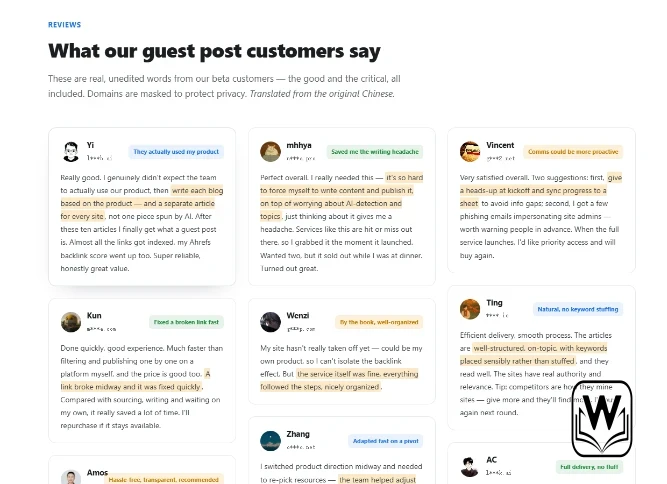
Guest-post work creates a believable reason for strangers to email you. A sender can mention a real publisher, a pending article, or a payment detail and still be an impostor. One BestLinks AI beta reviewer reported phishing emails that impersonated site administrators and asked for earlier warnings. That feedback turns communication security into part of the operating cost behind Guest Posts, not a side note for the IT team.
The service already uses a dedicated channel for one-on-one coordination from site mining through publishing and index tracking. That channel gives the campaign a useful source of truth. It does not make every message outside the channel safe. A small team still needs one rule: unexpected requests pause until someone verifies the sender and the campaign state through a known route.
- Map The Messages A Real Campaign Produces
- Store One Verified Campaign Sender Card
- Pause Requests That Change Money Or Access
- Treat Urgency As Data Not Authority
- Run Three Verification Steps In Order
- Match The Request To One Campaign Row
- Restart Contact From A Known Route
- Keep Draft Links Separate From Login Links
- Open Clean Copies From The Workspace
- Make Security Status Visible Beside Publishing
- Review The Incident Without Slowing Every Message
- One Pause Rule Protects The Whole Campaign
Map The Messages A Real Campaign Produces
Security starts with knowing what normal work looks like. The buyer sends a domain and competitors. BestLinks AI mines candidate sites from backlink neighborhoods in Ahrefs, the buyer chooses hosts, separate English drafts are prepared, and publishing proceeds one site at a time. The client later marks indexing while the managed team watches link health.
Those stages generate recognizable messages: shortlist approval, draft review, publication status, a broken-link repair, and an indexing request. Write them down before the first publisher contact. An attacker benefits when every unfamiliar email looks like a normal exception. A known message map gives the recipient something concrete to compare.
| Message type | Expected proof | Pause signal |
|---|---|---|
| New host approval | The same host and price appear in the dedicated channel | An external sender asks for approval first |
| Draft revision | The current title, target, and owner match the shared record | A file arrives for an unknown article |
| Payment change | A known coordinator confirms it through the existing channel | Bank, wallet, or invoice details change by email |
| Broken-link repair | The live URL and repair state already exist in the campaign row | The sender demands credentials or a new login |
The table works because each proof comes from campaign state you already possess. You do not have to judge whether a logo, signature, or urgent tone looks professional. Attackers can copy those elements. They cannot easily change the record inside a channel they do not control.
Store One Verified Campaign Sender Card
Create a short card with the managed team’s known contact route, the dedicated channel, who can approve hosts, and who can change payment details. Keep the card inside the campaign workspace rather than in an email thread. If an unexpected sender appears, the reviewer uses the card instead of replying to the message that created the doubt.
Pause Requests That Change Money Or Access
Most campaign messages are low risk. A title correction or status question does not usually expose an account. Requests that change where money goes, ask for a login, or introduce a new file deserve a different path. Speed cannot decide those requests.
A phishing email often borrows urgency from a real deadline. It may claim that a publisher will cancel a slot unless the buyer pays again, signs into a portal, or downloads a replacement brief. The story looked fine until the sender domain and payment route were compared with the verified campaign record. That mismatch is enough to stop. The team does not need to prove who sent the message before refusing its instructions.
- Do not use the reply button on a suspicious message.
- Do not open its attachment to discover whether it is genuine.
- Do not copy a new payment address into finance chat.
- Confirm the request through the known dedicated channel.
This pause can cost ten minutes. Skipping it can cost a payment, account access, and an afternoon of rework across finance and IT. The comparison is not close.
Treat Urgency As Data Not Authority
Record the deadline in the channel and ask the known coordinator to confirm it. A real publication problem survives verification. A false sender needs the recipient to act before that second path opens. Teams should never clear payment or credential changes because a message contains a countdown.
Run Three Verification Steps In Order
A useful test protocol stays short enough for a busy editor. The goal is not forensic attribution. The goal is deciding whether the campaign can act on the request without trusting the request itself.
- Match the row. Find the host, draft, payment, or live URL in the shared campaign record. If no row exists, stop.
- Confirm through the known channel. Ask the established coordinator whether the request is real. Start a new message inside that channel.
- Resume from clean information. If confirmed, use the link, file, or payment detail supplied through the verified route, not the original email.
These steps separate content operations from message appearance. A forged email can use the right publisher name. It may copy an old title from a public page. It can even arrive while the real article is in review. The clean route matters because it connects the action to a channel and record the attacker did not create.
Match The Request To One Campaign Row
The first step catches broad phishing quickly. A message about a host the buyer never selected, an article title that does not exist, or a payment already marked complete has no valid operating context. Reject it without opening anything. A real coordinator can create or correct the missing row through the normal channel.
Restart Contact From A Known Route
Verification fails when the recipient calls a number or opens a chat link supplied by the suspicious sender. Use the saved channel, a known account, or the contact route already used at kickoff. Then summarize the request in plain text. The coordinator can answer without touching the suspicious attachment.
Keep Draft Links Separate From Login Links
Guest-post campaigns move many URLs: client pages, competitor sites, shortlisted publishers, draft documents, live articles, and Search Console records. That normal volume can make another link feel harmless. Separate reading links from links that ask a person to authenticate, upload a file, or approve money.
A reading link can still be malicious, but an authentication link raises the consequence. If a message claims that a publisher needs account access, route the request to the managed team before anyone signs in. The published workflow does not require clients to hand unknown site administrators their product or email credentials. An unexpected login should be treated as a rejected instruction, not as a new campaign step.
The same rule applies to replacement documents. A real draft already has a title, target, anchors, owner, and record. Ask the coordinator to place the replacement in the shared workspace. If the file remains available only through an external download, keep the row paused.
Open Clean Copies From The Workspace
After verification, open the document or URL from the trusted campaign record. Do not return to the suspicious email because it is convenient. That single habit keeps the clean path clean and gives the team a traceable source for later review.
Make Security Status Visible Beside Publishing
Publishing status usually tracks draft, review, live, and indexed. Add one lightweight security state for unusual messages: clear, verifying, rejected, or confirmed. This prevents two teammates from investigating the same email in separate chats and stops a second recipient from acting after the first person already spotted the problem.
A rejected message should leave a short note with sender, claimed host, requested action, and reason for rejection. Do not paste active links into the note. The purpose is pattern recognition. If several messages impersonate site administrators after the shortlist circulates, the team can warn everyone before the next one lands.
BestLinks AI can support this discipline because the dedicated channel and sequential publishing path make current campaign state visible. The reviewer who raised the phishing concern also asked for proactive warnings. Turning one critical review into a small warning step costs less than asking each client to rediscover the same threat.
Review The Incident Without Slowing Every Message
Teams often overcorrect after a scare. They route every title change through security or ban useful links. A better response focuses on the actions with material consequences: money, credentials, new files, and changes to the approved campaign state.
After a rejected message, check whether anyone opened a file, entered a password, or forwarded payment details. If the answer is no, record the attempt and continue. If someone acted, involve the account owner and finance team at once. Do not hide the click to protect an individual from embarrassment; silence gives the attacker more time.
The visible pass condition is modest. Everyone knows the verified route, suspicious requests stay paused, and the publishing row shows why work resumed. The security rule should support the campaign, not become another opaque queue.
One Pause Rule Protects The Whole Campaign
The managed team handles the labor of mining sites, preparing separate English articles, coordinating publication, and monitoring links. Buyers still control approvals, payments, account access, and GSC marks. Those client-side actions need a verified path because a managed service cannot make an inbox trustworthy.
Adopt one sentence before kickoff: any unexpected request involving money, credentials, or a new file pauses until the dedicated channel confirms it. The rule is easy to teach and produces a clear result. A real request waits a few minutes. A false request loses the urgency it needed.
That pause belongs beside editorial and indexing checks, not in a forgotten security handbook. BestLinks AI already gives the campaign a channel and a sequence. Use them as the source of truth, and let unknown senders prove themselves outside the message they want you to trust.





A little discussion goes a long way.
Ask a question, share your experience, or help someone find an answer.
There is room for your perspective.
No discussions match this view yet.
Your voice belongs here
Keep it useful. Keep it kind.