

With the new Instagram update, sharing music is easier than ever. You can send your favorite songs in DMs. This makes chats fun. Recommend a hit song or share a personal favorite. Here’s how to do it.
How to Share Music in Instagram DMs
You may share music on Instagram DMs with friends or in group chats. Just do it in this way:
- Open Instagram app.
- Tap on the home icon at the bottom.
- Tap on the message icon in the top right corner.
- Select a conversation with a friend or group.
- Tap on the sticker icon in the message box.
- Select Music from the options.
- Enter the name of the song and select it from the list.
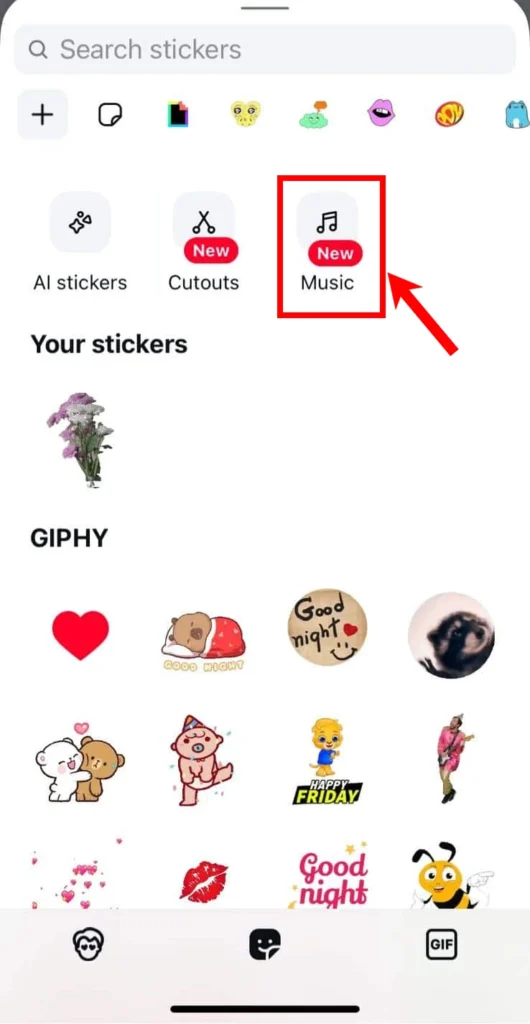
The song will be sent to your chat.
Why Can’t I Send a Song in Instagram DMs?
The music feature might not show in your Instagram DMs because of the following reasons:
- Outdated App: Ensure your Instagram app is updated.
- Feature Unavailable in Your Region: Some features roll out slowly, so it might not be available in your country yet.
Once you know how to share music in Instagram DMs, you can make your chats more enjoyable and interactive. More Instagram tips are coming soon, so stay tuned.







A little discussion goes a long way.
Ask a question, share your experience, or help someone find an answer.
There is room for your perspective.
No discussions match this view yet.
Your voice belongs here
Keep it useful. Keep it kind.