

Instagram is continuously rolling out an AI-powered editing tool that makes the app more fun and advantageous to the creators. The latest addition is the Restyle AI feature to Instagram Stories, allowing users the capabilities to change clothes, add or remove objects, and fully transform the background, with just a few taps.
If you want to know how to open and use the Restyle feature or why it does not show up to you, here is all you need to know.
What is the Restyle AI Feature on Instagram?
Restyle is an AI-enabled editing tool on Instagram Stories that will allow you to:
- Change outfits in your photos
- Add or remove objects
- Replace the background
- Customize the appearance of your story with natural prompts
How to use Restyle AI option on Instagram story
Here’s how you can use Restyle AI Instagram story feature.
- Open Instagram app.
- Tap the home icon.
- Tap “Your Story” at the top left corner.
- Capture a new photo or upload one from your gallery.
- Tap the three dots (⋯) in the top right corner.
- Select Restyle from the menu.
- If you need to make any edits, tap Add, Remove, or Change.
- In the prompt box, type your customization.
- Tap the arrow icon to submit the suggestion.
- Tap Undo to revert the changes.
- When you are satisfied, tap Done.
- Go back to the three dots.
- Tap Save to store the edited version.
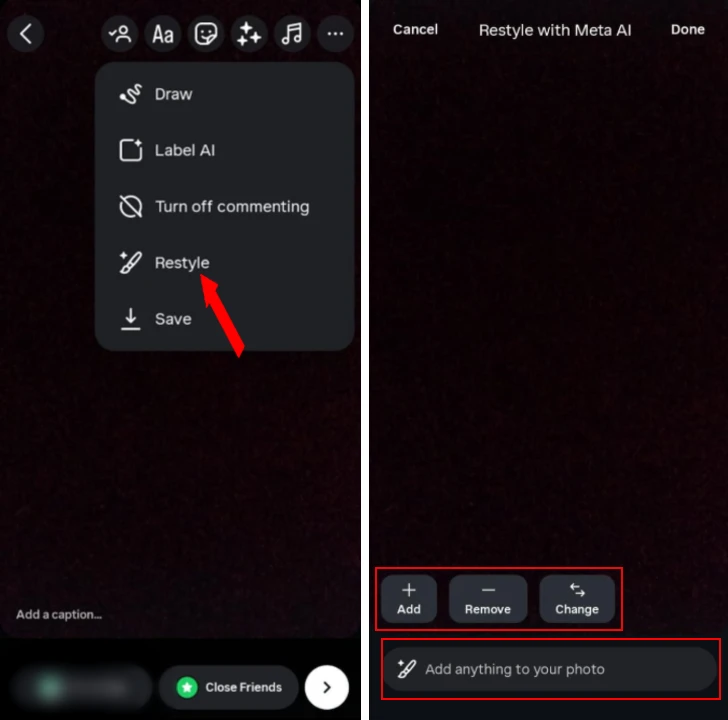
Now your story has got a new AI-powered makeover.
Why is the Restyle option not showing?
If you can not find the Restyle option, the reasons could be as follows:
- You are not using the updated Instagram app.
- Restyle currently works only on photos, not videos.
- Instagram often rolls out features by region.
- Some features become initially available only on personal or professional accounts.
Tip: If the option still is not shown, then try creating a professional account or clearing an app cache.
Instagram Stories just make crafting stories through the Restyle AI feature more inspired and appealing. Change outfits, edit the backgrounds, delete the extras you do not need, and more. Now you can do it all in the app.







A little discussion goes a long way.
Ask a question, share your experience, or help someone find an answer.
There is room for your perspective.
No discussions match this view yet.
Your voice belongs here
Keep it useful. Keep it kind.