Close Menu
    Facebook X (Twitter) Instagram Pinterest YouTube Bluesky WhatsApp TikTok Threads RSS
    WikiTechLibrary
    • Converters & Media
    • Web Tools
    • Finance & Tax
    • Utility & Bills
    • Vehicle Tax
    WikiTechLibrary

    WatchOS 26 Beta: Think Twice Before You Update

    By Muqadas FatimaJune 11, 2025No Comments3 Mins Read
    Facebook Twitter WhatsApp Threads Copy Link
    watchos 26 beta installation guide and warning

    watchOS 26 has been officially announced by Apple at WWDC 2025, and you may be eager to test the new features. However, just before you run off and install the first developer or public beta, there is a big warning: you cannot downgrade your Apple Watch once the update is installed.

    No Downgrade Available

    Unlike iOS, macOS, or iPadOS, watchOS does not support downgrades. When you upgrade to a beta software, such as watchOS 26 beta 1, you cannot revert to watchOS 18.5. In the case of critical bugs, you can either wait until Apple provides a stable version or visit an Apple store, where they may be able to assist you.

    Unless you are a developer preparing apps for rollout in the fall or have a backup device, it is probably best to wait.

    When Is It Safe to Try?

    The public beta is scheduled to be launched by Apple in July 2025; however, the same risks remain relevant at that point. However, if you wear your Apple Watch every day and can utilise it in areas such as health, fitness, or productivity, it is smarter to wait until the final release later this year.

    How to Install watchOS 26 Beta

    Should you still want to continue with the installation of the beta, you will have to install the iOS 26 beta on your iPhone first:

    Step 1: Install iOS 26 Developer Beta

    • Open the Settings app on your iPhone.
    • Go to General > Software Update > Beta Updates.
    • Switch from iOS 18 Developer Beta to iOS 26 Developer Beta.

    Step 2: Install watchOS 26 Beta on Your Apple Watch

    • Open the Watch app on your iPhone.
    • Go to General > Software Update > Beta Updates.
    • Select watchOS 26 Developer Beta.
    • Follow the on-screen prompts to download and install.

    watchOS 26 Features

    Liquid Glass Design

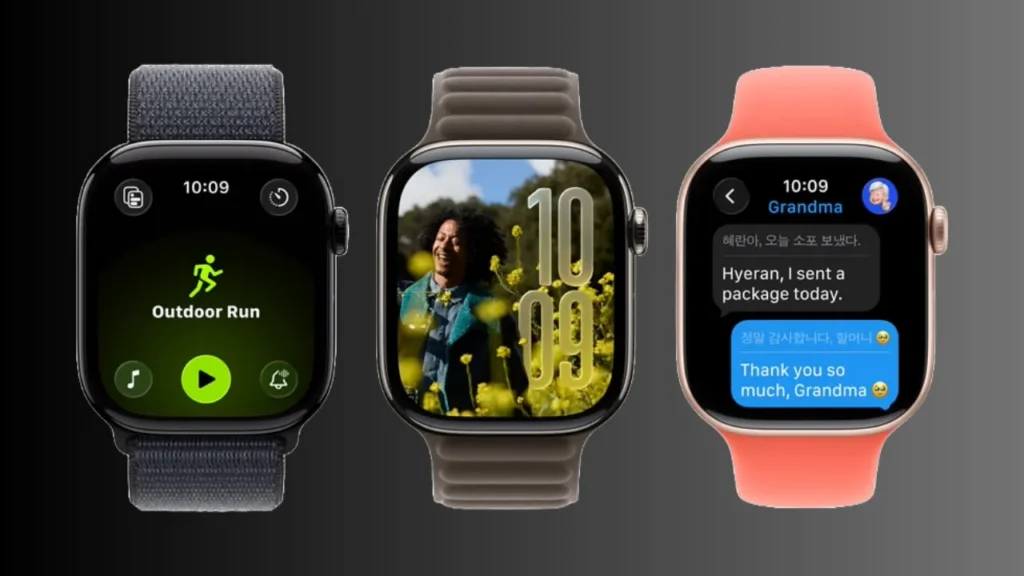
    Just like in visionOS, Apple is introducing beautiful shimmering light effects, as well as interactive reflections on buttons and menus, making your Watch look futuristic.

    watchos 26 beta features
    Source: Apple Inc.

    Workout Buddy

    Meet this new AI-based fitness assistant that studies your training history and provides individual training recommendations. It is compatible with all kinds of workouts, such as:

    • Outdoor/Indoor Running
    • Walking (Indoor/Outdoor)
    • Cycling
    • HIIT
    • Strength Training

    To use Workout Buddy, you will need:

    • An iPhone that supports Apple Intelligence
    • Bluetooth headphones paired with your Watch

    It is not worth trying watchOS 26 unless you are a developer (or have an extra Apple Watch). It has a lot to be excited about, and the fact that one cannot downgrade this beta makes it particularly risky.


    Share. Facebook Twitter Pinterest LinkedIn Email WhatsApp Threads
    Muqadas Fatima

      Muqadas Fatima is a dedicated writer at WikiTechLibrary, focusing on creating insightful "how-to" tutorials related to social media, tech, and life hacks. With a keen interest in simplifying the complexities of digital world, she creates content that helps readers improve their social media skills and adopt practical solutions for everyday challenges.

      Related Articles

      best whatsapp web extensions

      The browser extensions that finally make WhatsApp Web feel complete

      can you see who views your instagram highlights

      Can you see who views your Instagram highlights?

      whatsapp without phone number

      Can you use WhatsApp without a phone number?

      animate childrens drawings with ai how to

      I Tested AI Tools That Animate Kids Drawings, Here Is What Actually Worked

      crosh commands in chromebook

      What are CROSH Commands in Chromebook? Complete Guide

      weirdest tech innovations history

      7 Weirdest Tech Innovations in History That Actually Existed

      JOIN THE CONVERSATION

      A little discussion goes a long way.

      Ask a question, share your experience, or help someone find an answer.

      0 comments
      NewestOldestMost helpfulUnanswered
      ◇

      There is room for your perspective.

      No discussions match this view yet.

      +

      Your voice belongs here

      Keep it useful. Keep it kind.

      Cancel reply

      Your email address will not be published.


      MOST VIEWED
      whatsapp How To

      How to Find and Restore a Lost WhatsApp Message

      By Ahmad Ali
      roblox Gaming

      Roblox Promo Codes List For Free Items

      By Ali Rehman
      best online games for pc Gaming

      7 Best Online Games for PC You Can Play Right Now (Free and Paid)

      By Ali Raza
      flip minigames codes Gaming

      Flip Minigames Codes

      By Ahmad Ali
      What's New

      AI Video Generator Clips Need a Real Compression Preview

      November 12, 2026
      image

      Made in America and Priced at $7,999: StarBot Launches Spark Humanoid Robot

      November 5, 2026
      tiktok adds voice notes and image carousels in comments

      TikTok Adds Voice Notes and Image Carousels in Comments

      September 4, 2026
      google messages adds ai detection to chat photos

      Google Messages Adds AI Detection to Chat Photos

      September 3, 2026
      © 2026 WIKITECHLIBRARY | All Right Reserved
      • About Us
      • Contact Us
      • Privacy Policy
      • Terms & Conditions
      • Disclaimer

      Type above and press Enter to search. Press Esc to cancel.