
Online databases and telecom verification systems in Pakistan have made it much easier to trace a mobile number. Whether you have received an unknown number or want to confirm the SIM’s ownership, there are some ways to trace mobile numbers safely and legally.
This article explains how you can trace any mobile number in Pakistan for free, using the official PTA systems and other online tools.
- Trace Mobile Number via PTA SIM Information System
- Steps to Use PTA SIM Information System
- Trace Mobile Number Using Network Service Codes
- Trace Number Through Online CNIC Databases (Third-Party Sites)
- Contact Network Customer Support
- Report Suspicious Numbers
- Use Mobile Tracker Apps (Caution Advised)
- FAQs About Tracing Mobile Numbers in Pakistan
- Q1: Can I trace someone’s location by mobile number in Pakistan?
- Q2: Is the PTA portal completely free?
- Q3: Can I find the name of the person who owns a number?
- Q4: How can I check if my number is registered under my name?
- Q5: Are mobile tracker apps safe?
Trace Mobile Number via PTA SIM Information System
Pakistan Telecommunication Authority (PTA) offers the most authentic and legal method to trace SIM information. PTA SIM Information System (668) can help you check the registered numbers for a specific CNIC.
Steps to Use PTA SIM Information System
- Visit the official PTA SIM portal: cnic.sims.pk
- Enter your CNIC number (without dashes).
- Complete the CAPTCHA and click Submit.
- You will see all SIMs registered on CNIC with their respective networks.
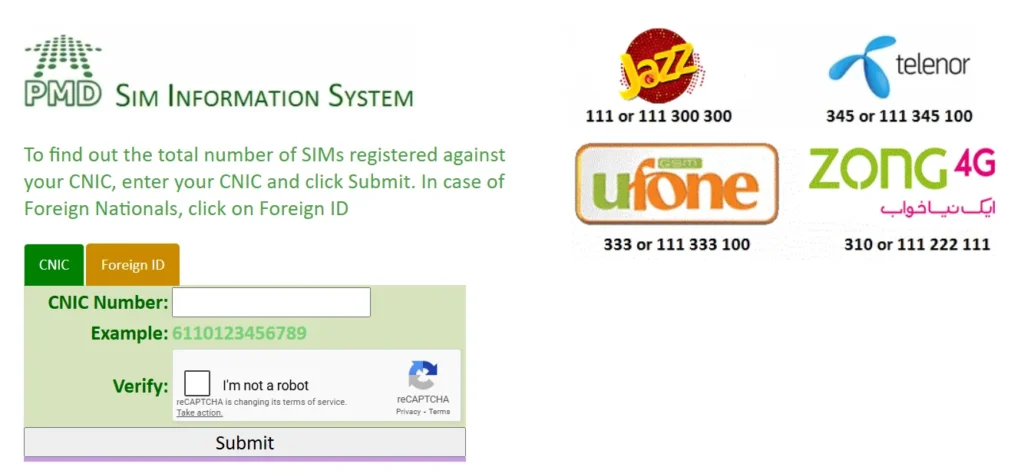
This method allows you to verify whether a number is registered on your ID, but it will not reveal your details, like your address or call history.
Trace Mobile Number Using Network Service Codes
Every telecom company in Pakistan allows you to see SIM information and sometimes trace ownership information via their USSD codes and official apps.
| Network | Trace/Info Code | Alternative Method |
|---|---|---|
| Jazz / Warid | Dial *99# to view your number | Use Jazz World App |
| Zong | Dial *8# or *100# | Use My Zong App |
| Ufone | Dial *780*3# | Use My Ufone App |
| Telenor | Send a blank SMS to 7421 | Use My Telenor App |
| SCO | Dial *975# | Call 355 for support |
These methods work to identify your own number or confirm whether the SIM is active.
Trace Number Through Online CNIC Databases (Third-Party Sites)
Some online databases claim to display the SIM ownership information using phone numbers or CNICs. While most of these are not officially approved.
Always verify your information using official PTA records to avoid outdated data. Also, do not enter your personal CNIC on unverified websites.
Contact Network Customer Support

You can also contact your network’s customer service for official confirmation about a specific number. Here are the helpline numbers for all major telecom companies in Pakistan.
| Network | Helpline |
|---|---|
| Jazz | 111 |
| Zong | 310 |
| Ufone | 333 |
| Telenor | 345 |
Report Suspicious Numbers
If you are receiving spam, scam, or harassing calls, report the number to PTA immediately.
- Send an SMS to 9000 with the spam number and write a brief description of the issue.
- File a complaint via the PTA Complaint Portal: https://complaint.pta.gov.pk
After verification, PTA can block or take action against this number.
Use Mobile Tracker Apps (Caution Advised)
Many mobile apps and websites claim to trace numbers by location or name, but most of them are inaccurate or violate privacy laws.
If you choose to use such tools, make sure they
- Do not request your CNIC or sensitive data.
- Are verified or have good user ratings.
- Only show publicly available information.
Remember: Using illegal tracing apps that access your personal data is a violation of Pakistan’s PECA cybercrime laws.
FAQs About Tracing Mobile Numbers in Pakistan
Q1: Can I trace someone’s location by mobile number in Pakistan?
No, you cannot legally track someone’s location without their consent. Only law enforcement agencies can do that.
Q2: Is the PTA portal completely free?
Yes, cnic.sims.pk is a free and government-authorized service.
Q3: Can I find the name of the person who owns a number?
Officially, no. PTA only shows how many SIMs are registered on your CNIC.
Q4: How can I check if my number is registered under my name?
Enter your CNIC on the PTA SIM Information portal to verify all SIM numbers on your ID.
Q5: Are mobile tracker apps safe?
Most third-party apps are risky. Always use PTA or your telecom network’s official source.




A little discussion goes a long way.
Ask a question, share your experience, or help someone find an answer.
There is room for your perspective.
No discussions match this view yet.
Your voice belongs here
Keep it useful. Keep it kind.