
Have you ever received any calls or messages from an unknown number? You are not the only one. Most individuals in Pakistan want to verify the details of any mobile number, including the owner’s name, CNIC, and registered network.
Pak SIM Data Check has become one of the most popular searches in Pakistan, helping users to check the number, avoid scams, and manage registered SIMs easily. This article explains all the official ways to check SIM data for any number in Pakistan.
- What is Pak SIM data check?
- Official PTA SIM Information System
- SIM Owner name check by mobile number
- Jazz Number Details Check
- Zong Number Details Check
- Telenor, Ufone, and Warid
- Verify SIM ownership by CNIC
- SMS Method
- Avoid fake SIM data websites
- What to do if you find unknown SIMs on your CNIC
- FAQs for Pak SIM data check
- Q1: Can I check the owner name of any SIM number?
- Q2: How many SIMs can I register on one CNIC?
- Q3: Is the Pak SIM Data website official?
What is Pak SIM data check?
Pak SIM Data Check is an online system that allows users to check mobile numbers registered on their CNIC. It’s primarily based on the official PTA SIM Information System, which helps citizens to verify the total number of SIMs issued in their names. The service is helpful for
- Detect unauthorized SIMs registered under your CNIC
- Confirm if a number is active or real
- Avoid scams or spam calls
- Verify the ownership of a mobile number
However, it’s important to note that only limited and authorized information is available due to privacy and security reasons.
Official PTA SIM Information System
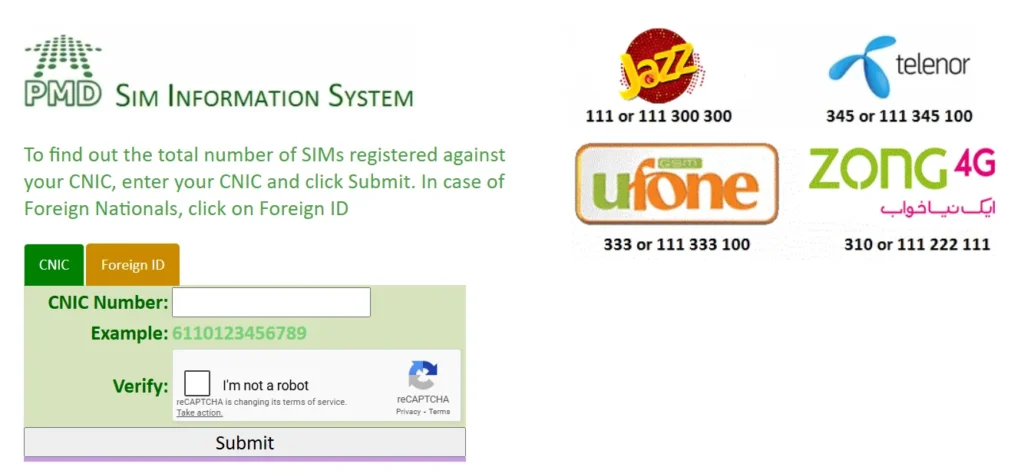
Pakistan Telecommunication Authority (PTA) offers an official portal for SIM verification.
- Visit the PTA SIM Information System at cnic.sims.pk.
- Enter your CNIC number (without dashes).
- Complete the captcha verification.
- Click on Submit.
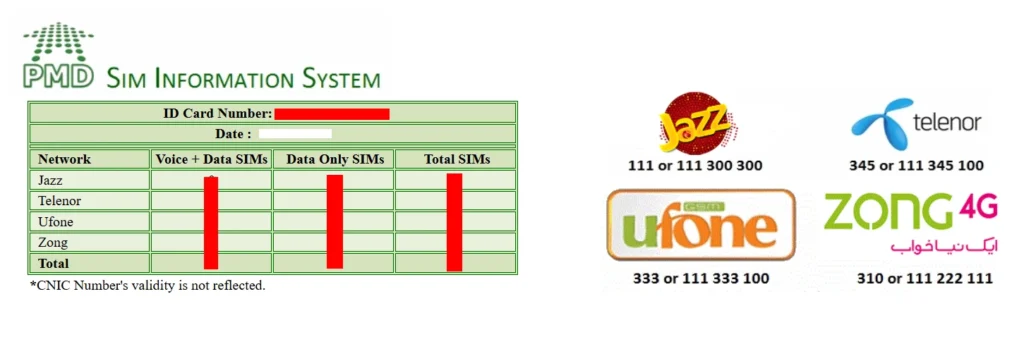
You will see a table
- Total number of SIMs registered under your CNIC
- Network name (Jazz, Zong, Ufone, or Telenor)
SIM Owner name check by mobile number
While PTA does not support any access to the personal owner names due to privacy reasons, you can check the basic information via network-specific methods.
Jazz Number Details Check
- Open your phone dialer.
- Type MNP and send it to 667.
- You will receive an SMS with
- Owner name (if available)
- CNIC
- SIM activation date
- Network type
Zong Number Details Check
- Send MNP to 667.
- You will receive details about the SIM’s activation and network information.
Telenor, Ufone, and Warid
- For all networks: Send MNP to 667.
- You will receive details for your number’s registered information.
Note: You can only check the details of the number currently active on your device.
Verify SIM ownership by CNIC
If you want to know how many SIMs are registered on your CNIC using PTA CNIC check method.
SMS Method
- Type your CNIC number (without dashes).
- Send it to 668.
- You will receive a list showing
- Total SIMs registered on your CNIC
- Network-wise breakdown
Avoid fake SIM data websites
Some third-party websites might display the SIM owner’s names, call details, and CNIC information, but these are not approved by PTA and can be dangerous.
Why you should avoid them
- They can steal personal information.
- They violate privacy laws in Pakistan.
- They may install malware or phishing scripts.
Always use PTA official portal or your mobile network operator for SIM verification.
What to do if you find unknown SIMs on your CNIC
If PTA SIM portal shows unknown numbers registered on your CNIC.
- Visit your nearest franchise or customer service center.
- Bring your original CNIC.
- Request deactivation of unknown SIMs.
You can also file a complaint via PTA Complaint Portal at complaint.pta.gov.pk.
FAQs for Pak SIM data check
Q1: Can I check the owner name of any SIM number?
No, only limited information is shown due to security reasons.
Q2: How many SIMs can I register on one CNIC?
A maximum of 5 SIMs per network.
Q3: Is the Pak SIM Data website official?
Only cnic.sims.pk is official. Others are unauthorized.




A little discussion goes a long way.
Ask a question, share your experience, or help someone find an answer.
There is room for your perspective.
No discussions match this view yet.
Your voice belongs here
Keep it useful. Keep it kind.