
Apple’s Action Mode, first introduced with the iPhone 14, has been continually improved since its release, making it one of the most impressive tools for handheld video recording. Originally launched in the market as a way to stabilize footage during specific activities, like running or sports, Apple is now focusing on a new case: accessibility.
In its emotional ad “No Frame Missed,” Apple narrates the story of a father with Parkinson’s disease who still records stable, high-quality videos despite shaky hands, with the help of Action Mode.
This feature combines high-tech hardware and software stabilization, capturing a larger frame than what you see, and then crops and moves that frame in real-time to cancel out hand movements or bumps. Paired with the iPhone’s optical image stabilization, it is smooth and cinematic footage that feels steady even in difficult shooting conditions.
How to Activate Action Mode on iPhone
Apple has slightly changed how you access Action Mode across iOS versions. Here’s a quick guide:
On iOS 18
- Open the Camera app.
- Swipe to the Video tab.
- Look for the Action Mode toggle beside the Flash icon.
- Tap it and start recording.
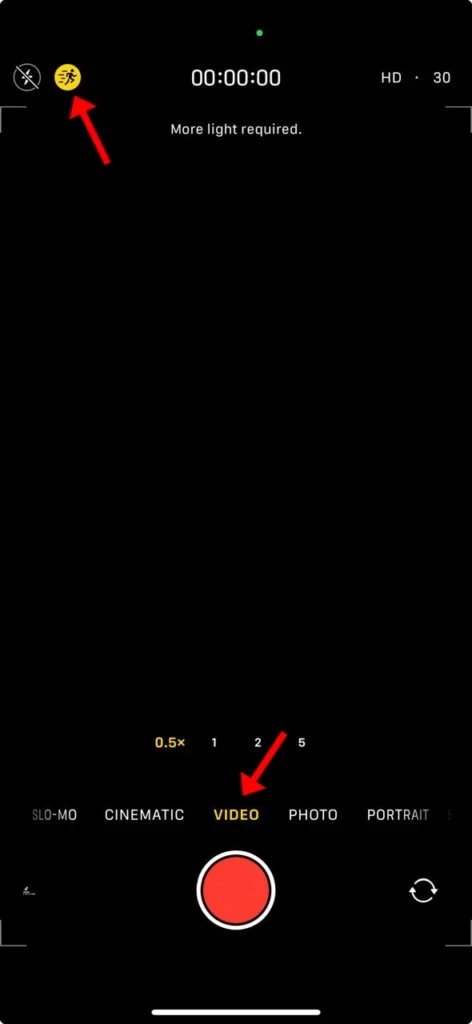
On iOS 26
- Open the Camera app.
- Switch to Video mode.
- Tap the Action toggle under the Video tab.
- Start recording.
Pro Tip: Action Mode works best in bright conditions. If you do not see the option, it might not work on your iPhone model.
iPhone Models That Support Action Mode
Action Mode is available only on iPhones with more advanced camera setups. Here’s the full list of supported devices.
- iPhone 14 and iPhone 14 Plus
- iPhone 14 Pro and iPhone 14 Pro Max
- iPhone 15 and iPhone 15 Plus
- iPhone 15 Pro and iPhone 15 Pro Max
- iPhone 16 and iPhone 16 Plus
- iPhone 16 Pro and iPhone 16 Pro Max
Unsupported Devices
- iPhone SE (2nd and 3rd gen)
- iPhone 16e
- iPhone 17 Air
- iPhone 17e
Apple appears to be limiting this feature to iPhones with multiple cameras, so this may never be available on the budget and SE.
While Action Mode is an amazing feature to use when shooting stable videos in sports or action shots, Apple has recently focused on accessibility, showing its importance. This feature offers an easy but powerful solution to those who have hand tremors or limited mobility, so that they can still capture life moments without fear of shaky videos.

A little discussion goes a long way.
Ask a question, share your experience, or help someone find an answer.
Your work continues to inspire 💕 positive change in communities around the globe
Your blog is a testament to your passion for your subject matter. Your enthusiasm is infectious, and it's clear that you put your heart and soul into every post. Keep up the fantastic work!
Every time I visit your website, I'm greeted with thought-provoking content and impeccable writing. You truly have a gift for articulating complex ideas in a clear and engaging manner.
I've been following your blog for some time now, and I'm consistently blown away by the quality of your content. Your ability to tackle complex topics with ease is truly admirable.
Your voice belongs here
Keep it useful. Keep it kind.