
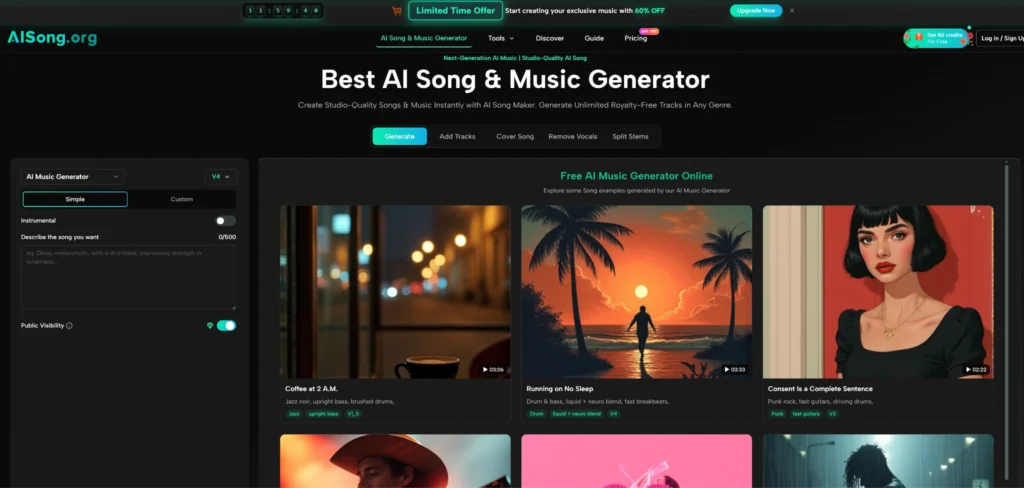
I started with a silent travel video and a vague hope. The footage looked decent, but without music it felt weightless. I had no budget for a composer, no patience for stock library browsing, and no interest in settling for a track that only half-fit the tone. The AI Song Generator crossed my path exactly then.
My earliest attempts produced music that was structurally complete yet emotionally mismatched, close but not quite right. What followed over the next week was less a passive tool interaction and more a dialogue. I learned to read what the engine heard in my words, adjust, and try again.
The point of this account is not to claim that the AI replaced skill. It is to show that with the right kind of input, a non-musician can arrive at a personally meaningful result.
- Why My First Prompt Delivered a Generic Result
- Recognizing the difference between a wish and a workable cue
- The Skill of Iteration: Treating the AI as a Sketch Partner
- Developing an ear for what to change next
- A Practical Comparison: Vague Cues Versus Detailed Descriptions
- Walking Through My Actual Refinement Workflow
- Step 1: Build a Prompt That Names Genre, Instrument, and Emotional Color
- Step 2: Generate a First Draft and Listen Once Without Judgment
- Step 3: Edit the Prompt Along One Dimension and Regenerate
- Step 4: Download Only When the Track Feels Complete in Context
- Where the AI Song Generator Fit Into My Creative Routine, and Where It Still Felt Short
Why My First Prompt Delivered a Generic Result
The first prompt I typed into the free tier was “upbeat instrumental for a road trip video with mountains.” The track that came back had a driving beat and a major-key synth hook. It was pleasant and entirely forgettable. The problem was not the engine. It was that my description gave the AI no specific texture to build from. “Upbeat” covers thousands of possible arrangements, and “road trip” added no meaningful musical constraints.
After that initial letdown, I stopped treating the prompt field like a search bar and started treating it like a creative brief. I wrote a longer description: “mid-tempo indie rock with a clean electric guitar riff, steady drums, and a sense of forward motion but not euphoria, like early morning driving through fog.” The result had a shape and a mood that aligned with the footage.
That gap between the two attempts taught me that the AI Song Generator responds to specificity the way a session musician responds to a well-written chart. The engine needs enough musical clues to lock onto a genre and emotional register. Vague language gave me vague music every single time.
Recognizing the difference between a wish and a workable cue
One practical lesson emerged fast. A phrase like “something cinematic” carries little usable signal because cinematic can mean orchestral tension, ambient drone, or percussive trailer music. When I replaced cinematic with “warm string quartet with subtle piano chords, slow tempo, hopeful but restrained,” the output consistently landed in the right emotional territory. The engine does not interpret loose adjectives predictably. It performs better when you translate feeling into concrete musical elements.
The Skill of Iteration: Treating the AI as a Sketch Partner
Almost none of my usable final tracks came from a single generation. The typical path involved an initial version that got the skeleton right but missed on texture, then a second version with one targeted change.
This iterative rhythm felt closer to writing with a band than to operating software. I would listen, notice that the guitar tone felt too bright, and adjust the prompt from “clean electric guitar” to “warm, slightly overdriven guitar.” The next version often tightened the mood around that single change without losing the structure I already liked.
A 2025 overview from MusicTech on generative music tools observed that while current models produce structurally coherent output consistently, the gap between a passable track and one that genuinely serves a scene still depends on human-led refinement.
My experience mirrored that exactly. The AI Song Generator reliably delivered a workable first draft. Making that draft into something I wanted to use afterward required a willingness to go through a few rounds of listening, rephrasing, and comparing variations.
Developing an ear for what to change next
Iteration works best when you adjust only one variable at a time. I tried once to rewrite the entire prompt after a disappointing generation and received a completely different song that lost the one part I liked.
After that, I kept a simple mental checklist: if the tempo felt off, I adjusted BPM language; if the vocal delivery sounded robotic, I added descriptors like “breathy” or “conversational”; if the arrangement crowded the midrange, I simplified the instrumentation list. This small-discipline approach turned guesswork into a method, and the number of throwaway generations dropped sharply.
A Practical Comparison: Vague Cues Versus Detailed Descriptions
The table below documents the kind of difference I saw when moving from an underspecified prompt to one that named concrete musical ingredients. Both examples were generated on the platform’s Basic Model, which is accessible on the free tier.
| Aspect | Vague Prompt Example | Detailed Prompt Example |
| Prompt text | “Happy summer song” | “Upbeat pop with acoustic guitar strumming, bouncy bass, light handclaps, female vocal, nostalgic but bright” |
| Instrumental texture | Generic synth pad and simple drum loop, indistinguishable from stock music | Defined acoustic layers with identifiable strumming pattern and rhythmic handclaps |
| Vocal presence | Forced, overly processed and slightly pitchy delivery | Clean, airy vocal that sat naturally in the mix |
| Emotional match | Pleasant but directionless, could fit almost any sunny scene | Evoked a specific late-afternoon nostalgia that matched the intended video mood |
| Number of generations to usable result | Five, with large swings in style between attempts | Two, with the second generation fine-tuning only the vocal tone |
The difference in generation count mattered. With the vague prompt, I burned through most of my free monthly credits chasing a target I had not clearly defined. The detailed prompt gave me a viable candidate on the first attempt and a refined version on the second. This is not a promise that every detailed prompt works flawlessly. It is a record of what pattern consistently improved my own outcomes during the trial week.
Walking Through My Actual Refinement Workflow
To make this repeatable, I captured the sequence that eventually worked for me. These steps follow AI Song Maker native flow, with the added layer of iterative listening that I found essential.
Step 1: Build a Prompt That Names Genre, Instrument, and Emotional Color
Start by writing a sentence that combines a clear genre, a lead instrument, a tempo hint, and the exact emotional register you need. Avoid abstract adjectives without grounding them in sound references. A prompt like “indie folk with fingerpicked guitar, gentle drums, warm vocals, reflective and intimate” gives the engine multiple anchors simultaneously.
Using the custom mode to separate choices when the free tier is not enough
On the free tier, all these elements go into a single text box. That worked fine once I learned to pack them into a dense sentence. When I later tested the Custom Mode on a paid plan, the separate fields for mood, instrumentation, and structure removed the guesswork. I could specify “melancholic” in the mood field, “acoustic guitar and strings” in the instruments field, and “slow build” in structure, and the engine rarely misfired. The trade-off is that paid access is required for this level of control.
Step 2: Generate a First Draft and Listen Once Without Judgment
After submitting, the paid queue returned a track in under a minute, while the free queue sometimes took several minutes at peak hours. I learned not to decide instantly. The first listen is for orientation. I noted what I liked, what distracted me, and whether the overall shape matched the footage or the mood I had in mind.
Marking the keeps and the fixes in a single pass
I kept a scratch note with two columns: “keep” and “change.” For one track intended as a podcast intro, the keep column included the bass line and the drum groove. The change column had only one item: “vocal feels too synthetic, make it softer and closer.” That clarity turned the next prompt edit into a single-sentence adjustment rather than a complete rewrite.
Step 3: Edit the Prompt Along One Dimension and Regenerate
Resist the urge to overhaul everything. Choose the single most distracting element from your change list and adjust only that part of the description. Regenerate and compare to the previous version. If the vocal was the issue, change just the vocal descriptor and leave the genre and instrumentation intact.
Stacking improvements without collapsing the structure
When I wanted to add a bridge section or a key change, I moved to the Custom Mode and used the structure field to request a “contrasting middle section.” The engine respected the existing mood while adding variation. When I tried to change instrumentation and structure and vocal delivery all at once, the result felt like a different song entirely, and I lost the thread I had liked. Single-axis edits preserved continuity.
Step 4: Download Only When the Track Feels Complete in Context
Once a generation sounded right, I played it alongside the video or voiceover without immediately downloading. Listening in context sometimes exposed a rhythmic clash or a tonal mismatch that solo listening hid. Only after that final check did I export the MP3.
Checking licensing status before locking the file into a project
Free-tier downloads remain publicly visible and do not come with a commercial use right. For personal projects, that was acceptable. When a track needed to go into a client deliverable, I activated a paid plan to enable private mode and secure the commercial license. Doing this before embedding the audio in a final render saved a potential headache later.
Where the AI Song Generator Fit Into My Creative Routine, and Where It Still Felt Short
After a week of use, the tool had earned a permanent spot in my video production workflow for background scoring and placeholder music. It did not replace my occasional collaboration with human musicians, nor did it produce anything that moved me on a deep emotional level. What it did do was remove several hours of searching and force me to clarify what I actually wanted from a piece of music. That clarification habit has carried over into briefs I now write for other projects, AI-assisted or not.
The limitations I hit were real and probably familiar to anyone using current generative music tools. The engine favors symmetry and clean transitions, which sometimes made indie-folk prompts feel too polished and rock prompts lack the raw edge I was chasing. Vocal phrasing occasionally drifted into a pattern that sounded more sampled than sung.
A detailed review from Sound On Sound on AI vocal synthesis this year noted that while timbre and pitch accuracy have advanced, expressive phrasing and long-form emotional arc remain weak points across multiple platforms. That matched my results. For tracks where vocal character was central, I often needed to blend the AI output with additional editing or simply accept that the current ceiling was lower than I wanted.
My recommendation for anyone curious is to approach the tool as a sketch engine. Use it to test genre ideas, generate demo-quality backing tracks, and train your own ability to describe music in precise terms. The free tier credit allowance is enough to run a meaningful set of experiments before deciding if a subscription fits your needs.
The AI Song Generator will not hand you a finished masterpiece in one click. When you invest the time to learn its language, it does hand you something that sounds unmistakably like a song, one that started with your idea and can end up in your project with a bit of careful steering.





A little discussion goes a long way.
Ask a question, share your experience, or help someone find an answer.
There is room for your perspective.
No discussions match this view yet.
Your voice belongs here
Keep it useful. Keep it kind.