

Instagram has announced a new feature that allows creators to link multiple Reels into a series, making it easier than before to tell a story, share a tutorial, or keep an audience engaged across multiple videos.
The global rollout is set to be helpful to creators who depend on episodic content, solving a long-standing challenge. Previously, when a creator uploaded a “Part 1,” viewers had to search through their profile to find a “Part 2.” Instagram has added a Watch Next button to its Reels Series feature, allowing audiences to continue watching linked Reels.
How to link reels on Instagram
Linking a reel while posting a new one
- Create or upload your Reel.
- On the caption screen, scroll down and tap “Link a Reel.”
- Select the existing Reel you want to connect.
- Optionally, add a title (up to 15 characters) like “Part 2” or “Next Chapter.”
- Tap OK, then press Share to publish.
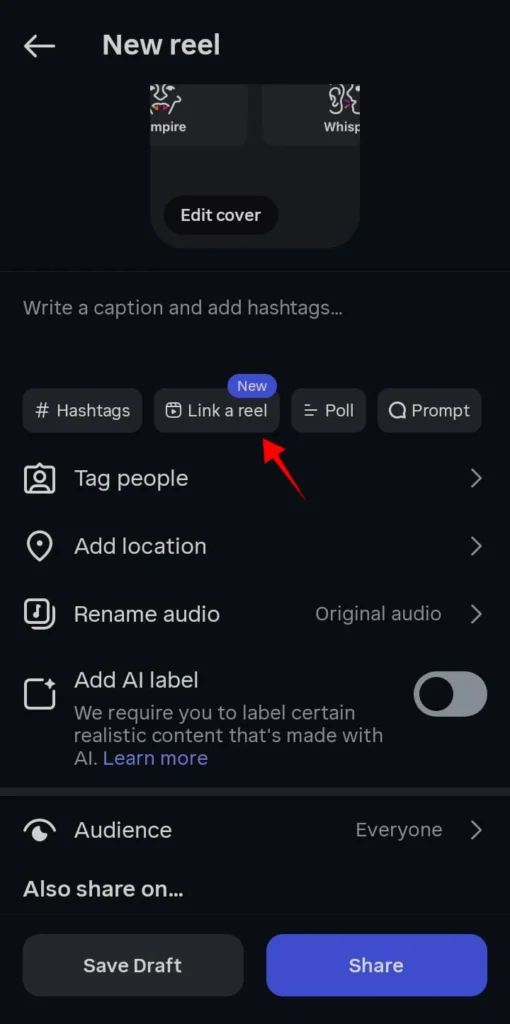
Your viewers will now see a “Watch Next” button to watch your linked Reel.
Linking an existing reel
- Open the Reel you want to update.
- Tap the three-dot menu in the top right.
- Select “Link a reel”.
- Choose another Reel to connect, or tap Edit linked reel if one is already attached.
- You can remove or change the link anytime.
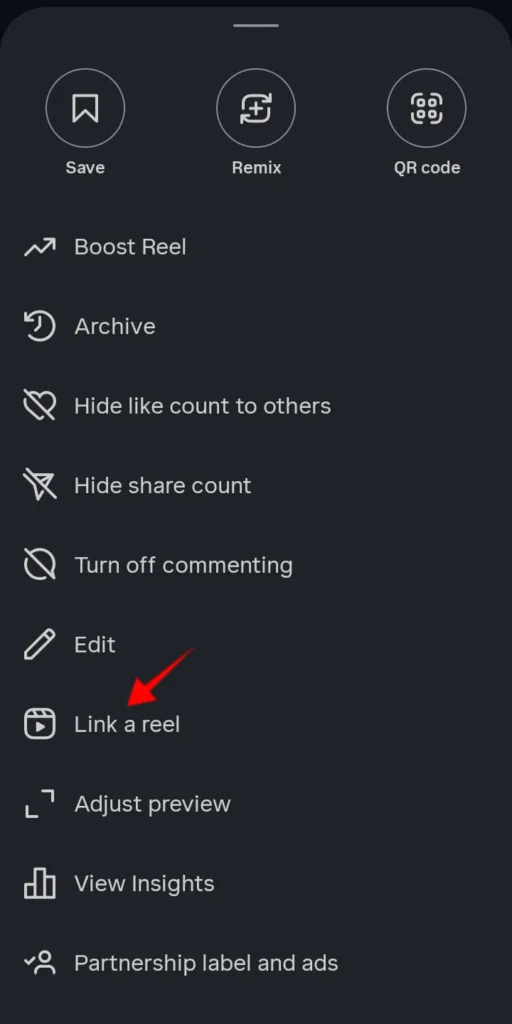
Note: The feature can be used on both new and existing Reels, but not for Close Friends or subscriber-only reels.
Tips for creators to maximize reel series
- Label clearly: Use captions like “Part 1” and “Part 2” for clarity.
- Plan: Record multi-part videos in sequence for smooth transitions.
- Hook early: Tease the next part at the end of each Reel.
- Cross-promote: Mention in Stories or captions that Reels are linked.
With this update, creators can convert episodic content into a binge-worthy format, and they are able to increase the total viewing and engagement time.
If you have already created multi-part Reels, now is the perfect time to connect them and give your audience a storytelling experience.


A little discussion goes a long way.
Ask a question, share your experience, or help someone find an answer.
There is room for your perspective.
No discussions match this view yet.
Your voice belongs here
Keep it useful. Keep it kind.