
Added an incorrect date of birth to TikTok, or are you stuck with age limits that do not match your real age? You are not alone. Many users face this problem if they signed up quickly or years ago.
You cannot change your date of birth directly in the TikTok app. This is due to strict safety and privacy regulations, especially against the younger users. But you can still fix it, follow the methods below.
Here are some ways to update your date of birth on TikTok, what documents you may need, and what to do if your account is restricted.
Why TikTok limit date of birth changes?
TikTok removed manual birthday edits back in 2021 to protect minors and comply with child safety laws. Here’s why your birth date matters
- Users under 13 cannot have accounts
- Ages 13 to 15 have private accounts by default
- Direct messages unlock at 16
- Live streaming and gifts unlock at 18
You can get restricted features like messaging, posting, or going live if your date of birth is wrong. The content might also be unavailable if you meet the age requirement.
Method 1: Contact TikTok support through the app
This is the most reliable option for most users.
- Open the TikTok app
- Tap Profile at the bottom right
- Tap the three line menu at the top right
- Go to Settings and Privacy
- Scroll down and tap Help Centre
- Click on the “Chat With Us” button
- Explain clearly that your birth date is incorrect and include the correct date
- Example message:
“I entered the wrong date of birth when creating my account. I need to update it to my correct date. I can provide ID for verification.”
- Example message:
- Submit the request.
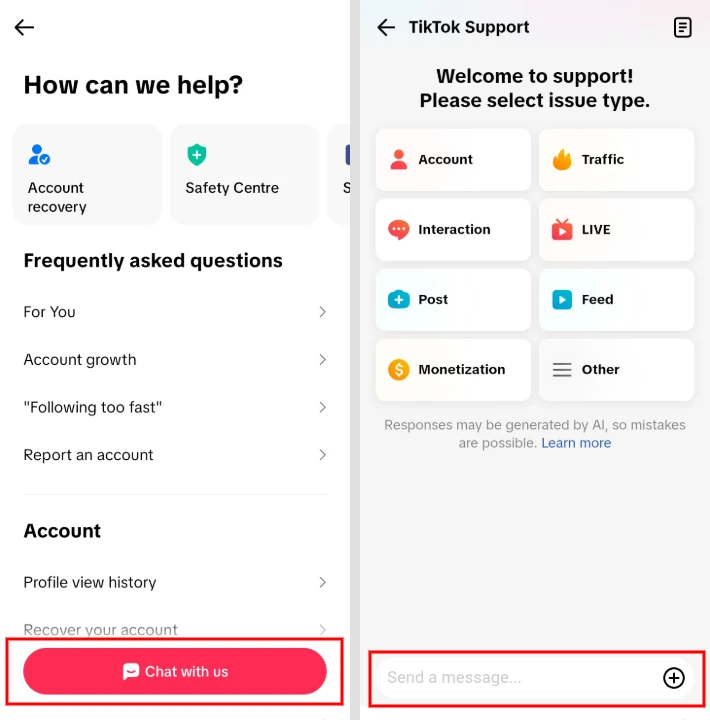
TikTok usually respond within a few days. They require a government-issued ID, passport, or driver’s license. Make sure your photo is clear, and your name and date of birth are visible.
Once approved, TikTok will update your account.
Method 2: Email TikTok support directly
If you cannot access your account, you may contact TikTok through its official support channels or the privacy email address when appropriate. In most cases, using the in app support option is the recommended method.
- privacy@tiktok.com
Use the subject line: Request to Change Date of Birth
In your message, include
- Your TikTok username
- The incorrect birth date
- Your correct birth date
- A clear photo of your government-issued ID
Keep the message short and polite. TikTok may respond to you within a day, or sometimes longer. Only send your personal documents to official TikTok email addresses.
Method 3: Apply for TikTok verification
This method works only for some users, such as public figures, creators, brands, or organizations. Also, it is not available in all regions.
- Go to Profile
- Open Settings and Privacy
- Tap Account, then Verification
- Follow the instructions based on your account type
- Submit required documents
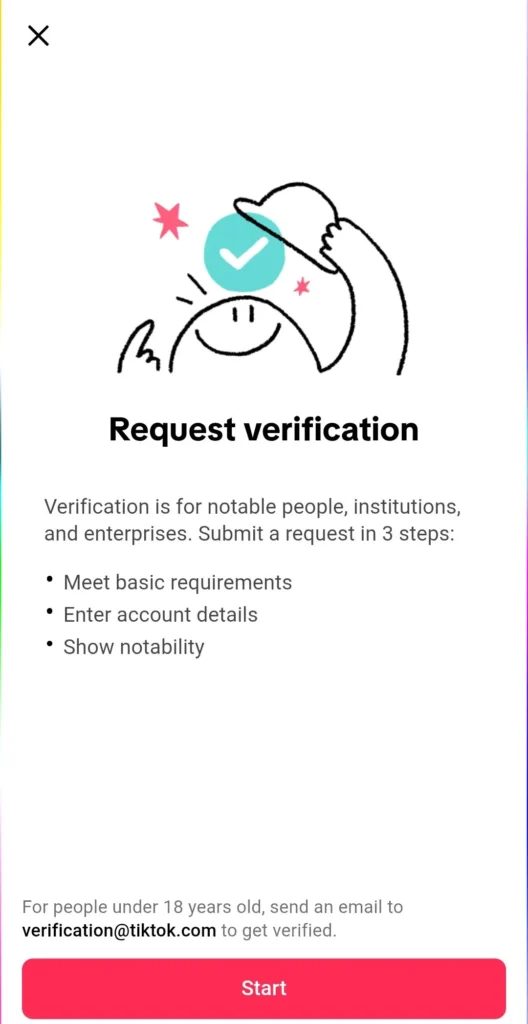
If available, mention that your date of birth needs correction during the process.
Verification process can take weeks. If you do not find the verification option, you can use the support methods.
Method 4: Create a new TikTok account
If you do not have a valid ID or support does not respond, you can create a new account.
- Log out or delete your old account
- Sign up again with a new email or phone number
- Enter the correct birth date during signup
You can save your videos before you log out to reupload them later.
Frequently Asked Questions
Why can’t I change my date of birth directly on TikTok?
TikTok removed the option to edit your birth date to help protect minors and comply with child safety and privacy laws. If your birthday is incorrect, you must contact TikTok Support to request a correction.
What ID does TikTok accept to verify my age?
TikTok generally accepts a government issued photo ID, such as a passport, driver’s license, or national identity card. The document must clearly show your name and date of birth.
How long does TikTok take to respond to a date of birth request?
Response times vary, but many users receive a reply within a few days to one week. More complex cases or high support volumes may take longer.
What if my account is still restricted after my birth date is corrected?
If age based restrictions remain after your birthday has been updated, contact TikTok Support again and ask them to review your account. Some restrictions may require an additional manual review.
Can I create a new TikTok account with the correct birth date?
Yes. If you cannot recover or update your existing account, you can create a new TikTok account using the correct date of birth. Make sure to enter accurate information during registration.
Will changing my birth date unlock age restricted features immediately?
Not always. After TikTok updates your birth date, some features may become available automatically, while others may require additional verification or time for your account settings to refresh.






A little discussion goes a long way.
Ask a question, share your experience, or help someone find an answer.
There is room for your perspective.
No discussions match this view yet.
Your voice belongs here
Keep it useful. Keep it kind.