

AI image generation has made the first draft cheaper, faster, and easier to start. The harder problem now appears one step later: how should a team decide which generated images are worth developing, which ones are only interesting experiments, and which ones should be rejected before they reach a client or campaign review?
That is why Krea 2 feels relevant for creative teams that need more than random image output. It gives teams a practical way to combine prompts, reference images, style strength, aspect ratios, and iteration into a reviewable visual process. The point is not only to make an image quickly. The point is to make a batch of images that can be judged with the same language a team would use in art direction.
This distinction matters because AI image tools often make visual exploration feel finished before it really is. A polished concept can look impressive in isolation, yet still fail when placed beside a landing page, a campaign headline, a product claim, or a brand system. Creative review is the stage that separates useful direction from visual noise.
For many teams, the bottleneck is no longer the blank page. It is the review meeting. Stakeholders may like different images for different reasons, designers may notice style drift, marketers may worry about channel fit, and founders may choose the most dramatic option even when it does not match the audience. Without a shared review structure, AI generation can multiply opinions faster than it multiplies clarity.
- Why AI Image Review Needs A Workflow
- The Five-Part Review Framework
- Step By Step: Turning AI Outputs Into Reviewable Concepts
- Step 1: Write A One-Sentence Visual Job
- Step 2: Build A Narrow Reference Set
- Step 3: Generate A Small Batch
- Step 4: Score Images Against The Same Criteria
- Step 5: Choose A Direction, Not A Winner
- A Practical Comparison Of Review Methods
- Where This Workflow Helps Most
- Common Review Mistakes
- A Simple Checklist Before Moving Forward
- The Bottom Line
Why AI Image Review Needs A Workflow
Traditional creative production has built-in friction. A photo shoot, illustration commission, or 3D render requires a brief, references, budget approval, and a production timeline. That friction can be annoying, but it also forces teams to clarify intent before money is spent.
AI image generation removes much of that friction. A marketer can generate ten campaign images before lunch. A designer can test five illustration styles in one sitting. A founder can create product mood visuals before the product is visually finalized. This speed is useful, but it creates a new kind of risk: the team may start reviewing outputs before it has agreed on what the images are supposed to prove.
A review workflow solves this by turning image selection into a series of decisions. Instead of asking, “Which image do we like?”, the team asks more specific questions: Does the image match the brief? Does the style support the brand? Does the composition work in the target format? Is the image accurate enough for the claim it supports? What human finishing would still be required?
These questions make AI images easier to use professionally. They also prevent a common problem: treating the most striking image as the best image.
The Five-Part Review Framework
A strong AI image review process should separate five layers: intent, style, format, accuracy, and production readiness. Each layer catches a different kind of problem.
Intent is the reason the image exists. A concept image for a pitch deck can be looser than a hero image for a paid campaign. A social thumbnail needs immediate clarity. An editorial illustration can tolerate more metaphor. If the intent is unclear, reviewers will judge the image against different invisible standards.
Style is the visual language of the image. This includes palette, texture, lighting, realism, illustration density, grain, contrast, and overall attitude. Style is where reference images and mood boards become useful because they show taste in a way that words often cannot.
Format is the place where the image will appear. A wide blog header, a 4:5 social post, a square ad, and a vertical story all create different composition needs. A strong image can still fail if its subject sits in the wrong area for the final crop.
Accuracy is the degree to which the image can be trusted. This includes product details, interface details, cultural signals, visible text, anatomical issues, object logic, and implied claims. The more factual the image needs to be, the stricter this layer becomes.
Production readiness is the final handoff question. Some AI images are suitable as mood references only. Others can become production assets after retouching, layout work, typography, or legal review. A team should decide which category an image belongs to before it is sent forward.
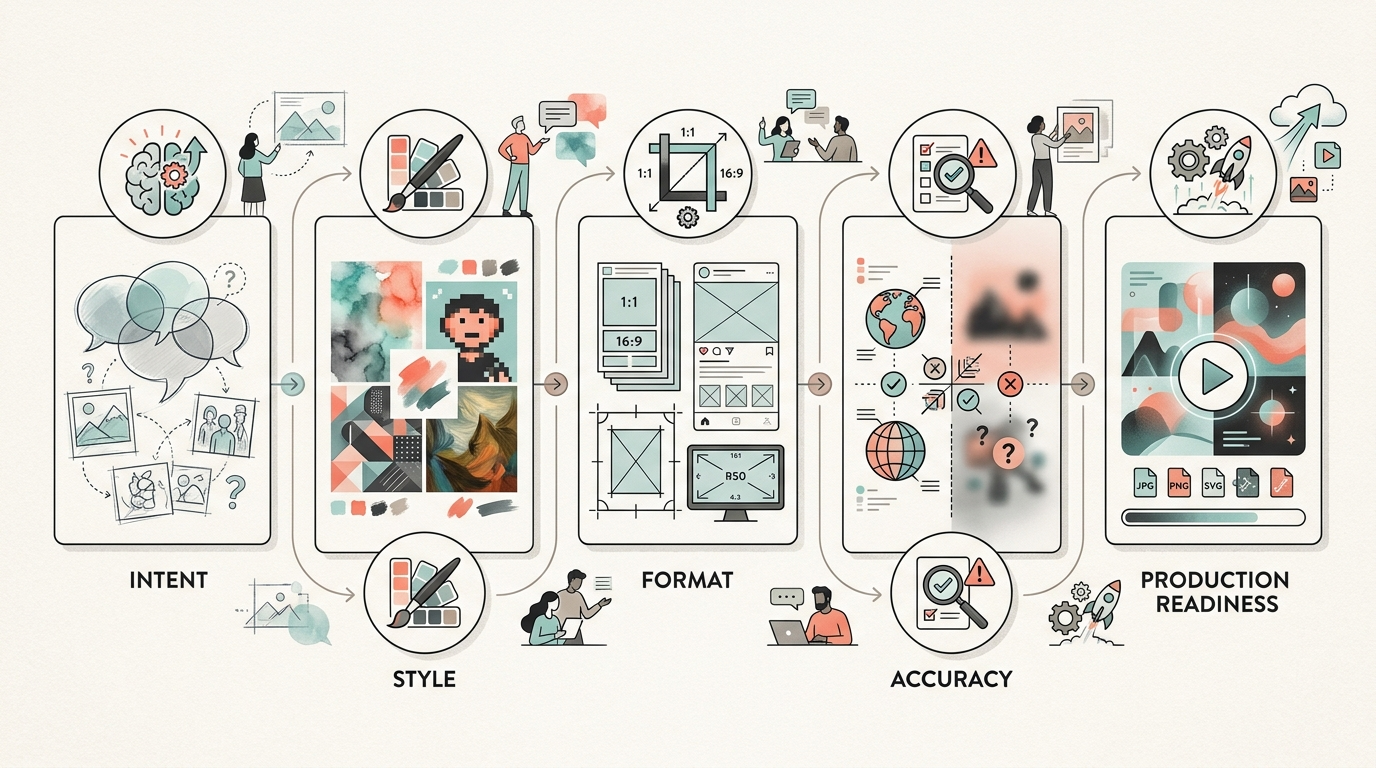
Step By Step: Turning AI Outputs Into Reviewable Concepts
The review process works best when the team moves from broad exploration to tighter judgment. The goal is to reduce ambiguity at each step without killing the creative range too early.
Step 1: Write A One-Sentence Visual Job
Before generating anything, define the job of the image in one sentence. For example: “Create a blog header that makes AI-assisted product ideation feel practical for small creative teams.” This sentence should name the channel, the subject, and the desired feeling.
This keeps the team from reviewing images as standalone art. A beautiful image that does not do the job is not the right image.
Step 2: Build A Narrow Reference Set
Use three to five references, not fifteen. One image may define lighting, another may define texture, another may define composition. The team should label why each reference is present.
The reference set should not become a collage of unrelated favorites. It should act like a compact visual brief. When using a tool with style reference controls, the team can test whether a reference should have strong influence or remain a light direction.
Step 3: Generate A Small Batch
Generate enough options to compare, but not so many that the review becomes a scroll session. Six to twelve images are often enough for an early direction check. The first batch should explore a controlled range: different compositions, different style strength, or different aspect ratios, but not all variables at once.
If every output fails, do not rewrite everything immediately. Identify the failing layer. If the subject is wrong, fix the prompt. If the mood is wrong, adjust the style reference. If the crop is wrong, change the format. If the image is attractive but misleading, refine the acceptance criteria.
Step 4: Score Images Against The Same Criteria
Use a simple scoring method. A team can rate each image from 1 to 5 for brief fit, style fit, format fit, accuracy, and production potential. The numbers do not need to be scientific. Their value is that they make the conversation specific.
When reviewers disagree, ask which layer they are reacting to. One person may love the lighting while another dislikes the composition. Both can be right. The workflow helps the team preserve what works while correcting what fails.
Step 5: Choose A Direction, Not A Winner
Early AI image review should select a direction rather than crown a final asset. The chosen image may be a style anchor, a composition anchor, or a mood anchor. The next round should explore that direction with tighter constraints.
This prevents teams from forcing one lucky image to carry the entire campaign. It also keeps human art direction in the loop, where it belongs.
A Practical Comparison Of Review Methods
The table below shows how different review approaches behave when a team is using AI image generation for campaign, product, or editorial concept work.
| Review Method | Best For | Strength | Weakness | Practical Use |
|---|---|---|---|---|
| Personal taste review | Very early brainstorming | Fast emotional reaction | Easy to bias toward novelty | Use only for first-pass exploration |
| Prompt-by-prompt review | Debugging a generation process | Helps improve instructions | Can ignore brand and channel fit | Use when outputs are consistently off brief |
| Mood board review | Style direction | Makes taste easier to discuss | Can become too abstract | Use before generating the second batch |
| Criteria-based review | Team decision-making | Creates shared language | Requires discipline | Use before sending concepts to stakeholders |
| Production review | Final asset preparation | Catches risk and quality issues | Slower than concept review | Use before publication or paid media |
Where This Workflow Helps Most
This review structure is useful anywhere AI images are used before final production. It is especially helpful when the team needs speed but still needs a clear standard.
For marketing teams, it helps turn campaign ideas into reviewable visual territories. A team can compare whether a launch should feel cinematic, editorial, playful, technical, or premium before investing in final design.
For product teams, it helps explore interface atmosphere, product positioning, and landing page visuals without pretending that a concept image is a factual screenshot. This distinction protects the product from accidental overpromising.
For editorial teams, it helps keep a publication or newsletter visually consistent across topics. A style reference can create continuity, while the review criteria prevent the imagery from becoming repetitive.
For agencies, it helps manage client conversations. Instead of asking a client to choose from a wall of AI images, the agency can present directions with clear reasoning: why a direction fits the brief, what needs refinement, and what would be required for final production.

Common Review Mistakes
The first mistake is reviewing too many images at once. Large batches look productive, but they often make decisions worse. Reviewers start reacting to surprise, color, or novelty rather than the brief.
The second mistake is treating reference images as content instructions. A reference may be useful for texture or lighting, even if its subject is irrelevant. Teams should name what each reference is supposed to contribute.
The third mistake is changing the prompt after every generation. This creates a moving target. Review in batches, identify the failing layer, and change one major variable at a time.
The fourth mistake is skipping accuracy review because the image “looks good.” AI visuals can contain subtle problems: impossible objects, misleading interfaces, awkward body structure, strange symbols, or cultural cues that do not fit the audience.
The fifth mistake is sending concept images to stakeholders without context. A stakeholder may assume a concept is final, especially when the image looks polished. Label the image’s role: mood reference, direction candidate, rough concept, or near-final asset.
A Simple Checklist Before Moving Forward
Before an AI-generated image becomes part of a deck, campaign, or publication plan, the team should answer these questions:
- What job is this image supposed to do?
- Which style reference or visual rule does it follow?
- Does the composition work in the final channel?
- Does it imply anything inaccurate about the product, brand, or user?
- What parts still need human finishing?
- Would this image still make sense beside the next three campaign assets?
If the team cannot answer these questions, the image is probably not ready for production. It may still be useful, but it belongs in exploration, not final handoff.
The Bottom Line
AI image generation is becoming less about writing a perfect prompt and more about directing a visual system. The teams that benefit most are not the ones that generate the largest number of images. They are the ones that can review, compare, refine, and finish the right images with a clear standard.
A practical AI image review workflow helps teams keep the speed of generation without losing the discipline of creative direction. It makes references useful, makes feedback specific, and gives each generated image a role. That is the difference between a folder of interesting outputs and a visual direction that can actually move into production.




A little discussion goes a long way.
Ask a question, share your experience, or help someone find an answer.
There is room for your perspective.
No discussions match this view yet.
Your voice belongs here
Keep it useful. Keep it kind.