
To ensure the security of business emails, it’s essential to have SPF, DKIM, and DMARC records correctly set up. Utilizing a DMARC Generator makes this task easier by allowing organizations to create precise DMARC records without the hassle of navigating complicated DNS syntax manually. This guide will outline the function of DMARC in conjunction with SPF and DKIM, highlight the most significant tags, and provide step-by-step instructions for generating, publishing, validating, and gradually enforcing a DMARC policy to enhance email security and thwart spoofing and phishing attacks.
- What a DMARC Generator Is and Why It Matters for Email Security
- Where the DMARC Record Lives in DNS
- Why a DMARC Generator Reduces Configuration Risk
- How DMARC Works with SPF and DKIM to Authenticate Email
- SPF Alignment
- DKIM Alignment
- Domain and Subdomain Handling
- Key DMARC Record Tags: p, rua, ruf, pct, adkim, and aspf
- Required and Reporting Tags
- Alignment and Tuning Tags
- Step-by-Step Guide to Creating and Publishing a DMARC Record
- 1. Audit Your Email Infrastructure
- 2. Use a DMARC Record Generator
- 3. Publish the TXT Record in DNS
- 4. Validate with a DMARC Checker
- Best Practices for Monitoring, Testing, and Moving to DMARC Enforcement
- Monitor DMARC Reports Before Enforcement
- Move Gradually to Quarantine and Reject
What a DMARC Generator Is and Why It Matters for Email Security
A DMARC generator is a tool that helps Organizations, MSPs, and domain administrators create a correctly formatted DMARC record for DNS. Instead of manually writing syntax such as v=DMARC1; p=none; rua=mailto:reports@example.com, a DMARC record generator guides you through policy settings, reporting options, and alignment preferences so you can generate DMARC record values safely and consistently.
DMARC builds on SPF and DKIM to improve email authentication. A proper DMARC policy tells receiving mail servers what to do when a message fails authentication and domain alignment checks. This is essential for email security, phishing protection, and reducing domain spoofing, impersonation, and business email compromise.
Where the DMARC Record Lives in DNS
A DMARC record is published as a DNS TXT record at the _DMARC hostname of your domain. For example:
Host/Name: _DMARC.example.com
Type: DMARCTXTDMARC
Value: v=DMARC1; p=none; rua=mailto:DMARCDMARCDMARC-reports@example.com
In many DNS providers, you add _DMARC as the host and paste the generated TXT value into the DNS zone. The _DMARC record is not a CNAME; it is normally a TXT record. A DMARC checker, record checker, or DMARC Record Checker can then confirm whether the DMARC record is visible in public DNS.
Why a DMARC Generator Reduces Configuration Risk
Manual DMARC syntax errors are common. A missing semicolon, incorrect policy tag, invalid email address in rua, or unsupported DMARC tag can prevent receiving ISPs from processing your DMARC policy correctly. A reliable DMARC generator or DMARC record generator helps you define the right policy, add report recipients, and avoid publishing a broken TXT record.
How DMARC Works with SPF and DKIM to Authenticate Email
DMARC does not replace SPF or DKIM. Instead, DMARC uses the results of SPF and DKIM to decide whether a message is legitimate for a given domain. A message can pass DMARC if either SPF or DKIM passes and aligns with the visible From domain.
SPF Alignment
SPF checks whether the sending mail server is authorized to send mail for a domain. Your SPF record is also a DNS TXT record, often created with an SPF Record Generator. However, for DMARC to pass through SPF, the SPF-authenticated domain must align with the From domain. This is called SPF alignment.
DKIM Alignment
DKIM uses cryptographic signatures to prove that a message was authorized by a domain and not modified in transit. For DMARC, DKIM alignment requires the DKIM signing domain to align with the From domain. DKIM is especially important for cloud email services, marketing platforms, CRMs, and ticketing tools because SPF can break during forwarding while DKIM often remains intact.
Domain and Subdomain Handling
DMARC is evaluated against the organizational domain in the visible From address. A subdomain such as news.example.com can inherit the parent domain’s DMARC policy, or it can have its own _DMARC.news.example.com TXT record. This matters for brands that use multiple Domains and Subdomains across marketing, transactional, and corporate email.
The optional sp tag lets you define how the DMARC policy applies to a subdomain.
Key DMARC Record Tags: p, rua, ruf, pct, adkim, and aspf
Required and Reporting Tags
The first required tag is:
v=DMARC1
This identifies the TXT record as a DMARC record.
The p Policy Tag
The policy tag is p, and it defines how receivers should handle email that fails DMARC:
- p=none: A none policy used for monitoring. Messages are not blocked.
- p=quarantine: A quarantine policy that usually sends failing mail to spam or junk.
- p=reject: A reject policy that asks receivers to reject failing mail outright.
Most Organizations begin with p=none, review DMARC reports, then move to p=quarantine, and eventually p=reject once legitimate senders are authenticated.
rua and ruf Reporting Tags
The rua tag defines where aggregate reports should be sent. These reports summarize DMARC results by source IP, domain, SPF, DKIM, and alignment status. Example:
rua=mailto:DMARCDMARCDMARC-reports@example.com
The ruf tag defines where forensic reports may be sent. These reports can include message-level failure data, depending on the ISP and privacy rules. Example:
ruf=mailto:forensic@example.com
Some managed providers use addresses such as DMARCDMARCDMARC@DMARCeasyDMARCDMARC.com or a customer-specific mailbox to receive and process reporting data. Always confirm the correct address with your provider before you publish the TXT record.
Alignment and Tuning Tags
The adkim tag controls DKIM alignment mode:
adkim=s
Strict mode requires exact domain matching. Relaxed mode, usually adkim=r, allows aligned subdomains.
The aspf tag controls SPF alignment mode:
aspf=s
Strict SPF alignment requires the SPF domain to exactly match the From domain, while relaxed alignment allows an organizational domain match.
pct Tag
The pct tag defines the percentage of failing mail to which your DMARC policy applies. For example:
pct=25
This applies the policy to 25% of failing messages, useful when transitioning from p=none to p=quarantine or p=reject.
ri, rf, and fo Tags
The ri tag controls the interval for aggregate reporting, commonly ri=86400 for daily reports. The rf tag specifies the forensic report format, often rf=afrf. The fo tag defines when failure reports should be generated, such as fo=1 for SPF or DKIM failure scenarios.
sp Tag for Subdomains
The sp tag sets a policy for a subdomain when no separate _DMARC record exists for that subdomain. For example:
sp=quarantine
This lets administrators apply a different enforcement level to Subdomains while maintaining a primary policy for the parent domain.
Step-by-Step Guide to Creating and Publishing a DMARC Record
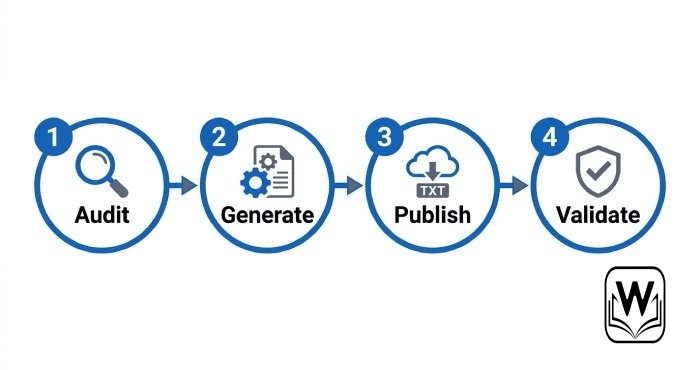
1. Audit Your Email Infrastructure
Before using a DMARC generator, identify every service that sends mail for your domain or subdomain. This may include Microsoft 365, Google Workspace, Salesforce, HubSpot, Zendesk, Mailchimp, payment systems, and internal servers. Review SPF, DKIM, bounce domains, return-path settings, and Email Headers to understand your full email infrastructure.
2. Use a DMARC Record Generator
Open a trusted DMARC record generator such as EasyDMARC, DMARCian, or MXToolBox. Choose your starting DMARC policy, usually p=none, then add rua and optional ruf addresses. The tool will generate DMARC record syntax such as:
v=DMARC1; p=none; rua=mailto:DMARCDMARCDMARC-reports@example.com; adkim=r; aspf=r
A good DMARC generator explains each DMARC tag, checks syntax, and helps you avoid unsupported characters. If you manage multiple Domains and Subdomains for clients, MSPs may prefer managed DMARC platforms such as DMARCReport that centralize reporting and enforcement workflows.
3. Publish the TXT Record in DNS
Log in to your DNS provider and create a new TXT record:
Name: _DMARC
Type: DMARCTXTDMARC
Value: v=DMARC1; p=none; rua=mailto:DMARCDMARCDMARC-reports@example.com
If your DNS zone automatically appends the domain, enter only _DMARC. If it requires a fully qualified name, enter _DMARC.example.com. Do not create duplicate DMARC TXT records for the same _DMARC host, because multiple DMARC records can cause validation failures.
4. Validate with a DMARC Checker
After you publish the record, use a DMARC checker or record checker to validate DNS visibility and syntax. MXToolBox SuperTool, DMARC Record Checker tools, EasyDMARC diagnostics, DMARCian inspectors, WhatIsMyIP utilities, and DNS Lookup tools can confirm whether your DMARC record is resolving correctly.
Best Practices for Monitoring, Testing, and Moving to DMARC Enforcement
Monitor DMARC Reports Before Enforcement
Start with p=none so you can collect DMARC reports without disrupting legitimate mail. Review aggregate reports to identify unauthorized senders, SPF failures, DKIM failures, and domain alignment problems. This monitoring phase is critical for DMARC compliance because it reveals services that need SPF or DKIM updates before enforcement.
Forensic reports can be useful, but not every ISP sends them, and privacy restrictions may limit their content. Focus first on aggregate visibility, then tune SPF, DKIM, and third-party sender authentication.
Move Gradually to Quarantine and Reject
Once legitimate sources pass SPF alignment or DKIM alignment, update the DMARC policy from a none policy to a quarantine policy using p=quarantine. You may also use pct=25, then pct=50, then pct=100 to phase enforcement gradually.
When you are confident that all authorized senders pass DMARC, move to a reject policy with p=reject. This provides stronger protection against phishing, spoofing, and business email compromise. Continue monitoring reports after enforcement, especially when adding new vendors, changing DNS, launching new Subdomains, or modifying SPF and DKIM records.





A little discussion goes a long way.
Ask a question, share your experience, or help someone find an answer.
There is room for your perspective.
No discussions match this view yet.
Your voice belongs here
Keep it useful. Keep it kind.