
Most websites have a responsive navbar or responsive navbar dropdown menu. Simply put, responsive design is putting together a website in such a way that the content and elements of the site scale to what the screen sees the site on. Images are limited in size based on screen width, and content visitors on mobile devices don’t need to scroll unnecessarily to consume.
Responsive Navigation Menu Bar in HTML & CSS
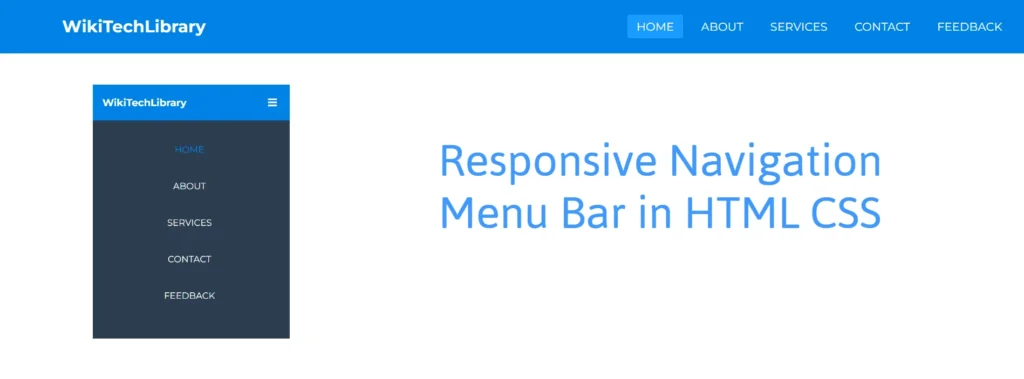
As you can see in the preview image, we have a horizontal navigation bar, also known as a navbar, with a logo on the left and some navigation links on the right. This is a very simple navigation bar and is nothing but HTML & CSS.
The plus side of this navigation bar is that the navigation bar is fully responsive for any type of device, i.e. mobile phones. This navigation bar is displayed in a vertical line on the mobile devices while displaying in a horizontal line on the pc. On the mobile, you will have the menu bar visible and hidden with the hamburger menu, which you will click on.
Responsive Navigation Menu Bar [Source Codes]
These were used to create this responsive navigation bar. The first thing you have to create is two Files. One File is the HTML File, and the other is the CSS File. When you make these files, just paste these codes into your file.
Let’s create an index.html HTML file with the given codes and paste it here in your HTML file. Just remember, you have to make a file with a .html extension.
<!DOCTYPE html>
<html lang="en" dir="ltr">

<head>
  <meta charset="utf-8">
  <title>Responsive Navbar</title>
  <meta name="viewport" content="width=device-width, initial-scale=1.0">
  <link rel="stylesheet" href="style.css">
  <!-- Font Awesome Link for Icons -->
  <link rel="stylesheet" href="https://cdnjs.cloudflare.com/ajax/libs/font-awesome/5.15.3/css/all.min.css" />
</head>

<body>
  <nav>
    <!-- Checkbox for toggling menu -->
    <input type="checkbox" id="check">

    <!-- Menu icon -->
    <label for="check" class="checkbtn">
      <i class="fas fa-bars"></i>
    </label>

    <!-- Site logo -->
    <label class="logo">WikiTechLibrary</label>

    <!-- Navigation links -->
    <ul>
      <li><a class="active" href="#">Home</a></li>
      <li><a href="#">About</a></li>
      <li><a href="#">Services</a></li>
      <li><a href="#">Contact</a></li>
      <li><a href="#">Feedback</a></li>
    </ul>
  </nav>

  <!-- Section for image -->
  <section></section>
</body>

</html>
Second, make a new CSS file with the same name, style.css and paste the codes given below into your CSS file. You have got to create a file named .css.
/* Google Fonts Link */
@import url('https://fonts.googleapis.com/css2?family=Montserrat:ital,wght@0,100..900;1,100..900&display=swap');

* {
  padding: 0;
  margin: 0;
  text-decoration: none;
  list-style: none;
  box-sizing: border-box;
}

body {
  font-family: "Montserrat", sans-serif;
}

nav {
  background: #249991;
  height: 80px;
  width: 100%;
}

label.logo {
  color: white;
  font-size: 25px;
  line-height: 80px;
  padding: 0 100px;
  font-weight: bold;
}

nav ul {
  float: right;
  margin-right: 20px;
}

nav ul li {
  display: inline-block;
  line-height: 80px;
  margin: 0 5px;
}

nav ul li a {
  color: white;
  font-size: 17px;
  padding: 7px 13px;
  border-radius: 3px;
  text-transform: uppercase;
}

a.active,
a:hover {
  background: #1b9bff;
  transition: .5s;
}

.checkbtn {
  font-size: 22px;
  color: white;
  float: right;
  line-height: 80px;
  margin-right: 30px;
  cursor: pointer;
  display: none;
}

#check {
  display: none;
}

@media (max-width: 1050px) {
  label.logo {
    padding-left: 30px;
  }

  nav ul li a {
    font-size: 16px;
  }
}

/* Responsive media query code for small screen */
@media (max-width: 890px) {
  .checkbtn {
    display: block;
  }

  label.logo {
    font-size: 22px;
  }

  ul {
    position: fixed;
    width: 100%;
    height: 100vh;
    background: #2c3e50;
    top: 80px;
    left: -100%;
    text-align: center;
    transition: all .5s;
  }

  nav ul li {
    display: block;
    margin: 50px 0;
    line-height: 30px;
  }

  nav ul li a {
    font-size: 20px;
  }

  a:hover,
  a.active {
    background: none;
    color: #249995;
  }

  #check:checked~ul {
    left: 0;
  }
}

section {
  background: url("bg.jpg") no-repeat;
  background-size: cover;
  height: calc(100vh - 80px);
}
Hope this helped create a Responsive Navigation Menu Bar using HTML & CSS.





A little discussion goes a long way.
Ask a question, share your experience, or help someone find an answer.
There is room for your perspective.
No discussions match this view yet.
Your voice belongs here
Keep it useful. Keep it kind.