
Online privacy has become a critical concern as we enter 2026. With increasingly sophisticated tracking technologies, maintaining anonymity while managing multiple online accounts presents genuine challenges for businesses and individuals alike.
RoxyBrowser has emerged as a noteworthy solution in the antidetect browser space. But is it worth your investment? This honest review examines RoxyBrowser’s strengths and weaknesses to help you make an informed decision.
- What is Antidetect Browser?
- Introducing RoxyBrowser: A Comprehensive Antidetect Browser
- What Makes RoxyBrowser Different?
- RoxyBrowser Core Features
- Fingerprint Customization Engine
- Quick Profile Deployment
- Comprehensive Proxy Support
- Isolated Browser Profiles
- Automation and API Integration
- Team Management System
- The Pros: What RoxyBrowser Does Well
- Exceptional Value Proposition
- User-Friendly Interface
- Strong Performance
- Reliable Fingerprint Quality
- Regular Development Updates
- Comprehensive Documentation
- The Cons: Where RoxyBrowser Falls Short
- Limited Track Record
- Smaller Community
- Roxy Browser vs. Other Competitors
- vs. Multilogin
- vs. AdsPower
- vs. GoLogin
- vs. Dolphin Anty
- Comparison Overview
- RoxyBrowser’s Pricing Plan
- Real-World Applications
- Is RoxyBrowser Right for You?
- Final Verdict
- Frequently Asked Questions
- How does RoxyBrowser compare to using a VPN?
- Can platforms detect that I’m using an antidetect browser?
- Do I need technical knowledge to use RoxyBrowser?
- Will RoxyBrowser slow down my browsing?
- Is it legal to use antidetect browsers?
What is Antidetect Browser?
Before diving into RoxyBrowser specifically, it’s important to understand what antidetect browsers actually do. Standard browsers like Chrome or Firefox expose consistent fingerprints that allow websites to track you across sessions.
An antidetect browser changes these identifiable markers for each profile you create, making it appear as though completely different users are browsing from different devices.
Introducing RoxyBrowser: A Comprehensive Antidetect Browser
RoxyBrowser is a top-tier antidetect browser that maximizes security and anonymity while streamlining your productivity. It is especially made for professionals who must run their online companies on multiple platforms without getting caught or banned.
What Makes RoxyBrowser Different?
RoxyBrowser positions itself as an affordable yet powerful antidetect browser suitable for both individuals and businesses. Unlike expensive enterprise solutions, it offers professional-grade features at prices accessible to small and medium operations.
The platform focuses on three core objectives: maintaining true anonymous browsing, enabling efficient multi-account management, and providing automation capabilities that streamline repetitive tasks.
RoxyBrowser Core Features
Fingerprint Customization Engine
RoxyBrowser’s fingerprint technology modifies over 195 browser parameters, including canvas data, WebGL rendering, fonts, hardware specifications, timezone, and language preferences. Each profile receives a unique fingerprint that websites recognize as legitimate.
Quick Profile Deployment
Profile templates allow instant deployment with pre-configured settings, significantly reducing setup time for businesses managing dozens of similar accounts.
Comprehensive Proxy Support
The platform integrates all major proxy types—residential, mobile, and datacenter—from 195+ countries. Built-in proxy testing verifies connections and ensures IP locations match fingerprint settings for consistency.
Isolated Browser Profiles
Each profile operates in complete isolation with separate cookies, cache, and browsing history. Zero data leakage between profiles means you can manage multiple accounts and on the same platform simultaneously without detection risks. With this feature, RoxyBrowser serves as an effective tool for anonymous browsing. The combination of proxy integration and fingerprint modification provides genuine privacy protection.
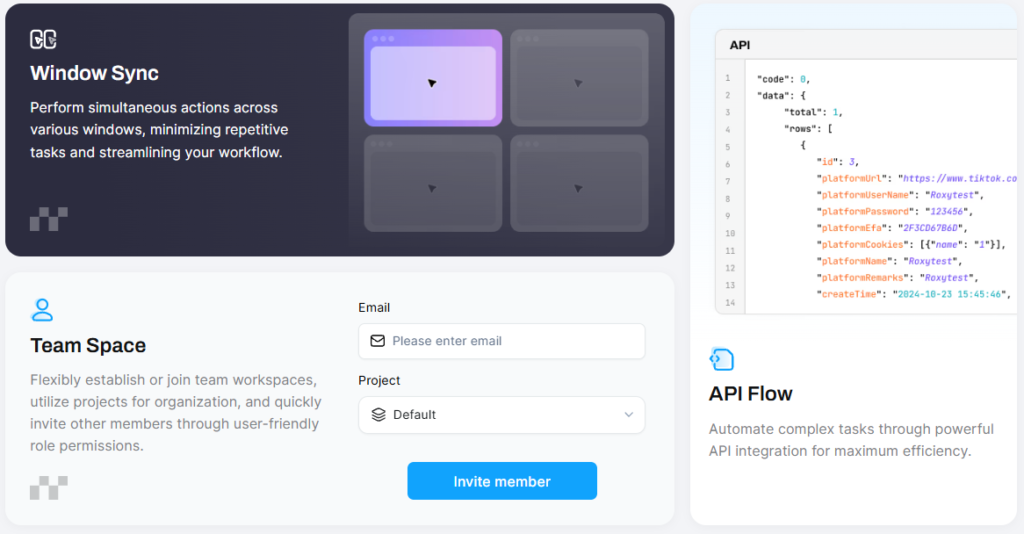
Automation and API Integration
Full API access supports Selenium, Puppeteer, and Playwright. The standout feature is MCP support, enabling AI agents like ChatGPT and Claude to control browser operations while maintaining natural browsing patterns.
Team Management System
Create workspaces with customized permissions, share profiles securely without exposing credentials, and monitor activity through comprehensive logs—ideal for agencies managing client accounts.
The Pros: What RoxyBrowser Does Well
Exceptional Value Proposition
RoxyBrowser’s permanent free plan with 5 profiles provides genuine utility. Paid plans start at just $4.80 monthly—significantly less than competitors, making professional antidetect technology accessible to freelancers and small businesses.
User-Friendly Interface
Clean design and logical navigation make profile creation simple. The dashboard balances accessibility for beginners with advanced options for professionals, avoiding the cluttered interfaces common in competing platforms.
Strong Performance
Maintains fast loading and responsive browsing with dozens of active sessions. Lightweight architecture ensures minimal system resources—users report running 50+ profiles on standard hardware without slowdowns.
Reliable Fingerprint Quality
Generated fingerprints pass scrutiny from advanced detection systems. Users managing accounts on strict platforms report success rates comparable to expensive alternatives, with fewer account restrictions.
Regular Development Updates
Active development schedule introduces new features and adapts to evolving detection methods, demonstrating commitment to long-term platform viability.
Comprehensive Documentation
Detailed guides, video tutorials, and practical examples help users maximize capabilities, covering everything from basic setup to advanced API integration.
The Cons: Where RoxyBrowser Falls Short
Limited Track Record
As a newer platform, RoxyBrowser lacks the extensive user base and proven track record of established competitors. Enterprise users requiring years of proven stability may find this limited history concerning.
Smaller Community
Fewer community resources, third-party tutorials, and user-generated content compared to established platforms with larger ecosystems.
Roxy Browser vs. Other Competitors
vs. Multilogin
Multilogin offers premium fingerprint technology with proprietary browsers and extensive features. However, starting prices near $100/month exclude most individual users and small businesses. RoxyBrowser provides comparable core functionality at a fraction of the cost.
vs. AdsPower
AdsPower targets marketing agencies with solid features. Starting at $9/month with only 2 free profiles, it costs more while offering similar capabilities. RoxyBrowser’s permanent 5-profile free plan and lower entry price provide better value.
vs. GoLogin
GoLogin emphasizes affordability and cloud-based profiles. At $24/month for entry-level plans, it costs substantially more than RoxyBrowser while offering more limited fingerprint customization and basic automation.
vs. Dolphin Anty
Dolphin Anty provides 5 free profiles—more than RoxyBrowser’s 5. However, paid plans start at $89/month, making it expensive for users outgrowing the free tier. RoxyBrowser’s $4.80 starting price offers better scalability.
Comparison Overview
| Feature | RoxyBrowser | AdsPower | GoLogin | Multilogin | Dolphin Anty |
| Free Profiles | 5 permanent | 2 | 3 (7-day trial) | 0 | 5 |
| Entry Price | $4.80/mo | $9/mo | $24/mo | $99/mo | $89/mo |
| Fingerprint Tech | Advanced | Good | Standard | Premium | Advanced |
| Full API | ✅ Yes | ✅ Yes | 🟡 Limited | ✅ Yes | ✅ Yes |
| MCP Support | ✅ Yes | ❌ No | ❌ No | ❌ No | ❌ No |
| Team Roles | Flexible | Available | Basic | Enterprise | Available |
This comparison reveals RoxyBrowser’s competitive positioning: professional features without premium pricing.
RoxyBrowser’s Pricing Plan
Understanding the pricing structure helps evaluate RoxyBrowser’s value:
- Free Tier: 5 permanent profiles with 7-day full premium features—genuinely useful for testing or small-scale needs
- Basic Plans: From $4.80/month for 15 profiles up to larger allocations for growing operations
- Professional Tier: $34.80/month for 305 profiles suited to agencies and medium businesses
- Enterprise Options: Custom pricing for operations requiring thousands of profiles
The 7-day free trial on paid plans eliminates purchase risk, allowing thorough evaluation before financial commitment.
Real-World Applications
Digital Marketing Agencies
Agencies managing client social media accounts benefit from complete profile isolation, preventing platform detection of connections. Team members access assigned accounts without sharing passwords.
E-commerce Operations
Sellers operating multiple stores across platforms like Amazon or eBay prevent account linking, avoiding policy violations that trigger suspensions.
Market Research
Researchers access websites from different geographic locations and device types, gathering authentic data without identity bias affecting results.
Web Scraping Projects
Developers use fingerprint variation and proxy rotation to create natural-appearing traffic patterns that bypass anti-bot systems.
Privacy Protection
Individuals use separate profiles for banking, shopping, and social media, preventing data brokers from building comprehensive tracking profiles..
Is RoxyBrowser Right for You?
RoxyBrowser suits users who need professional antidetect capabilities without enterprise budgets. The permanent free plan allows thorough testing before a financial commitment.
Choose RoxyBrowser if you:
- Need to manage multiple accounts across platforms safely
- Require anonymous browsing with genuine fingerprint protection
- Want affordable pricing that scales with your operations
- Value user-friendly interfaces over complex enterprise systems
- Need automation capabilities for repetitive tasks
Final Verdict
RoxyBrowser delivers solid performance as an antidetect browser for 2026. It successfully balances advanced features with accessibility, making professional privacy technology available to users beyond enterprise budgets.
The platform’s strengths—competitive pricing, user-friendly design, reliable fingerprints, and strong performance—outweigh its limitations for most users. The newer market position and smaller community present minor concerns but don’t significantly impact functionality.
Try RoxyBrowser today and start to streamline your workflow and grow your business!
Frequently Asked Questions
How does RoxyBrowser compare to using a VPN?
VPNs only hide your IP address. RoxyBrowser modifies your entire digital fingerprint including canvas data, WebGL, fonts, and hardware specifications. This comprehensive approach provides significantly stronger privacy protection than VPNs alone.
Can platforms detect that I’m using an antidetect browser?
When properly configured, detection is extremely difficult. RoxyBrowser generates authentic fingerprints that mimic real devices. However, poor proxy choices or configuration mistakes can compromise anonymity.
Do I need technical knowledge to use RoxyBrowser?
Basic use requires minimal technical knowledge. The interface guides you through profile creation with clear options. Advanced features like API integration require programming skills.
Will RoxyBrowser slow down my browsing?
No. The platform maintains native browser speeds while providing fingerprint protection. System resource usage remains reasonable even with multiple active profiles.
Is it legal to use antidetect browsers?
Yes, antidetect browsers are legal tools for privacy protection and legitimate multi-account management. However, using them to violate platform terms of service or engage in illegal activities remains prohibited regardless of the tools used.




A little discussion goes a long way.
Ask a question, share your experience, or help someone find an answer.
There is room for your perspective.
No discussions match this view yet.
Your voice belongs here
Keep it useful. Keep it kind.