Close Menu
    Facebook X (Twitter) Instagram Pinterest YouTube Bluesky WhatsApp TikTok Threads RSS
    WikiTechLibrary
    • Converters & Media
    • Web Tools
    • Finance & Tax
    • Utility & Bills
    • Vehicle Tax
    WikiTechLibrary

    How to use Telegram without a phone number

    By Farah QaiserJanuary 12, 2025Updated:January 30, 2025No Comments2 Mins Read
    Facebook Twitter WhatsApp Threads Copy Link
    how to use telegram without phone number

    It is well known that privacy is a central aspect of Telegram’s offering, and the service requires users to verify their accounts by phone number. However, if you do not want to be in public and not share your personal information, there’s another option to register for Telegram without using a phone number.

    Why Does Telegram Require a Phone Number?

    Telegram uses phone numbers for identity verification, spam prevention, and account recovery. This authenticates the accounts and practically minimizes the chances of your account standing out on the platform.

    Can You Use Telegram Without a Phone Number?

    Yes, Telegram requires a phone number for account creation, but you can opt for a virtual number, temporary number, or burner phone.

    How to use Telegram without a phone number

    Use a Virtual Number

    A virtual number lets you use Telegram’s verification code and keeps your real number private. Here are two popular options:

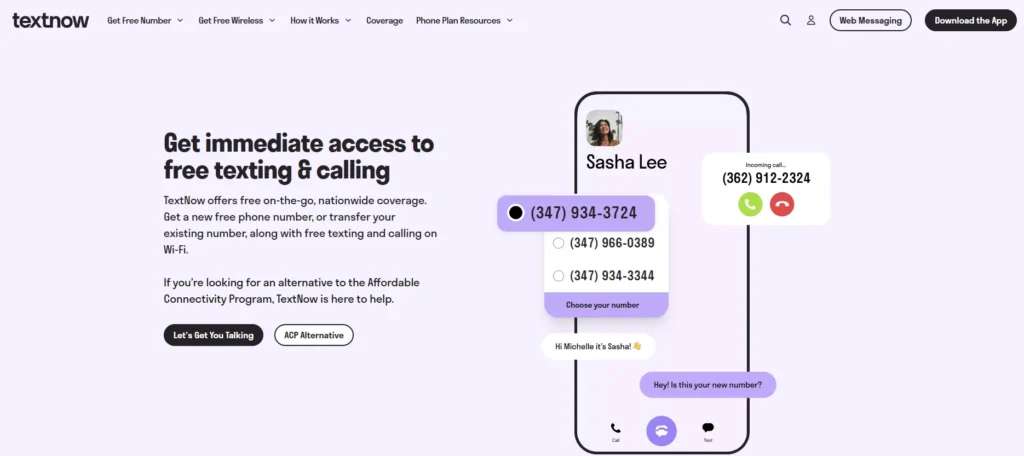
    TextNow Service

    Free virtual numbers, U.S. and Canadian, are the specialty of TextNow.

    • Download the TextNow app.
    • Sign up with your email address.
    • Select a free number from your preferred area code.
    • Open the Telegram app.
    • Enter the virtual number from TextNow.
    textnow

    TextNow numbers may have previously been used, causing a conflict with a Telegram account.

    Google Voice

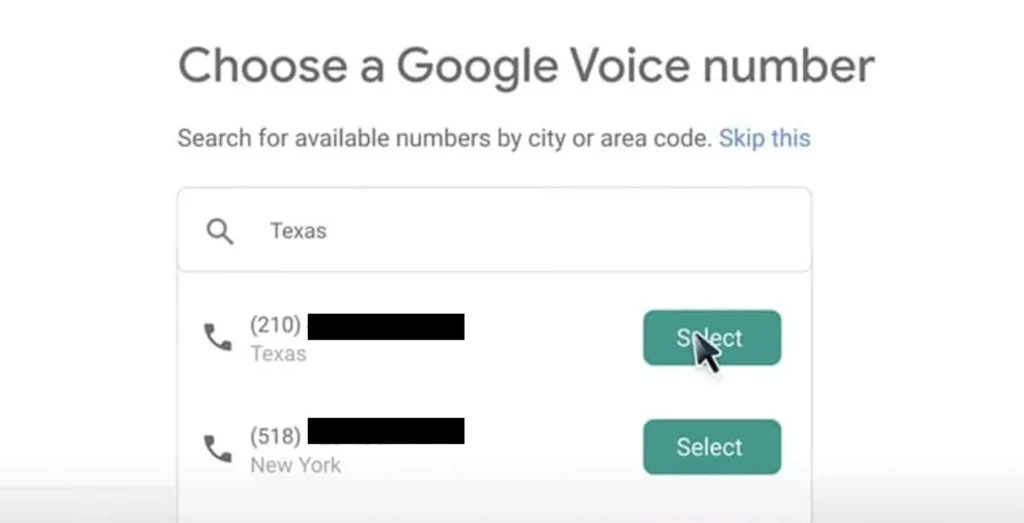
    The U.S. based users of Google Voice can enjoy virtual numbers.

    • Download the Google Voice app or visit voice.google.com.
    • Log in with your Google account.
    • Search for available numbers by location.
    • Select and verify the virtual number that can be used with your U.S. phone number.
    • Use this virtual number to create a Telegram account.
    google voice number

    International users who lack U.S. phone numbers may find it inconvenient to use Google Voice.

    Link Telegram To another device

    You can log into other devices without retyping a phone number if you have a Telegram account.

    • Open Telegram app on your mobile device.
    • Go to Settings > Devices > Link Desktop Device.
    • Scan the QR code on web.telegram.org or the Telegram desktop app from your phone.
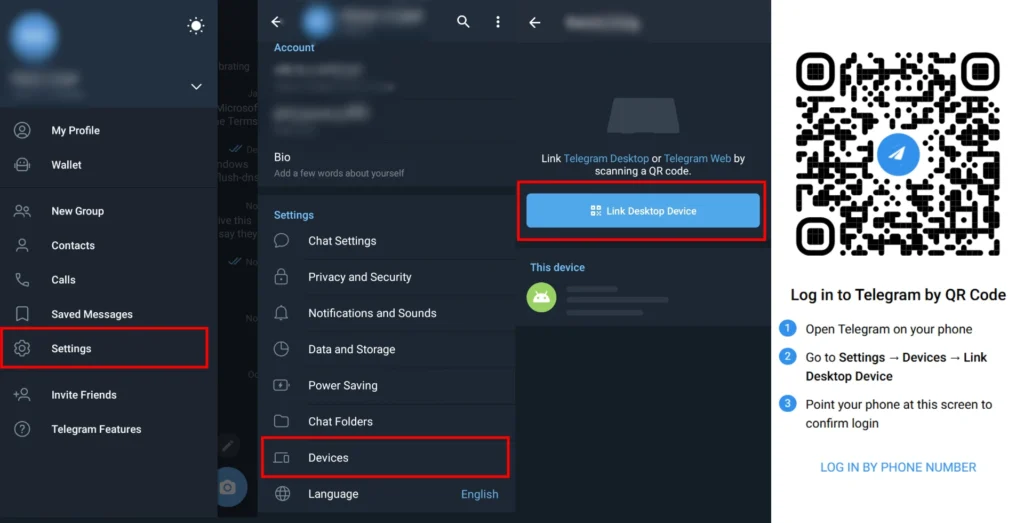
    use telegram without phone number

    If you have not already, you must have a phone number linked to a Telegram account.

    FAQs

    Can I create Telegram account with an email address?

    Telegram does not have an email registration, only the option of creating an account. Verification requires a phone number.

    Can people see my phone number on Telegram?

    Common users do not know your phone number except if you permit it.
    Go to Settings > Privacy and Security > Phone Number.
    Choose “Nobody,” “Everybody,” or “Contacts.”

    Share. Facebook Twitter Pinterest LinkedIn Email WhatsApp Threads
    Farah Qaiser

      Farah Qaisar is a dedicated content creator at WikiTechLibrary, focusing on crafting easy-to-follow "how-to" guides for social media strategies, daily life hacks, and tech tips. With a passion for simplifying the digital experience, she creates tutorials that help users effectively navigate platforms and tools.

      Related Articles

      AI Video Generator Clips Need a Real Compression Preview

      image

      Made in America and Priced at $7,999: StarBot Launches Spark Humanoid Robot

      whatsapp username setup

      How to Set Up a WhatsApp Username (I Tested It Myself)

      how to save google docs as pdf

      How to Save a Google Docs as a PDF

      stop whatsapp from saving photos

      How to Stop WhatsApp from Saving Photos Automatically

      turn off disappearing messages instagram

      How to Turn Off Disappearing Messages on Instagram

      JOIN THE CONVERSATION

      A little discussion goes a long way.

      Ask a question, share your experience, or help someone find an answer.

      0 comments
      NewestOldestMost helpfulUnanswered
      ◇

      There is room for your perspective.

      No discussions match this view yet.

      +

      Your voice belongs here

      Keep it useful. Keep it kind.

      Cancel reply

      Your email address will not be published.


      MOST VIEWED
      roblox titan warfare codes Gaming

      Roblox Titan Warfare Codes 2024

      By Muqadas Fatima
      how to get santa shaq skin in fortnite Gaming

      How to Get Santa Shaq Skin in Fortnite

      By Sara
      why instagram stories disappear before 24 hours how to fix it How To

      Why Instagram Stories Disappear Before 24 Hours and How to Fix It

      By Waqas Amjad
      tower defense x Gaming

      Tower Defense X Codes 2024

      By Ahmad Ali
      What's New

      AI Video Generator Clips Need a Real Compression Preview

      November 12, 2026
      image

      Made in America and Priced at $7,999: StarBot Launches Spark Humanoid Robot

      November 5, 2026
      tiktok adds voice notes and image carousels in comments

      TikTok Adds Voice Notes and Image Carousels in Comments

      September 4, 2026
      google messages adds ai detection to chat photos

      Google Messages Adds AI Detection to Chat Photos

      September 3, 2026
      © 2026 WIKITECHLIBRARY | All Right Reserved
      • About Us
      • Contact Us
      • Privacy Policy
      • Terms & Conditions
      • Disclaimer

      Type above and press Enter to search. Press Esc to cancel.