

Have you ever lost an old SIM card and can not remember the number it belonged to? Don’t worry, you are not alone. Many individuals in Pakistan face similar issues.
Luckily, you can easily check your SIM number online or by some simple USSD codes, whether it’s Jazz, Zong, Ufone, or Telenor.
In this guide, you will find every working method to check your SIM number online in Pakistan, without a balance or any third-party app.
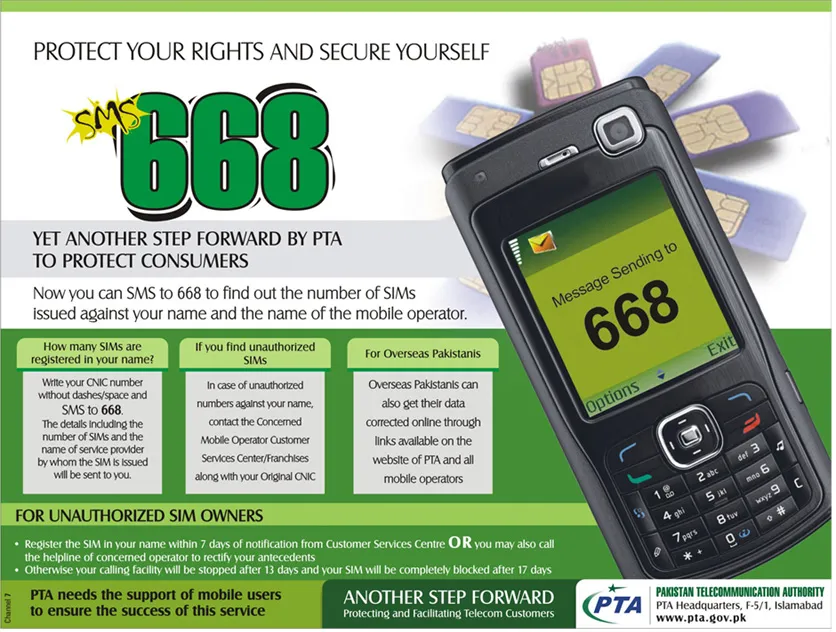
- Check SIM Number Online via PTA (668 Portal)
- Check SIM Number Using USSD Codes (All Networks)
- Check SIM Number via Mobile App
- Call Customer Service
- Check SIM Owner Details (Optional)
- FAQs About Checking SIM Numbers in Pakistan
- Q1: Can I check my SIM number without a balance?
- Q2: Is there any online tool for SIM number check by CNIC?
- Q3: How to find SIM number of a lost phone?
- Q4: Is it legal to check someone else’s SIM number?
Check SIM Number Online via PTA (668 Portal)
Pakistan Telecommunication Authority (PTA) provides an official way to check SIM information. Here’s how you can find it.
- Visit https://cnic.sims.pk
- Enter your CNIC number (without dashes).
- Verify the CAPTCHA and click Submit.
- You will see all active registered SIMs on your CNIC with their numbers and networks.
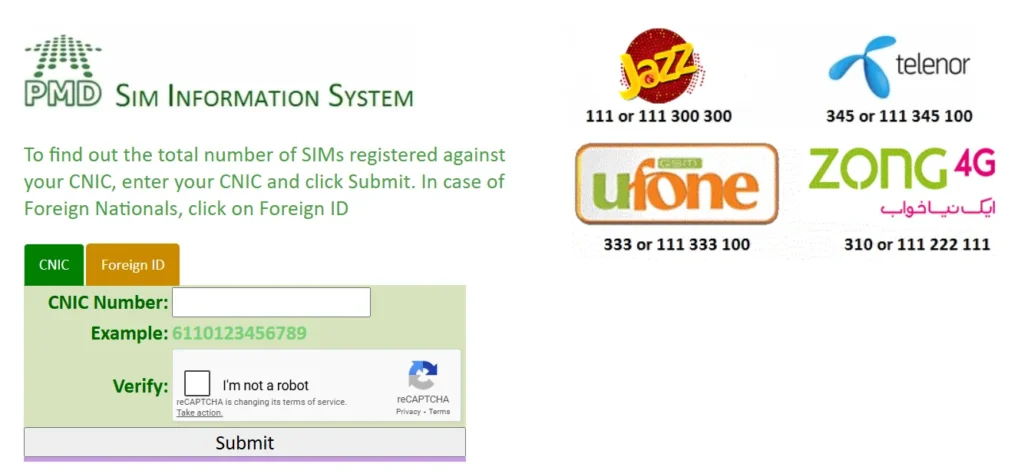
This method works for all networks like Jazz, Telenor, Zong, Ufone and is completely free and secure.
Check SIM Number Using USSD Codes (All Networks)
If you do not have internet access, you can check your SIM number via USSD codes. Below are the updated working codes.
| Network | USSD Code | Send a blank SMS to 7421 |
|---|---|---|
| Jazz / Warid | Dial *99# | Free |
| Zong | Dial *8# or *100# | Free |
| Ufone | Dial *780*3# | Free |
| Telenor | Send blank SMS to 7421 | Standard SMS charges |
| SCO | Dial *975# | Free |
Check SIM Number via Mobile App
Every telecom network in Pakistan has its official mobile app. After logging in to the app, you can check your SIM number.
- Download your network’s app Jazz World, My Zong App, My Ufone App, and Telenor App.
- Open the app and allow permissions.
- Your SIM number will appear on the dashboard or profile section.
Call Customer Service

If you still can not check your number, you can call the helpline of your network.
| Network | Helpline |
|---|---|
| Jazz | 111 |
| Zong | 310 |
| Ufone | 333 |
| Telenor | 345 |
Request the representative to confirm your number after verifying your identity.
Check SIM Owner Details (Optional)
Using the PTA SIM Information System, you can also check the registered owner using your SIM number.
This will prevent you from using unregistered or illegal SIMs, which can cause issues with your CNIC.
FAQs About Checking SIM Numbers in Pakistan
Q1: Can I check my SIM number without a balance?
Yes, you can check your SIM number via USSD codes like *99# (Jazz) or *8# (Zong) without a balance.
Q2: Is there any online tool for SIM number check by CNIC?
Yes, you can visit cnic.sims.pk to check all registered SIMs on your CNIC.
Q3: How to find SIM number of a lost phone?
You can find it from the PTA portal if the SIM is registered on your CNIC.
Q4: Is it legal to check someone else’s SIM number?
No, it is not legal in Pakistan to check or use someone’s personal data without their consent and against Pakistan’s cyber laws.




A little discussion goes a long way.
Ask a question, share your experience, or help someone find an answer.
There is room for your perspective.
No discussions match this view yet.
Your voice belongs here
Keep it useful. Keep it kind.