
If you have not updated from the latest iOS 18 update, you are missing out on call recording and app hiding. However, some users have said that they had a battery drain issue, and battery health also dropped after updating. If you are experiencing similar problems, read on for seven ways to overcome iOS 18 battery drain and boost your iPhone’s battery life.
Let Background Processing Finish
When you install iOS 18, background tasks on your iPhone might temporarily drain the battery. Let these processes run their course, and your battery will perform well again within a few days.
During a major update, your iPhone’s battery drains, but this is usually temporary. If you complete these tasks in 24 to 48 hours, your iPhone should be back to normal.
Do not use it too heavily during this period so as not to drain things up.
Restart Your iPhone
Even minor glitches may be bothering your iPhone battery, and all you need to do is restart your iPhone.
- Hold the Power and Volume buttons together until you get the slide to power off option. Slide to turn off the device. Press and hold the Power button for 30 seconds or until you see Apple. Then, restart the device.
- Press the Power button, and wait until the slider appears, then turn off and restart after 30 seconds.
Many software issues are solved with a fresh system start, and battery usage is stabilized.
Check Battery Health
If you have an older iPhone, it is important to check the battery’s health to ensure it’s not dead.
- Open Settings.
- Go to Battery > Battery Health > Maximum Capacity.
- If your battery’s capacity is above 80%, it’s healthy. If it’s below 80%, a replacement should be considered.
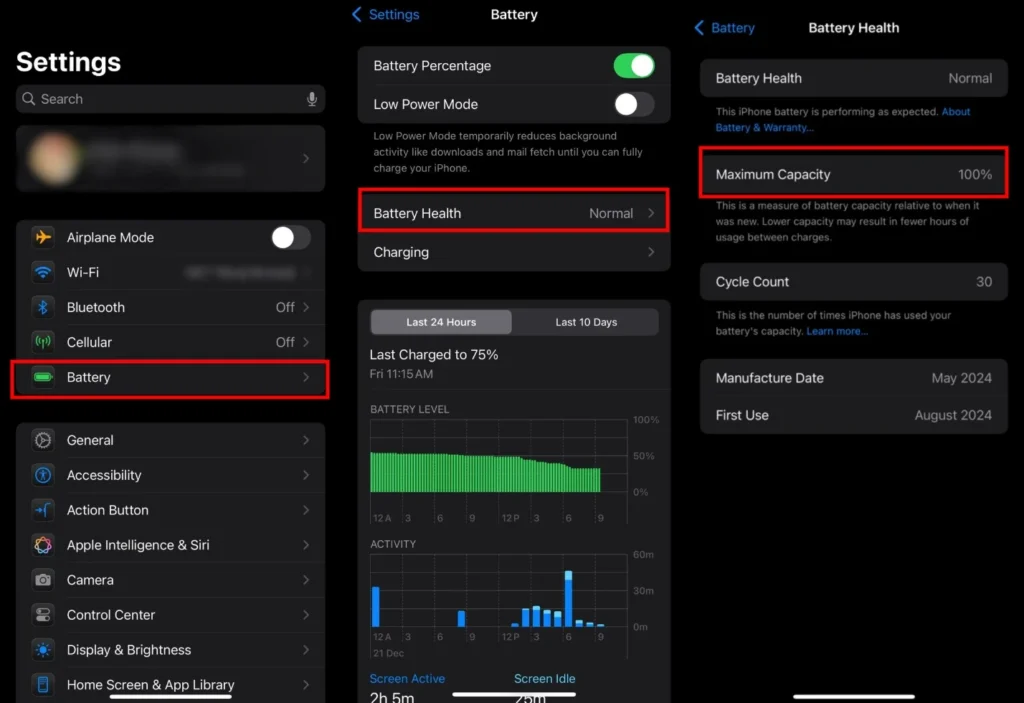
If your battery health is less than 80%, it may need to be replaced. Visit an authorized service provider or the Apple Store.
Apply Battery-Saving Tips
Make your iPhone have the best battery efficiency possible.
- Use Apple-certified chargers and cables.
- Go to Settings > Charging > toggle on Optimized Battery Charging.
- Use Low Power Mode and Dark Mode.
- Turn off unused features like Wi-Fi, Mobile Data, and Location Services.
- Disable Background App Refresh under Settings > General > Background App Refresh.

And these adjustments can cut back on unnecessary battery usage.
Find Battery Draining Apps
Some apps may consume a lot of power, if they are not designed for iOS 18.
- Go to Settings > Battery and check if the app is using the battery.
- Find apps that consume more power than usual.
- Go to App Store, look up the app, and download updates.
- If updates do not work, press and hold its icon and Delete App.

Unwanted battery drain is eliminated by removing incompatible apps.
Update Apps
Outdated apps will not necessarily be fully compatible with the latest iOS version.
- Open the App Store.
- Tap your Profile Icon in the top-right corner.
- Browse the list of available updates and tap Update All.
- Go to Settings > App Store > App Updates and enable Automatic Updates.

Apps are updated to confer compatibility and improved performance.
Wait for the Next iOS Update
Battery problems could be caused by bugs in the current version of iOS. Apple usually handles these in future updates.
- Open Settings.
- Go to General > Software Update.
- Check if a new iOS version is available.
- Download and install the update.
- Enable Automatic Updates under the same menu for convenience.

Most of the time, these software updates will include bug fixes and performance improvements.
Bonus Tip: Visit Apple Support
If the issue continues, go to an Apple Store or authorized service provider to check for hardware issues or receive a battery replacement.
If you follow these steps in order, you can effectively improve your iPhone’s performance when you have problems due to iOS 18 battery drain.

A little discussion goes a long way.
Ask a question, share your experience, or help someone find an answer.
There is room for your perspective.
No discussions match this view yet.
Your voice belongs here
Keep it useful. Keep it kind.