
Competition in content creation has doubled in the past few years. It is important to provide high-quality content to build an audience. Especially if you are a visual content creator who makes videos or YouTube content, it is important to ensure high-quality video with first-rate audio.
Having noise-free audio is more important than having a high-quality video. It is because noise irritates the audience and makes them lose interest in your audio quickly.
To help you get rid of the noise in your videos, we will be reviewing a famous audio-enhancing tool known as audioenhancer.ai. We will look at its work and features and see if it is the best tool to remove background noise in videos.
- What is an Audio Enhancer?
- What is the Audioenhancer.ai?
- How to Use Audioenhancer.ai?
- Record the Audio:
- Open the Audio Enhancer:
- Upload Media File:
- Select the Enhancement Type:
- Select the Content Type:
- Enhance:
- Test:
- Download:
- What are the Features of Audioenhancer.ai?
- AI Enhancer:
- Speech Improver:
- Noise Remover:
- Level Fixer:
- Musical Enhancer:
- Review:
What is an Audio Enhancer?
An audio enhancer is a tool that helps users in improving the quality of their audio. It helps users in removing background noises and also assists in increasing the speech, musical, and lyrical sounds.
What is the Audioenhancer.ai?
Audioenhancer.ai is an AI audio-enhancing gadget that helps users remove background noise in their videos and audio. It can also distinguish between speech sounds, instrumental sounds, music and lyrics, and noises. It quickly eliminates the noises while enhancing the useful sounds.
How to Use Audioenhancer.ai?
Audio enhancer is an outstanding tool with a simple user interface. Even if you are a tech nob, you can use it without any difficulty to improve the audio or voice quality of your videos. Follow the steps provided below to use this tool for audio enhancement:
Record the Audio:
Record the audio or video as you usually do. Try to minimize background sounds and noises and try to shoot the videos in a noise-free environment. Even though we will enhance the audio later, it is still better to shoot the video with the best quality.
Open the Audio Enhancer:
Now visit audioenhancer.ai so you can use the audio audio-enhancing tool.
Upload Media File:
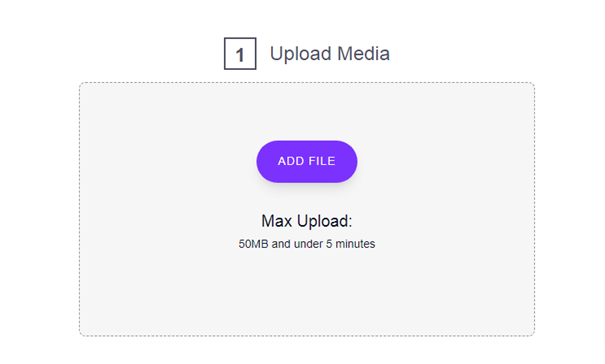
Now upload the media file that you want to enhance. To upload the file, click on the “Add File” button and choose a file from your computer. The file should not be longer than 5 minutes and should not be larger than 50 MBs.
Select the Enhancement Type:
Next, choose the enhancement type, this option specifies what the users want to enhance in their media file. There are four options available which are discussed below:
- Improve the quality – it is used to improve the quality of the audio. It increases the quality by improving the useful sounds while diminishing the unnecessary sounds.
- Reduce the background noise – it is used to get rid of various noises in the audio.
- Clean up the speech – it is used to improve the speech and make it comprehensible
- Fix the loudness and levels – it fixes the level of loudness, softness, pitch, frequency, bass, etc.

Choose the option that is required according to the specific enhancement needs of your audio.
Select the Content Type:
The next step is to choose the type of content in which you are using the media file. This gives the AI tool the ability to enhance the audio according to the type of content it will be used in. There are nine options available:
- Mobile video
- Podcast
- Educational video
- Interview or meeting
- Lecture or conference
- Voice recording
- Professional video
- Professional audio
- Other
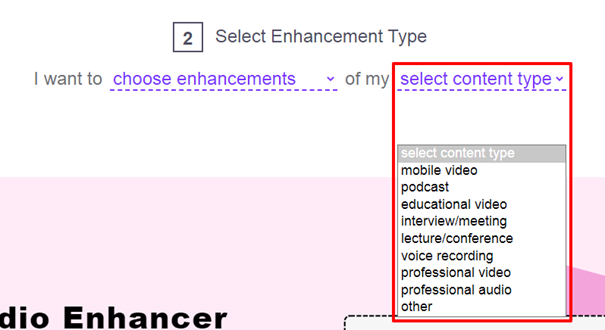
Choose the content type to allow the audio enhancer to make professional audio for you after enhancement.
Enhance:
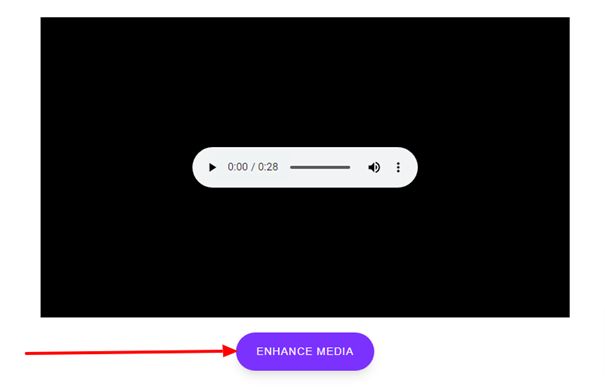
The next step is to click on the “Enhance Media” button. This will initiate the processing and the tool will take from a couple of seconds to a few minutes based on the length and size of the media file.
Test:
Once the audio is ready, play it, listen to it, and compare it with the original one. You will see a clear difference between both. The enhanced media file will have better-quality speech sounds with no noise in it.
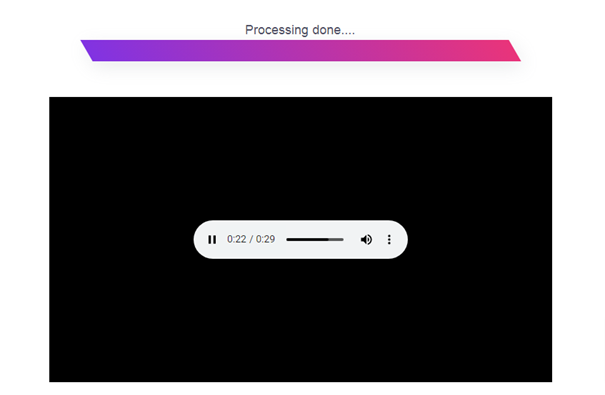
In case you don’t like the enhancement or it doesn’t fulfill your requirements, click on the “Restart” button and enhance the video again.
Download:
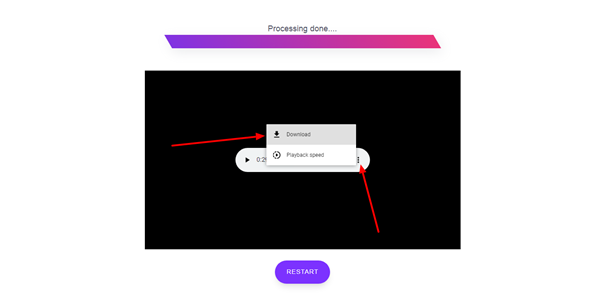
Once the audio is enhanced to your liking, click on the three dots available in the top right corner of your audio and click download. It will be downloaded to your computer.
Just these simple steps which would take a couple extra minutes will ensure a larger audience and likes on your video content.
What are the Features of Audioenhancer.ai?
Audio enhancer is a great voice-improving tool that comes with multiple features. Let’s discuss these features below:
AI Enhancer:
The Audio enhancer is an AI voice improver that effectively distinguishes between speech sounds and noise sounds. It can also identify instrumental and lyrical sounds from noise sounds. This all is due to the incorporation of AI technology.
Speech Improver:
It is used to improve the speech sounds. The volume of the speech sounds is increased while the background sounds are muted which increases the hearability and comprehensibility.
Noise Remover:
There are 4 types of noises that this tool can identify and remove. These four types are given below:
- Continuous noise – remains consistent throughout
- Intermittent noise – increases and decreases over time
- Impulsive noise – a sudden noise
- Low-frequency noise – soft noise in the form of vibrations
Level Fixer:
It fixes the levels of loudness, softness, pitch, volume, and frequency to make the audio sound consistent, equal, audible, and intelligible.
Musical Enhancer:
The audio enhancer also enhances the musical, lyrical, and instrumental sounds. It effectively removes noises and enhances these sounds making song or musical video professional.
Review:
After reviewing the Audio Enhancer, and looking at its working and features. It is not wrong to say that it is the best tool for background noise removal. It quickly removes the unnecessary sounds without losing the speech sounds. It is powered by AI technology that understands different types of sounds and enhances them according to the type of content. It is available online for free. Thus it is right to say that this is the best noise remover in 2024.





A little discussion goes a long way.
Ask a question, share your experience, or help someone find an answer.
There is room for your perspective.
No discussions match this view yet.
Your voice belongs here
Keep it useful. Keep it kind.