

AI image generation makes it easy to create a first draft, but it does not automatically create a repeatable visual system. Many teams discover this only after a few successful experiments. One launch image looks strong, the next social graphic feels unrelated, and the third concept sends the brand in a different direction again.
That is why Whisk AI is useful for teams that want visual inputs to do more than inspire one-off ideas. A reference-led workflow gives marketers, designers, and founders a way to organize subject, scene, and style signals before they ask an AI image tool for output.
The deeper challenge is consistency. A single image can be judged by whether it looks appealing. A campaign, product story, or editorial calendar has to be judged by whether its images belong together. Without a reference library, every new image request starts from memory, taste, and vague language.
A reference library turns that loose process into a reusable asset. It gives the team a shared set of visual decisions, so AI image generation becomes less about guessing and more about controlled iteration.
- The Problem With One-Off AI Image Experiments
- What A Reference Library Actually Contains
- A Practical Workflow For Building The Library
- Step 1: Pick One Real Campaign Or Content Series
- Step 2: Separate References By Job
- Step 3: Generate A Controlled Test Batch
- Step 4: Save The Winning Combination
- Step 5: Add Constraints After Real Review
- Reference Library Vs Prompt-Only Production
- Where This Helps Most
- Common Mistakes To Avoid
- A Simple Quality Checklist
- The Bottom Line
The Problem With One-Off AI Image Experiments
Most teams begin with prompts because prompts feel fast. Someone writes a short description, adds a few mood words, and generates a batch of images. When the results are good, the workflow feels successful. When the next batch is needed, the team tries to remember what worked.
That memory-based process breaks down quickly. A phrase like “clean modern workspace” may create a bright editorial image one day and a generic stock-style office scene the next. A phrase like “playful but premium” may mean soft color to one person and glossy contrast to another. Even when the tool is strong, the brief is often too unstable.
The risk is not only aesthetic inconsistency. Loose visual direction can create production problems. Images may have the wrong crop, fake interface details, a confusing product metaphor, too much visual noise, or a style that cannot be repeated across channels.
AI makes these problems faster, not smaller. The team receives more options, but it may still lack a clear way to decide which options should move forward.
What A Reference Library Actually Contains
A useful reference library is not a folder of random images. It is a structured set of visual inputs that explains what each reference is supposed to control.
The most practical version has five layers:
- Subject references
- Scene references
- Style references
- Composition references
- Negative examples
Subject references define what must remain recognizable. For a software product, that might be a dashboard, workflow board, browser window, device, data card, or abstract product object. For a creator tool, it might be a person editing, reviewing, arranging, or publishing work.
Scene references define the environment. A desk, studio, meeting wall, classroom, mobile workspace, or abstract product space will change how the viewer understands the image. Scene references keep the image connected to the use case.
Style references define the visual treatment. They might show lighting, color restraint, realism level, illustration density, camera distance, or texture.
Composition references define layout behavior. They help the team decide where the subject should sit, how much negative space the image needs, and whether the output will work as a blog header, hero image, ad creative, or thumbnail.
Negative examples are just as important. They show what the team wants to avoid: fake UI text, overly dramatic lighting, crowded scenes, exaggerated facial expressions, plastic-looking objects, or styles that feel off-brand.
A Practical Workflow For Building The Library
Before comparing workflows, it helps to make the process concrete. The goal is to build a small reference system that can guide repeated AI image creation without forcing every request to start from scratch.
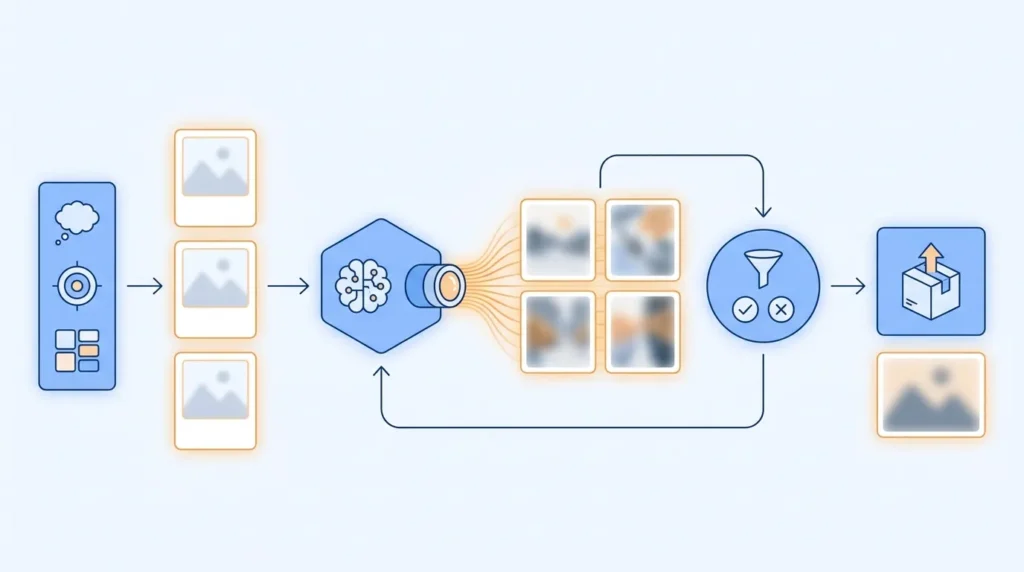
Step 1: Pick One Real Campaign Or Content Series
Do not begin by trying to define the entire brand. Start with one repeatable use case, such as blog headers, feature announcement visuals, landing page support graphics, or social images for product education.
This keeps the library useful. A reference set built for everything usually guides nothing. A reference set built for one channel can be tested, refined, and expanded.
Step 2: Separate References By Job
Collect references in small groups. Label one group for subject, one for scene, one for style, and one for composition. If a reference does not have a clear job, remove it or write down why it belongs.
This step prevents a common mistake: treating a mood board as a prompt. A mood board can contain many competing signals. A reference library turns those signals into roles.
Step 3: Generate A Controlled Test Batch
Use the library to generate a narrow batch of images. The goal is not maximum variety. The goal is to test whether the references work together.
Reviewers should ask specific questions. Is the subject clear? Does the scene match the message? Is the style repeatable? Does the image leave room for headlines or interface overlays? Would the same direction work for the next article or campaign?
Step 4: Save The Winning Combination
When a direction works, save the input references, prompt notes, selected image, and review comments. This becomes a reusable recipe for later work.
The library should capture why the result worked, not just what it looked like. For example: “This scene works because it suggests planning without showing fake UI text” is more useful than “use this image again.”
Step 5: Add Constraints After Real Review
Constraints should come from actual failures. If the first batch creates unreadable screens, add a rule against fake interface text. If the images look too staged, add more natural scene references. If the style feels too cinematic, add softer lighting references.
This turns the library into a living production tool rather than a static inspiration board.
Reference Library Vs Prompt-Only Production
The table below compares a reference library workflow with a prompt-only workflow and a traditional design handoff.
| Criteria | Reference Library Workflow | Prompt-Only Workflow | Traditional Design Handoff |
|---|---|---|---|
| Starting Point | Organized visual inputs | Written description | Written brief and design direction |
| Best Strength | Repeatable visual decisions | Fast experimentation | Strong human interpretation |
| Main Risk | Needs active maintenance | Inconsistent results | Slower production cycle |
| Review Style | Compare against roles and criteria | Judge each image separately | Review design execution |
| Useful For | Campaign systems and recurring visuals | Early ideation | Final branded assets |
| Team Skill Needed | Visual judgment and organization | Prompt writing | Design strategy |
| Reuse Value | High | Low to medium | High but resource intensive |
The reference library does not replace designers or strategy. It fills the space between a brand idea and a production asset. It gives AI image generation enough structure to support repeatable creative work.
Where This Helps Most
The workflow is especially useful for teams that publish often. Editorial teams can keep blog imagery visually connected across different topics. Product marketing teams can create more consistent feature visuals. Agencies can make client feedback easier to translate into new options.
It also helps small teams avoid overdependence on one prompt writer. If only one person knows how to describe the brand visually, the workflow is fragile. A reference library makes the knowledge visible to everyone involved in image review.
For paid campaigns, the library can reduce wasted tests. Instead of changing every visual element at once, the team can change one layer: subject, scene, style, crop, or energy level. That makes performance feedback easier to interpret.
For brand teams, it protects consistency. A campaign can still explore different ideas, but the visual system does not reset with every new asset.

Common Mistakes To Avoid
The first mistake is building a library from images that people simply like. Preference is not a production rule. Every reference should explain what it controls.
The second mistake is using too many references at once. A small set of clear references usually performs better than a large folder full of mixed signals.
The third mistake is ignoring negative examples. Teams often know what they dislike, but they do not document it. Negative examples help prevent the same problems from returning.
The fourth mistake is treating the first good result as the whole system. A single strong image is only proof that one combination worked. The library becomes valuable when it helps the team repeat quality across multiple assets.
The fifth mistake is skipping channel constraints. A visual that works inside a square social post may fail as a wide blog header. Cropping, text space, and layout needs should be part of the library.
A Simple Quality Checklist
Before using an AI-generated image in a campaign, ask:
- Which reference controls the subject?
- Which reference controls the scene?
- Which reference controls the style?
- What should remain consistent in future variations?
- What visual mistakes should this direction avoid?
- Does the image work in the final crop?
- Can another teammate reproduce this direction later?
If the team cannot answer those questions, the image may still be a useful concept. It is not yet a reliable production direction.
The Bottom Line
AI image tools are most valuable when teams stop treating every image as an isolated prompt. The more often a team publishes, the more it needs visual memory: references, roles, constraints, and review criteria that can be reused.
A reference library gives that memory a practical shape. It helps teams move from attractive one-off outputs to a repeatable creative workflow. For marketers, designers, founders, and agencies, that structure is often what turns AI image generation from a novelty into a dependable part of content production.





A little discussion goes a long way.
Ask a question, share your experience, or help someone find an answer.
There is room for your perspective.
No discussions match this view yet.
Your voice belongs here
Keep it useful. Keep it kind.