
You may have come across videos where “generating a full song with just one sentence.” While this sounds novel, it inevitably raises questions: If AI can compose music, do humans still need to learn music? Will musicians be replaced?
In reality, much of the discussion surrounding AI composition overestimates AI’s creative capabilities while underestimating the irreplaceable role of humans in music. AI is incapable of experiencing emotions or making aesthetic judgments on behalf of humans; what it truly excels at is turning human ideas into audible sound.
AI music generators like GenerateAiMusic don’t change “who creates music”, but rather “how music is created.” This article will explore, from an everyday person’s perspective, what AI composition can and cannot do, and whether ordinary people can genuinely use it to complete creative projects.
When Creativity Meets AI: Turning Inspiration into Music Instantly
A Common Misconception: Will AI Steal Musicians’ Jobs?
True music creation never begins with notes, but with the question: “What do I want to express?” Is it warm, gentle companionship, or tense, intense conflict? A relaxed background atmosphere, or an emotional climax?
AI can generate melodies and rhythms, but it cannot grasp the story or decide what the music should convey. It is a tool to execute your creativity, while the soul of that creativity remains yours alone. AI’s strength lies in rapidly assembling musical elements, rearranging melodies, chords, and rhythms to generate variations.
It can never grasp the flutter of first love or the complex emotions of graduation season; it merely calculates the most logical progression of notes from vast datasets. AI-generated music is simply an audible manifestation of your ideas. The final emotion, atmosphere, and expression still require the creator’s mastery.
When Human Creativity Meets AI Efficiency: A 1+1>2 Creation Model
The true value of AI composition lies not in creating inspiration for you, but in making your ideas heard instantly, transforming the rhythms, melodies, and emotions in your mind into playable music in real time. Often, it’s not that we lack musical ideas, but that we don’t know how to write them down.
Those fleeting melodies, indescribable emotions, and rhythms existing only in our heads often fade away due to a lack of creative tools. AI composition makes creation as intuitive as typing text: describe your feelings, and AI generates melodies and rhythms within minutes.
Creativity isn’t swallowed by production cycles, every attempt preserves the freshest inspiration for efficient creation. Music is no longer the exclusive domain of professional creators but has become an accessible form of expression for everyone.
How GAM Collaborates with Creators Instead of Replacing Them
The User Leads the Music Style and Emotional Direction
In GenerateAiMusic, the creative process is entirely in the user’s hands. The music begins with the images, emotions, and ideas in your mind, while the AI’s role is to transform these abstract concepts into audible melodies, chords, and rhythms.
For instance, you might recall a resonant moment: after months of hustle to finish an important project, driving home alone on a Friday evening, an old song playing on the radio, the city’s twinkling lights and streaking vehicle taillights outside the window, and a mix of weariness, relief, and a faint anticipation for the weekend swirling in your heart.
In traditional music creation, such delicate and personal emotions are often hard to translate directly through music theory and techniques, you have no idea how to weave the “rhythm of flowing city lights” into musical cadence, nor how to capture the intricate layers of “relief emerging amid weariness” with rhythmic patterns.
GenerateAiMusic exists precisely to help you overcome this barrier. All you need to do is distill this feeling into a clear, actionable creative prompt. Its core lies in a universal formula for generating music that even complete beginners can master quickly: “Music Style + Emotional Vibe + Usage Scenario”.
Taking the previous example, your prompt can be structured like this:
- Music Style: Lo-fi Chill / Mellow Electronic Pop;
- Emotional Vibe: Tranquility after weariness, with a touch of urban solitude and gentle hope;
- Usage Scenario: Driving home alone on an evening, with flowing urban night views, suitable as background music for videos or vlogs.
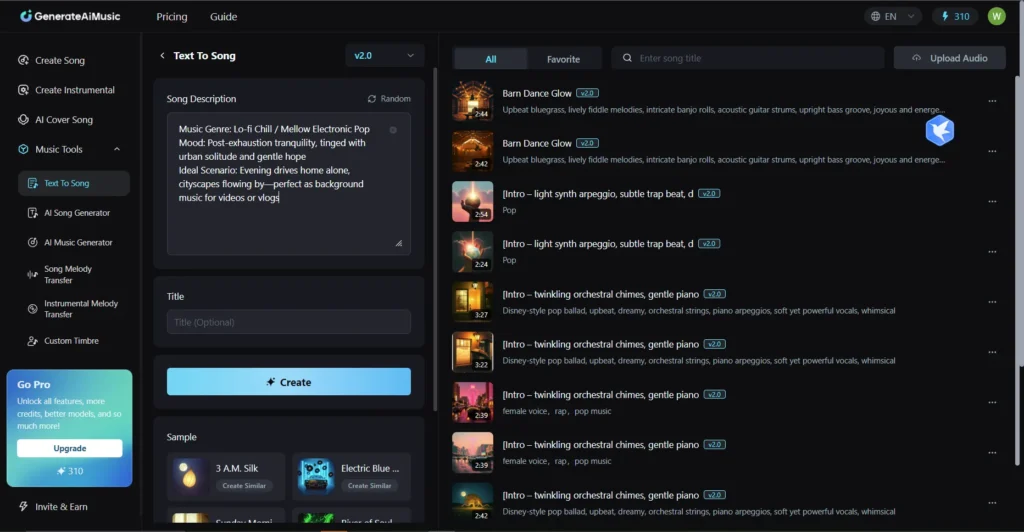
Once you’ve finalized the prompt for generating music, open GenerateAiMusic’s Text To Song feature. Combine these three elements naturally into a single description within the Song Description text box, such as:
“Lo-fi Chill style, tranquility after weariness with a touch of urban solitude and gentle hope, perfect as background music for driving home alone in the evening amid the flowing urban night views.”
Click Create below, and GenerateAiMusic will quickly generate melodies, chords, and rhythms based on your description, offering multiple versions for preview and comparison. You can:
- Preview each version one by one in the generation list to find the melody that best matches the scene in your mind.
- Fine-tune the emotional or stylistic keywords as needed, such as “add soft piano” or “slower rhythm“, to generate new versions;
- Continue until the music fully captures the imagery and emotion you envision.
To help users get started with GenerateAiMusic quickly, we’ve compiled a list of the most commonly used prompts in a table, covering the three core dimensions of Music Style, Emotional Vibe, and Usage Scenario. By simply combining these prompts, you can easily generate music tailored to different scenarios and emotions.
| Category | Common Prompts | Description / Use Case |
| Music Style | Pop, Rock, Electronic, Lo-fi, Chill, Hip-hop, Orchestral, Game, Cinematic | Basic genre selection to match overall vibe |
| Mood / Emotion | Happy, Sad, Relaxed, Tense, Epic, Dreamy, Melancholy, Excited, Peaceful, Motivational | Conveys the emotional tone of the track |
| Use Case / Scene | Video Background, Vlog, Game Soundtrack, Trailer, Ambient, Commercial, Podcast, Study, Workout, Cinematic Scene | Specifies where the music will be used for a better context |
Mastering this universal formula, you can generate virtually any music you desire within GenerateAiMusic. Simply translate the images, emotions, or ideas in your mind into a clear textual description, and the AI will transform your abstract thoughts into high-quality music.
Whether you need a warm, soothing jazz piano piece tailored for a café scene or an intense, epic electronic symphony for a game battle sequence, the system can quickly generate multiple versions with different emphases for you to preview and select.
Each generation is not a random copy, but an extension of your creativity. Throughout this process, GenerateAiMusic doesn’t make decisions for you, it rapidly brings your ideas to life. Every melodic rise and fall, every rhythmic shift is driven by your intent, ensuring the music not only resonates but conveys the emotions and stories you wish to express.
AI Generates Drafts and Multiple Variations for Exploration
In GenerateAiMusic, AI’s core role is to assist with creation rather than replace the creator. Once you’ve set the creative direction using the formula of Music Style + Emotional Vibe + Usage Scenario, GenerateAiMusic will quickly generate music drafts based on your description. It also supports multiple generations for comparison, making the creative process more efficient and controllable.
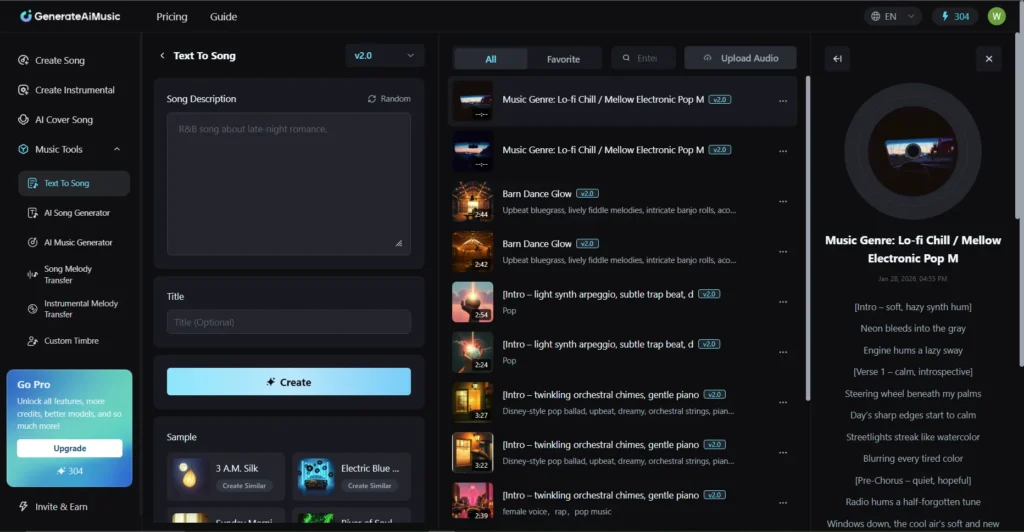
Generate different versions
Under the same prompt, GenerateAiMusic will generate two distinct versions with different focuses. For example, if you want background music for a weekend home vlog, envision scenes like cooking in the kitchen, a gentle breeze outside the window, and the aroma of coffee mingling with relaxed conversation.
Using the formula above, enter the prompt “Relaxing and cozy folk/Lo-fi for a weekend home vlog” into the input box. GenerateAiMusic might generate two versions:
- Version A: Highlighting simple guitar and soft drum beats with a relaxed and natural rhythm;
- Version B: Featuring piano and strings, with subtle ambient sounds added (e.g., clinking of pots and pans, gentle breeze)
- Provide creative assets
You don’t need to build every note from scratch. The two music drafts generated by GenerateAiMusic present different possibilities under the same theme, greatly expanding the scope of creative choices. You can judge directly based on the audio, rather than relying solely on your imagination.
Reduce trial-and-error time
In traditional creation, experimenting with different arrangements requires a great deal of time and technical skill. AI can quickly carry out these experiments, allowing you to focus on higher-level aesthetic judgments: Which melody best expresses the ease and joy of cooking in the kitchen? Which instrumental combination best enhances the warm, homely vibe of a gentle breeze interwoven with the aroma of coffee and casual chatter?
With GenerateAiMusic, you no longer need to repeatedly tweak tracks. Simply preview and select to find the composition that most closely matches your vision, efficiently completing your creation while retaining ultimate control over mood and style.
The Creative Process Remains Controllable, Not Random One-Click Generation
Controlled Generation & Flexible Exploration: Unlike “blind box-style generation”, every output from GenerateAiMusic strictly relies on the keywords and emotional descriptions input by the user. When using GenerateAiMusic, you can control the precision of the generated music by adjusting the level of detail in your descriptions.
For example, “Upbeat jazz style with interwoven piano and baritone sax, perfect for the relaxed ambience of reading and drinking coffee in a café on a weekend afternoon”, the more detailed your description, the closer the generated music will be to the scenes and emotions in your mind.
However, this doesn’t mean that GenerateAiMusic cannot handle broad descriptions. On the contrary, simpler prompts offer more possibilities for exploration and comparison. For instance, simplifying the aforementioned prompt to “Light music style, cheerful and relaxed, suitable as background music for daily life or videos”.
This approach maintains creative control while preserving space for exploring unknown possibilities. Each generation becomes both precise and flexible, satisfying whether you seek subtle emotional atmospheres or wish to quickly experiment with different style combinations.
User-Driven Creation: Most importantly, the user is always in charge of the entire creative process. AI serves as a tool to materialize your ideas, not a decision-maker. Every melodic shift and rhythmic variation ultimately stems from your vision. You can preview and fine-tune the multiple generated versions, or merge the strengths of different versions to form your final piece. This not only drastically cuts down the time spent on repetitive trial and error in traditional creation, but also lets your creativity be heard most intuitively.
Summary
AI music composition won’t replace creators, it will become their creative partner. Simply define the musical style, emotional vibe, and usage scenario, and GenerateAiMusic will swiftly generate drafts and multiple variations, making your creative process more efficient and controllable. Whether crafting music for vlogs, game soundtracks, or personal projects, GenerateAiMusic instantly transforms your inspiration into high-quality, fully playable music.
Experience GenerateAiMusicnow, turn your ideas into melodies and let music truly tell your story.



A little discussion goes a long way.
Ask a question, share your experience, or help someone find an answer.
There is room for your perspective.
No discussions match this view yet.
Your voice belongs here
Keep it useful. Keep it kind.