
Every week, another AI video generator launches with a free tier that looks generous on paper, until you hit the watermark, the resolution cap, or the daily limit that makes you feel like you are using a demo rather than a real tool. That is the pattern, and I have been burned by it enough times to be skeptical.
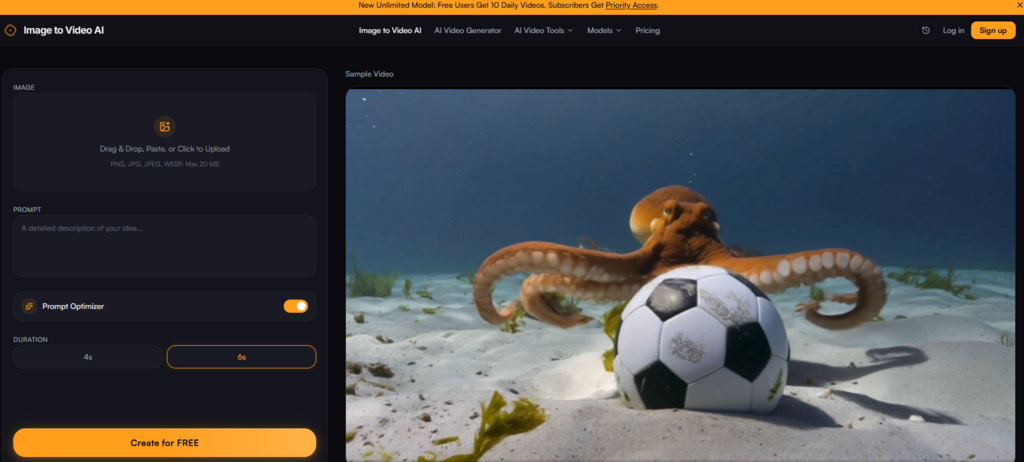
So when I came across image to video ai with its promise of free daily generations and no credit card required, I did not just skim the landing page. I put the free tier through its paces, then bought credits to see what actually changes when you pay. The goal was simple: figure out whether the upgrade is a genuine value proposition or just another way to get you through the door before hitting you with mediocre output.
- What the Free Tier Actually Gives You, And Where It Stops
- The Watermark Trade-Off
- The Ten-Video Ceiling
- What Changes When You Move to a Paid Plan
- Watermark-Free Output at 1080p
- The Credit System, Demystified
- Priority Queue and Faster Generation
- Testing the Paid Experience Against the Free Tier
- When the Upgrade Makes Sense
- When You Can Stick With Free
- Real-World Value: What You Are Actually Paying For
- The Hidden Cost of Free
- A Comparison of Free vs. Paid
- The Real Limitations You Should Know About
- Prompt Quality Is Everything
- Complex Scenes May Need Multiple Attempts
- No Guarantee of Perfect Consistency
- Credits Are Consumed on Every Generation
- Who Should Pay and Who Should Stay Free
- A Practical Takeaway
What the Free Tier Actually Gives You, And Where It Stops
The free plan offers ten video generations per day at zero cost. No credit card, no trial period that expires after seven days, just ten chances a day to turn images into motion. That is a meaningful amount of runway for testing, especially if you are new to image-to-video AI and want to understand how prompts translate into actual motion before committing money.
The Watermark Trade-Off
Free outputs include a small watermark. In my testing, the watermark sits unobtrusively in the corner, visible enough that you would not want to use it for client work or polished social media, but not so aggressive that it ruins the experience of evaluating the tool.
For internal testing, moodboarding, or personal experiments, the watermark is a reasonable trade-off for free access. The resolution on free outputs is still crisp, and the motion quality does not appear to be throttled on the free tier, you get the same generation engine, just with a logo attached.
The Ten-Video Ceiling
Ten generations a day sounds like a lot until you start iterating. In practice, I found myself burning through five or six runs just to dial in a single prompt for a complex image. If you are a content creator producing multiple clips per day, the free tier will feel restrictive. But for casual users, hobbyists, or anyone still learning how to write effective prompts, ten videos is more than enough to explore the tool without pressure.
What Changes When You Move to a Paid Plan
The upgrade unlocks three concrete benefits: watermark removal, higher daily limits, and priority processing. The pricing structure is refreshingly straightforward, there are no confusing tiers with hidden caps, and credits roll over on the one-time pack.
Watermark-Free Output at 1080p
Removing the watermark is the most obvious reason to upgrade. For anyone publishing to YouTube, Instagram, TikTok, or a professional portfolio, a watermark signals “amateur” in a way that undermines the quality of the content itself. The paid output is clean, crisp, and indistinguishable from something produced by a more expensive tool. At up to 1080p resolution, the clips hold up well on both mobile screens and desktop displays.
The Credit System, Demystified
Every successful generation costs 10 credits. The one-time pack gives you 200 credits for $9.99, roughly twenty generations at about fifty cents each. The Standard monthly plan at $9.9 per month provides 2,000 credits roughly six hundred generations at just over three cents each. Credits on the one-time pack never expire, which is a nice touch for occasional users who do not want to feel rushed.
Priority Queue and Faster Generation
The free tier processes alongside everyone else, which means during peak hours you might wait a bit longer. Paid subscribers get priority access, and in my testing, the difference was noticeable, generations completed in what felt like half the time. For anyone producing content at scale, that speed difference translates directly into productivity.
Testing the Paid Experience Against the Free Tier
To really understand the gap, I ran the same image through both tiers using identical prompts. The motion quality was consistent, the paid version did not produce better animation, just cleaner output without the watermark. That is actually reassuring: the tool is not crippling free users with inferior models. The difference is purely about presentation and throughput.
When the Upgrade Makes Sense
For social media managers posting multiple times per day, the Standard plan pays for itself quickly. Two hundred generations a month at $9.9 is cheaper than a single coffee run per week, and the watermark-free output means you can post directly without additional editing.
For e-commerce store owners animating product catalogs, the Pro plan offers the best per-generation cost, six hundred clips a month at roughly three cents each is hard to argue with.
When You Can Stick With Free
If you are a hobbyist, a student, or someone who only needs a few clips per week, the free tier is genuinely sufficient. Ten videos a day adds up to three hundred a month, more than enough for personal projects, social media experiments, or learning how to write effective prompts. The watermark is a minor annoyance, but for non-commercial use, it is perfectly acceptable.
Real-World Value: What You Are Actually Paying For
The upgrade is not about unlocking a “better” AI , it is about removing friction. The watermark is friction. The queue wait is friction. The daily cap is friction. Paid plans remove those barriers so you can focus on creating rather than managing limitations. For professionals, that friction removal is worth the monthly cost. For casual users, the free tier delivers the same core value without any financial commitment.
The Hidden Cost of Free
There is a psychological cost to the free tier that is worth acknowledging. Knowing you only have ten generations a day can make you hesitant to experiment. You might stick with safe prompts rather than pushing the tool to see what it can really do.
Paid credits remove that hesitation, you can burn a few generations on wild experiments without worrying about running out. That freedom to explore is, in my experience, where the real value of the upgrade lies.
A Comparison of Free vs. Paid
| Aspect | Free Tier | Paid Plans |
| Daily Generations | 10 per day | 200–600 per month depending on plan |
| Watermark | Small watermark included | Completely removed |
| Resolution | Up to 1080p | Up to 1080p, same quality |
| Generation Speed | Standard queue | Priority processing |
| Cost Per Video | Free | $0.05 down to $0.033 |
| Best For | Testing, learning, casual use | Professional publishing, high-volume production |
The Real Limitations You Should Know About
No matter which tier you choose, the tool has constraints that are worth keeping in mind.
Prompt Quality Is Everything
The AI interprets both your image and your text prompt together. Vague prompts produce vague motion. Specific, descriptive prompts produce better results. This is not a limitation unique to this tool but it does mean there is a learning curve. New users should expect to spend their first few generations figuring out what kind of language works best.
Complex Scenes May Need Multiple Attempts
Images with many subjects, intricate backgrounds, or ambiguous focal points can produce inconsistent results. In my testing, a busy street scene required several generations before I got a clip without visible artifacts. The result may vary depending on the image, and for complex visuals, you may need to budget extra generations.
No Guarantee of Perfect Consistency
Like all generative AI, this tool does not promise identical outputs every time. The same image with the same prompt can produce slightly different motion on different runs. This is inherent to the technology, not a flaw in the implementation. For production work where consistency is critical, plan to run multiple generations and select the best one.
Credits Are Consumed on Every Generation
Every successful generation costs 10 credits. Failed or cancelled generations do not appear to consume credits based on my testing, but the policy notes that once a generation is completed, the service is considered fulfilled. If you are experimenting heavily, credits can disappear faster than you expect, especially if you are iterating on complex prompts.
Who Should Pay and Who Should Stay Free
The decision ultimately comes down to your use case.
Upgrade if you are:
- Publishing content professionally where watermarks are unacceptable
- Producing more than ten videos a day on a regular basis
- Working on client projects that require clean, polished output
- Someone who values speed and wants to skip the queue
Stick with the free tier if you are:
- Experimenting with image-to-video AI for the first time
- Creating content for personal use or internal testing
- Producing fewer than ten videos per day
- Not ready to commit financially to a tool you are still evaluating
The free tier gives you enough runway to make an informed decision. Ten generations a day is generous enough to test the tool across different image types and prompt styles. By the time you hit the daily limit a few times, you will know whether the upgrade is worth it for your workflow.

A Practical Takeaway
After testing both the free and paid experiences, the conclusion is straightforward: the tool delivers the same core quality regardless of which tier you choose. The difference is convenience, watermark removal, faster processing, and higher volume caps.
For professionals, those conveniences are easily worth the monthly cost. For everyone else, the free tier provides a genuine, usable experience without any hidden catches or forced upgrades. The pricing model is transparent, the credits are fairly priced, and the free tier is not a trap, it is a genuine invitation to see what the tool can do before you decide to pay.
If you are curious about whether this fits your workflow, the free tier is the perfect place to start. And if you find yourself hitting that ten-video limit regularly, ai image to video has a plan that will almost certainly cost less than you expect.




A little discussion goes a long way.
Ask a question, share your experience, or help someone find an answer.
There is room for your perspective.
No discussions match this view yet.
Your voice belongs here
Keep it useful. Keep it kind.