
Many Saudi expats use multiple SIM cards to communicate with their families or jobs or use the Internet. But it is important to stay informed about the number of SIM cards associated with your Iqama so that you don’t end up in a situation that may be a problem or legal web caused by unauthorised registrations.
Anyone anywhere in Saudi Arabia must show an iqama, a resident permit, and many services such as a mobile phone connection and SIM cards, are registered to an iqama. That is why sometimes, you may want to know how many SIM cards are registered to your Iqama to take care of your security and privacy or even if there is any SIM card you don’t want to have in your Iqama.
Why do you need to check your Iqama SIM card number?
All Saudi Arabian residents must regularly check the SIM cards linked to their Iqama. Unauthorized SIM can get you in legal trouble or fraudulent activities in your name. First of all, this will keep a note of SIM card registration, protect your identity and comply with Saudi telecommunications regulations.
You must understand how many SIM cards are related to your Iqama to avoid passing through any complications or legal issues because of third parties who will register their SIM cards to your Iqama.
How to Check How Many Saudi SIM Cards on Iqama
To check the number of SIM cards connected with your Iqama, visit its Mutasil portal.
Here’s how you can check it:
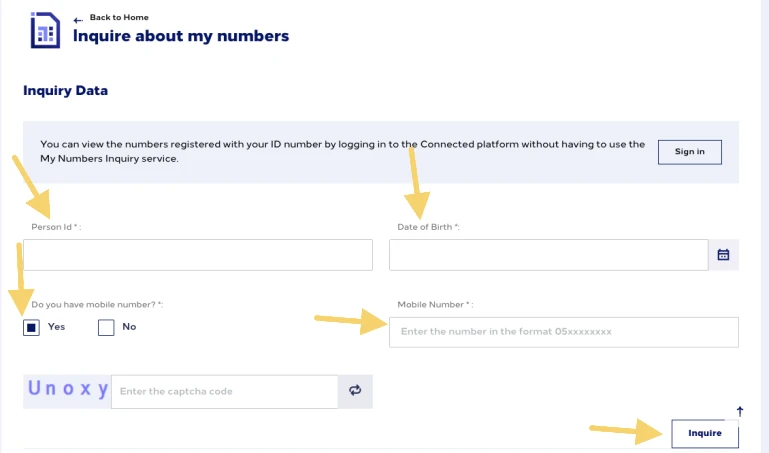
- Open the Mutasil portal.
- Click on the Start Service option.
- You can enter your Iqama number and date of your birth as per the Hijri calendar.
- Then, if you have a mobile phone, select “Yes.”
- Enter your ‘mobile number’.
- Enter the captcha verification code.
- Click on the ‘inquire’ button.
- Enter the OTP that has been sent to your mobile device.
- After doing this, you’ll be taken to a page that has listed your registered SIM card numbers. If you don’t have a mobile number, tap “No.” It will then review its records and show you the number of SIMs from each Saudi mobile network under your name.
If you find that someone registered under your Iqama has an unknown SIM, call the customer care helpline of the cellular company you have to help with this.
- STC: 900 or 114 555 555
- Mobily: other network: 0560101100, 1100
- Zain: For calls from other networks: 959 or 0590000959
- Virgin Mobile: 1789


A little discussion goes a long way.
Ask a question, share your experience, or help someone find an answer.
There is room for your perspective.
No discussions match this view yet.
Your voice belongs here
Keep it useful. Keep it kind.