

For students who lack access to a MacBook or laptop, Android is a perfect editing platform. Video editing apps on Android have made strides recently. Try these good apps for creating Instagram, TikTok, and YouTube content.
Below is a list of free and paid Android video editing apps. While some are offered as in-app purchases, many features are also provided in their free editions.
VN Video Editor
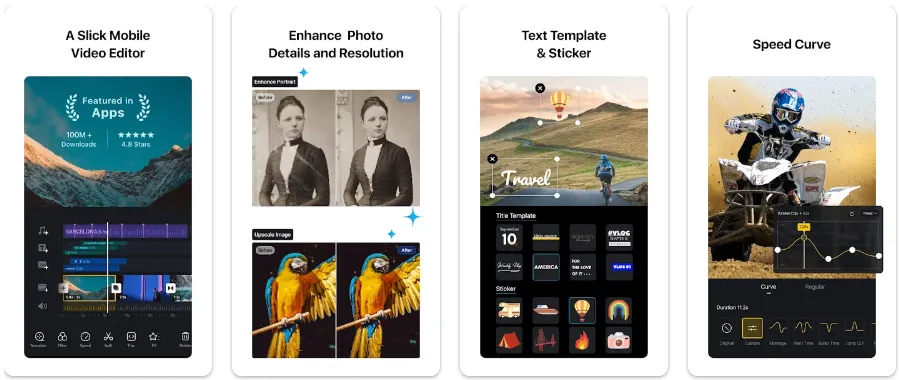
VN Video Editor offers comprehensive free video editing services on Android. It includes both basic and advanced features. Trimming, splitting, and speed changes are part of the basics, whereas keyframe animation, background elimination, and color grading comprise the advanced ones.
Features
- No watermark is present, like in most free video editors.
- Keyframe animation, background removal, and color grading are provided and are used by professionals.
- Music beats syncing with videos are automatically done, thus making editing easy.
- Pre-made templates, effects, and fonts enhancing video were included.
- Not requiring premium version for quality
| Pros | Cons |
|---|---|
| Lots of nifty features | Disruptive advertisements ruin the experience |
| No watermark | |
| Export videos in high quality for free | |
| Color grading support |
CapCut
CapCut is a great free video editor for Android built by TikTok’s parent company, ByteDance. It offers professional editing tools and AI-powered features.

Features
- Edit many tracks of video, text, and audio in layers.
- Quickly remove the background using AI.
- 3D Zoom Effects help create stunning cinematic effects for video.
- Auto Velocity Adjustment feature allows the editor to adjust speed for smooth transitions automatically.
- High-quality exports are available, supporting full HD videos without watermarks.
| Pros | Cons |
|---|---|
| Clean and beautiful UI | Limited audio library |
| Basic and advanced tools available | Effects could use improvements |
| Multi-track editing | |
| AI-powered background removal |
LightCut
LightCut AI-based editor possesses a high 4.8 rating. DJI recommends it for enthusiasts who need fast, automatic video edits.

Features
- Video editing using smart AI tools.
- Wide variety of templates for fast edits.
- High-resolution videos at 60 fps.
- Plenty of sound effects, stickers, and text effects.
- No watermark on exported videos.
| Pros | Cons |
|---|---|
| AI-powered auto editing | None as such |
| Free to use | |
| No watermark | |
| Exports videos up to 4K 60fps |
Splice
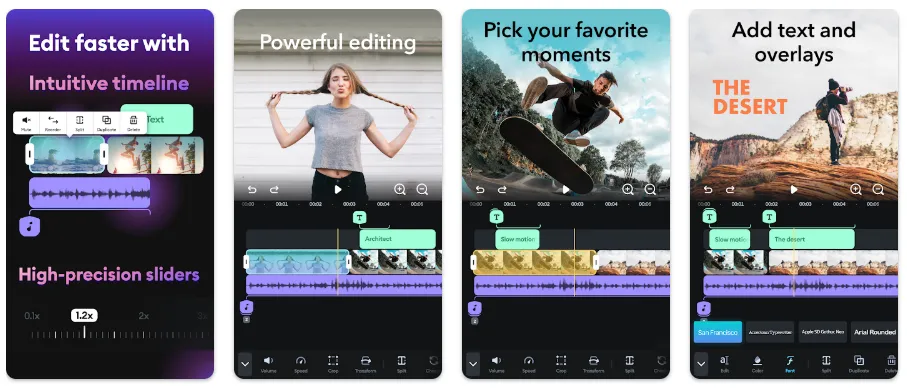
Splice is a powerful video editor that allows for precise editing through its intuitive timeline. You can quickly make adjustments.
Features
- Multi-Track Timeline offers a professional approach to editing.
- Audio editing enables volume adjustment by mixing sounds and adding background music.
- Slow Motion Speed Control makes slowing down the video easy.
- Custom Music Effects let you mix your music with built-in effects.
- Text Overlay Features provide access to a vast font library.
| Pros | Cons |
|---|---|
| Intuitive UI | Occasional glitches |
| Multi-track timeline | Some bugs haven’t been ironed out |
| Basic and pro-level editing tools | |
| Extract and remove audio from videos |
InShot
InShot is a simple yet powerful social media video editor allowing tools in an easy interface.

Features
- Social media is optimal for Instagram, TikTok, and YouTube.
- Simple editing tools like trim, cut, and control speed.
- Add custom audio tracks and voiceovers easily.
- Include animated text and meme stickers.
- Transitions and effects make videos more professional.
| Pros | Cons |
|---|---|
| Easy to learn for beginners | Batch addition of images can be improved |
| Huge library of fonts, filters, and effects | User interface could be better |
| Free soundtracks | |
| Export up to 4K resolution |
Quik by GoPro
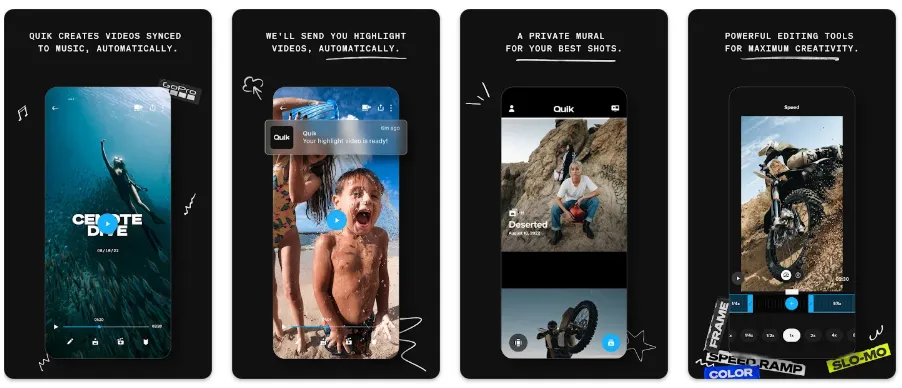
Quik is simple and lets you make quick, good-looking videos. It is good for new users having no need for their advanced options but making looking polished results.
Features
- Creates videos instantly from clips.
- Edit by picking clips and themes. Just tap one time.
- Add custom music easily.
- Backup in the cloud to edit later.
- Optimized for social media posts like Instagram and TikTok.
| Pros | Cons |
|---|---|
| Quick and easy video editing | Not much customization |
| Add custom music | Not for advanced video editing |
| Best for social media-ready videos |
KineMaster
KineMaster is a leading Android video editor known for its professional features and multi-layer editing capability which are ideal for serious creators.

Features
- Multi-layer editing supports videos/images/text/audio layered on top of each other.
- Real-Time Preview allows instant viewing of changes made.
- Chroma Key Support facilitates green screen effects.
- High-resolution exports support videos up to 4K quality.
- Extensive Asset Library includes royalty-free music/effects/overlays, etc.
| Pros | Cons |
|---|---|
| Free templates and rich editing assets | Free version adds a watermark |
| Great for both beginners and advanced users | Outdated user interface |
| Royalty-free music | |
| Lots of advanced editing tools |
Best video editors for your needs:
- Beginners: CapCut, InShot, Quik.
- Intermediate users: Splice, VN Video Editor.
- Advanced users: KineMaster, LightCut.
- Best free editor with features: VN Video Editor.
Choose the app that suits your editing style and requirements.




A little discussion goes a long way.
Ask a question, share your experience, or help someone find an answer.
There is room for your perspective.
No discussions match this view yet.
Your voice belongs here
Keep it useful. Keep it kind.