
Benazir Income Support Program (BISP) introduced the 8171 Web Portal to ensure eligible women receive their Rs13,500 Benazir Kafalat Program payment. The portal has improved since 2025, with more efficient and user-friendly updates allowing beneficiaries to verify their payment status and eligibility.
Here’s everything you need to know about the updated portal, how to check your status, and what to do if there are problems.
8171 Web Portal in 2025 Updates
To improve transparency and accessibility, the 8171 Web Portal has undergone several enhancements:
Updated Data Integration
- Integration of 2024 NSER survey data to identify eligible women accurately.
- Outdated or incorrect data from previous years have been corrected.
- Discrepancies are presented to close down the inequalities in the payment distribution.
Improved Payment Verification
- Eligibility criteria became clearer.
- They can work out if they have to do anything to get their payment.
Enhanced Accessibility
- Designed for rural and remote users.
- Updates to the portal are more mobile-friendly, allowing all beneficiaries to enjoy easy access.
These updates aim to ensure that the deserving recipients of money receive their money as soon as possible and efficiently.
How to Check Your Rs13,500 Payment Status
If you are eligible for the 8171, the 8171 Web Portal allows you to make it easy to look up your status and learn how to apply for the benefits. Follow these steps:
- Open the official website: 8171.bisp.gov.pk.
- Enter your 13-digit CNIC number without any dashes.
- Check that you are the human and complete the CAPTCHA.
- Click the Submit button to see your payment status and instructions.
Check Payment Status via SMS
For beneficiaries without internet access, the 8171 SMS service is a convenient option:
- Open the messages app.
- Send your 13-digit CNIC number to 8171.
- Your eligibility status will be sent to you via SMS and additional instructions.
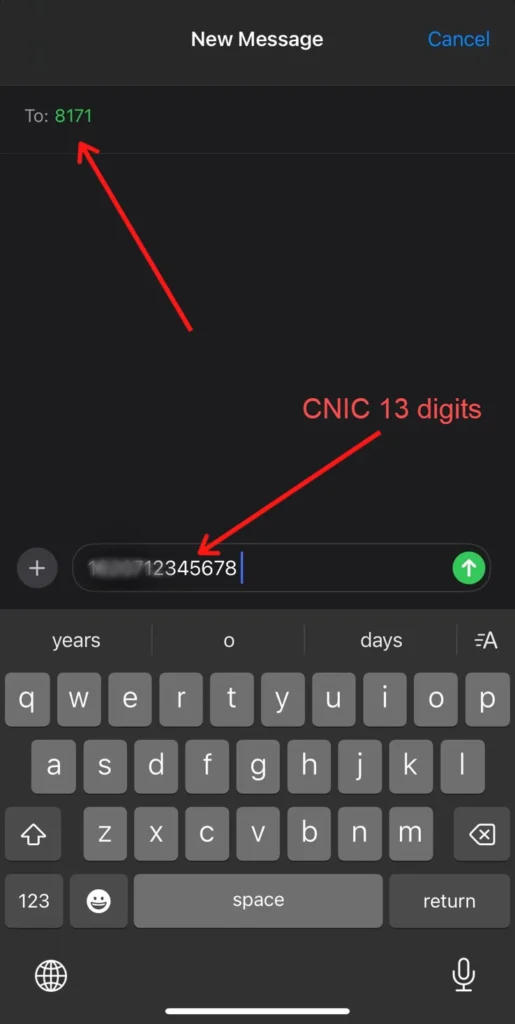
The service makes it accessible to people who are in remote areas and do not have smartphones.
What to do if your information is incorrect
If you experience issues with your payment status or eligibility:
- Check your CNIC, mobile Number, and Personal details.
- Update outdated or incorrect information at your nearest BISP office.
- If you did not participate in the 2024 NSER survey, ensure your details are in the official database.
- After that, check your status via the portal or SMS service.
How to collect your Rs13,500 payment
After confirming eligibility, there are three ways to collect your payment:
- Visit your designated payment center with your CNIC and payment token.
- Payments can be directly deposited into your linked bank accounts.
- Use mobile wallets like Easypaisa or JazzCash linked to your registered mobile number.
Don’t Miss the Deadline
To avoid delays or disqualification:
- Check your eligibility quickly.
- Up your information.
- Get your money before the March 2025 deadline.
The 8171 Web Portal and its updates are progressing in the path of making financial assistance reach the appropriate people as effectively as possible. Know the program and act promptly to benefit from it.



A little discussion goes a long way.
Ask a question, share your experience, or help someone find an answer.
There is room for your perspective.
No discussions match this view yet.
Your voice belongs here
Keep it useful. Keep it kind.