
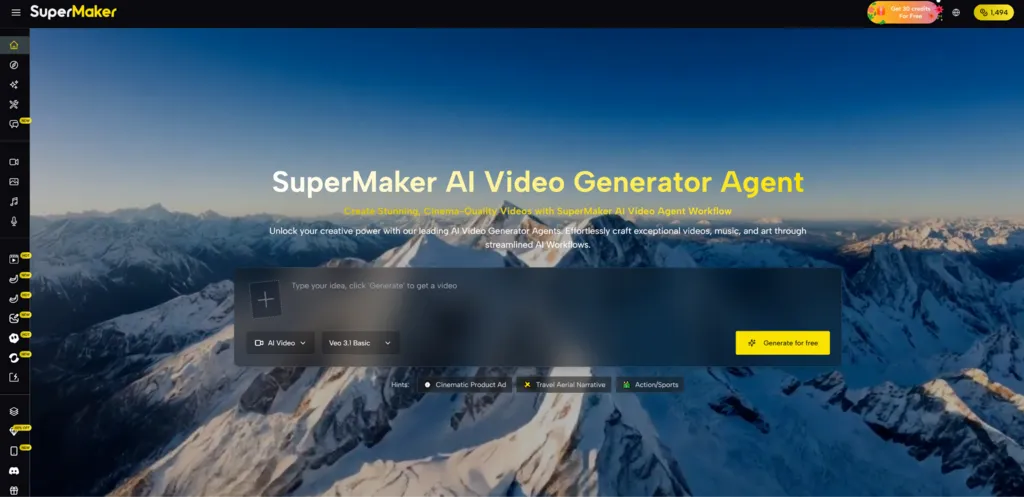
Most video ideas do not fail because they are weak. They fail because the path from concept to finished output is too fragmented. A creator may begin with a strong visual instinct, then get delayed by writing, clip generation, voiceover, music, timing, export settings, and a dozen small decisions that live in different tools. That is why an AI Video Generator Agent feels more important than a normal single-purpose generator. It suggests a different model: not just creating footage, but helping the entire production chain feel more connected.
That distinction matters more now than it did a year ago. In earlier phases of AI video, the wow factor came from seeing motion emerge from text. But in real use, many creators discovered that one generated clip was rarely enough.
The hard part was always what happened before and after the clip. A more complete system reduces that friction by turning separate actions into one creative route. In my view, that is where platforms like SuperMaker become easier to take seriously. They are not only promising output. They are trying to reduce the operational burden of making something coherent.
Why Video Creation Became A Workflow Problem
Video creation used to be limited mainly by equipment, editing skill, and production time. AI changed that equation by lowering the threshold for making visual material. But it also exposed a new problem: generation alone does not equal production. Once anyone can generate a clip, the question becomes whether they can shape that clip into something useful.
Single Outputs Rarely Solve Real Production Needs
A short AI-generated result can be impressive, but practical projects usually need more than one isolated moment. Social videos need pacing. Product demos need narration. concept videos need mood. Promotional pieces need sound, structure, and a usable ending. If the tool only solves one layer, the creator is still left assembling the rest manually.
Creators Now Need Coordination More Than Novelty
That is why coordination has become so important. A unified environment matters because it helps users preserve momentum. When the idea, image generation, video motion, voice, and music can all live in one place, the creative process begins to feel less like patchwork and more like production.
How SuperMaker Frames The Production Journey
SuperMaker appears to position itself around that broader need. Instead of centering the experience only on text-to-video, it places video inside a wider creation ecosystem that includes image tools, voice tools, music generation, and an agent-style conversational layer. This suggests that the platform is not only interested in generating media, but also in guiding a user through a project.
Video Remains The Main Structural Center
The platform still treats video as the anchor. That makes sense, because video is the format where multiple AI capabilities meet most naturally. Motion, image quality, sound, and timing all intersect there. The result is that the video maker acts less like a standalone widget and more like a central workspace.
Other Media Layers Support The Main Output
The image, voice, and music components are not separate curiosities. They work more like supporting departments within the same system. That is a meaningful design choice. It reflects an understanding that modern content is increasingly multimodal, and that a finished piece often depends on several creative layers working together.
Conversation Becomes Part Of Direction
The chat mode also changes the tone of the platform. Rather than making the user navigate every step through rigid settings, it gives them a way to refine direction through natural language. That matters because many creators know the feeling they want but do not necessarily think in technical controls.

What The Official Process Reveals About Its Design
The most useful way to understand the platform is to look at the official workflow it presents. Rather than describing magic, it lays out a sequence that feels grounded in how creators actually work.
Step One Begins With Intent And Framing
The user starts by entering a prompt. This step works like a brief rather than a raw command. It sets the tone, subject, atmosphere, and direction of the project. Even though it is simple on the surface, it determines much of what follows.
Step Two Produces The Visual Draft
The next step is generation. This is where the platform turns prompt input or source material into motion. In practical terms, this is the first visible draft of the idea. It is not yet the final video, but it becomes the material that the rest of the process can build on.
Step Three Adds Audio And Emotional Texture
Then the workflow moves into enhancement. This is where the platform integrates voice and music. That step is easy to underestimate, but it is often where a project stops feeling like a silent demo and starts feeling like actual media.
Step Four Moves Toward Finished Delivery
The last stage is publishing. This includes the final adjustment phase before export. In production terms, it is the acknowledgement that creators still need agency at the end. Even a strong AI-generated sequence benefits from review, cleanup, and a last pass before it is ready to be shared.
How This Model Helps Different User Types
The platform’s structure is especially useful when viewed through the needs of actual creators. Different people will use it differently, but the underlying logic remains consistent.
| User Need | Typical Multi-Tool Path | Agent Style Platform Approach |
| Fast concept testing | Jump between several apps | Start in one workspace |
| Visual draft creation | Generate clips separately | Build from a unified flow |
| Audio support | Add voice and music elsewhere | Enhance inside the same system |
| Revision cycle | Re-export repeatedly | Adjust within one process |
| Project continuity | Easy to lose assets and context | Stronger workflow continuity |
| Best use case | Tool-heavy creators | Workflow-focused creators |
Why This Matters For Solo Creators Most
The clearest value may be for solo users or small teams. Large studios can absorb complexity because they have specialized roles. Independent creators cannot. For them, every extra tool switch has a cost in time and attention.
Reduced Friction Often Beats Maximum Control
A solo creator does not always need the deepest possible interface. Often they need an interface that keeps them moving. A system that makes acceptable creative decisions faster can be more useful than one that offers endless granular controls but slows the project down.
Momentum Is Often The Hidden Advantage
When people talk about AI tools, they often talk about quality, realism, or output speed. But momentum may be the more important metric. If a platform lets a creator hold onto the original spark of an idea long enough to finish the piece, it has solved a real problem.
One Environment Can Support More Iteration
There is also a psychological advantage. Iterating inside one environment feels lighter than restarting across multiple disconnected services. That often leads users to test more directions, which can improve outcomes even when no single generation is perfect.
What The Platform Still Does Not Remove
A credible reading also needs to acknowledge the limits. No platform eliminates uncertainty from creative work, and AI video remains sensitive to direction quality.
Prompting Still Shapes Most Of The Outcome
The better the input, the more useful the first draft tends to be. A weak prompt can still produce generic material. A stronger prompt with a clearer atmosphere or scene structure usually gives the user more to work with.
Results May Still Require More Than One Try
In my experience with platforms built like this, convenience does not guarantee precision on the first attempt. Users should still expect to regenerate, compare, and refine. The difference is that the surrounding workflow may feel smoother, even when the creative result needs several passes.
A System Can Assist But Not Decide Taste
The platform can organize production, but it cannot fully replace judgment. It cannot know which emotional beat should linger, which cut should feel more restrained, or which tone best fits the audience. Those decisions remain human, and that is probably how it should be.
Why This Feels Like A Larger Industry Direction
What makes SuperMaker interesting is not only what it offers today, but what it represents. The industry is moving away from isolated generation demos and toward more complete creation systems. That is an important shift because the future of AI media will likely depend less on isolated moments of spectacle and more on repeatable creative workflows.
In that sense, the real promise of an agent-style video platform is not that it replaces creators. It is that it reduces the practical drag between imagination and publication. For many users, that may be the difference between experimenting once and creating consistently. SuperMaker feels aligned with that future because it treats video not as a novelty output, but as the center of a connected production process.



A little discussion goes a long way.
Ask a question, share your experience, or help someone find an answer.
There is room for your perspective.
No discussions match this view yet.
Your voice belongs here
Keep it useful. Keep it kind.