
Traffic fines help keep the roads safe in the UAE. It is important to pay them quickly; otherwise, you may face further penalties. There are various easy-to-use ways to pay fines in the UAE.
Online Payment Options
You can pay traffic fines in the UAE through online websites or mobile applications.
Websites for Online Payment
You can pay your fines via official websites:
- Ministry of Interior (MOI): moi.gov.ae
- Dubai Police: dubaipolice.gov.ae
- Roads and Transport Authority (RTA): rta.gov.ae
Mobile Apps for Fine Payments
Official apps are available for Android, iOS, and Huawei users.
1. Ministry of Interior (MOI) App
- Open MOI app UAE.
- Log in using your UAE Pass.
- Tap Traffic Fine Payment on the homepage.
- Enter your Traffic Code (TC), vehicle plate number, driving license number, or Emirates ID.
- Select the fine(s), apply any available discounts, and proceed to payment.
- Receive a digital receipt after successful payment.

2. TAMM App (Abu Dhabi Only)
- Log in with your UAE Pass using the TAMM app.
- Go to Payments > Traffic Fines Payment.
- View fines linked to your vehicle automatically.
- Select the fine(s).
- Complete the transaction via payment gateway.
Abu Dhabi offers a 35% discount for early fine payments.

3. Dubai Police App
- Open the Dubai Police App.
- Select Fine Inquiry and Payment.
- Search fines using:
- Vehicle plate number
- Traffic Code (TC) number
- Driving license number
- Ticket number
- Choose the fines to pay and complete the transaction securely.
Dubai Police allows installment payments for large fines.

4. Dubai Now App
- Open the Dubai Now app.
- Log in with UAE Pass.
- The app automatically detects linked fines under the Driving section.
- Select and pay securely using a credit card.
5. RTA Dubai App
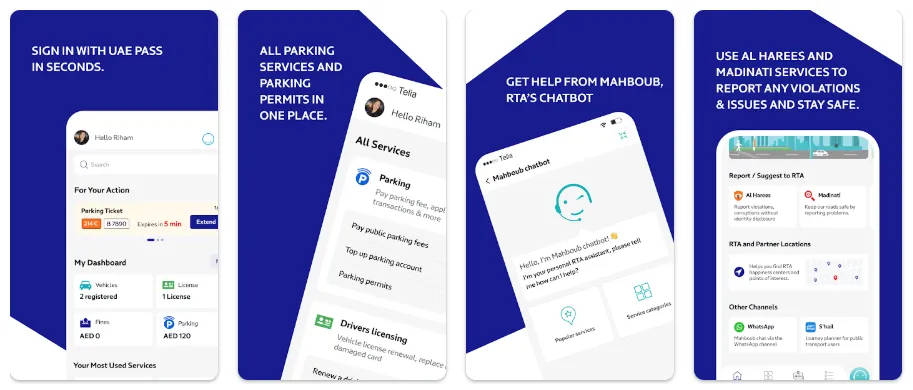
- Open RTA Dubai app.
- Log in using UAE Pass.
- Go to the Fines section to view all fines.
- Select the fine(s).
- Pay using a credit card or e-wallet.
Police Stations and Traffic Departments
You can also visit your nearest police station or traffic department for assistance.
Abu Dhabi Police Stations
- Khalidya Comprehensive Police Station
- Sha’abya Comprehensive Police Station
- Al-Madina Comprehensive Police Station
- Mussafah Comprehensive Police Station
- Khalifa Comprehensive Police Station
Dubai Police Stations
- Al Qusais Police Station
- Ports Police Station
- Barsha Police Station
Smart Police Stations (SPS) in Dubai
Dubai offers Smart Police Stations (SPS), which are fully automated and open 24/7 at locations like:
- Arabian Ranches
- City Walk
- Dubai Silicon Oasis
- Al Nahda
These stations allowyou to pay fine without human interaction.
Sharjah Police Stations
- Al Buhairah Comprehensive Police Station
- Al Gharb Comprehensive Police Station
- Wasit Comprehensive Police Station
- Al Hamriya Comprehensive Police Station
- Khor Fakkan Comprehensive Police Station
Other Emirates
- Ajman Police: You can pay fine at the Traffic and Patrol Department, Al Hamdiya 1.
- Ras Al Khaimah Police: Visit the Traffic and Licensing Services Centre, Khalifa Bin Zayed City.
- Umm Al Quwain Police: You can pay fine at the Traffic and Licensing Centre.
- Fujairah Police: You can pay fine at the Traffic and Licensing Services Centre.
Smart Kiosks & Self-Service Machines
Traffic fines can also be paid via smart kiosks.
- Malls
- Petrol stations
- Public transport hubs
Common self-service machines include:
- Sahl Devices (Abu Dhabi and other emirates)
- MBME Machines (available in malls)
- RTA Smart Kiosks (Customer Happiness Centres in Al Barsha and Deira)
- Dubai Police Payment Machines (available in malls and SPS locations)
Police Call Centers for Traffic Fine Queries
For any queries, you can contact:
- Abu Dhabi Police: 8003333
- Dubai Police: 901
- Sharjah Police: 901
- Ajman Police: 901
- Ras Al Khaimah Police: 901
- Umm Al Quwain Police: 901
- Fujairah Police: 09 2051100
Bank & Exchange House Payments
Many banks and exchanges allow you to pay fine through:
- Online banking
- Mobile apps
- ATMs
Some banks, like Emirates NBD and First Abu Dhabi Bank, offer installment plans for large fines.
Exchange houses like Al Ansari Exchange also facilitate traffic fine payments.
The UAE has many ways to pay traffic fines. You can use online sites or apps. You can pay at police stations or smart kiosks. If you have many fines, Dubai Police and some banks have payment plans. Paying on time helps you follow UAE road laws and avoid extra fees.


A little discussion goes a long way.
Ask a question, share your experience, or help someone find an answer.
There is room for your perspective.
No discussions match this view yet.
Your voice belongs here
Keep it useful. Keep it kind.