

In game development, music is often the most important yet most overlooked element. Players may not be able to articulate the melody itself, but they can definitely feel it: whether the atmosphere is authentic, whether exploration feels mysterious, and whether emotions are guided naturally.
For many creators, however, music remains a significant hurdle. They aim to craft the ideal musical atmosphere but lack systematic music production skills; they want to stick to original expression, yet are often held back by production costs and copyright risks.
This guide is specifically written for indie game developers and level designers. Using GenerateAiMusic as an example, we’ll explore how to truly integrate music into gameplay structures, making it an inseparable part of the immersive experience.
- Why Game Creators Need AI-Generated Music
- How to Generate Game Background Music with GenerateAiMusic
- Generate Vocal Background Music by Inputting Text To Songs
- Create Song Feature Overview
- Prompt Examples
- Character Theme
- World Theme / Opening
- Story Moment
- Generate Background Sound Effects Without Vocals
- Create Instrumental Feature Overview
- Prompt Examples
- Combat / Action
- Exploration / Puzzle
- Town / Safe Zone
- Applications of AI Music in Games
- Creating Character-Exclusive Theme Songs or Line Performances
- Enrich gaming experiences with royalty-free AI-generated sound effects
- Conclusion
Why Game Creators Need AI-Generated Music
For games, music has always been one of the key factors influencing the overall experience. It not only shapes the game’s atmosphere but also subtly guides players’ emotions and behavioral rhythms. However, in the actual development process, music often fails to receive the polish it deserves.
Producing original music comes with high barriers and a long cycle, requiring repeated refinement, while also being accompanied by exorbitant costs and copyright risks, making sustained investment challenging for many indie teams.
The emergence of AI-generated music offers a superior solution to this challenge. By understanding game scenarios and atmospheric requirements, AI can rapidly produce music content that aligns with gameplay and context, helping creators obtain usable solutions instantly without having to sift through music libraries repeatedly.
Additionally, games typically feature different types of levels, dynamic scene changes, and plot development, which demand music that evolves in tandem with the levels and storyline. AI music can be flexibly adjusted at minimal cost, allowing it to sync with gameplay and narrative, truly integrating into the game and becoming an inseparable part of its expression.
How to Generate Game Background Music with GenerateAiMusic
Generate Vocal Background Music by Inputting Text To Songs
In many games, certain pieces of music are more than just background tracks, but as pivotal elements that drive emotion, deepen memory, and ensure players truly remember specific story segments. For instance, key moments in the main storyline, a character’s first appearance, or the emotional resolution at chapter endings, these scenarios often require vocals to amplify the mood, rather than just filling the atmosphere.
Create Song Feature Overview
GenerateAiMusic’s Create Song feature enables users to rapidly generate vocal music tailored for game scenes, even without compositional expertise.
In Simple mode, you needn’t describe complex musical structures. Simply use gaming terminology to describe the scene and emotional atmosphere in the Song Description field, for example, “a low point after a character’s sacrifice” or “a hopeful chapter conclusion.”
GenerateAiMusic will automatically complete the melody, vocals, and overall arrangement, ensuring the music naturally aligns with the narrative rhythm.
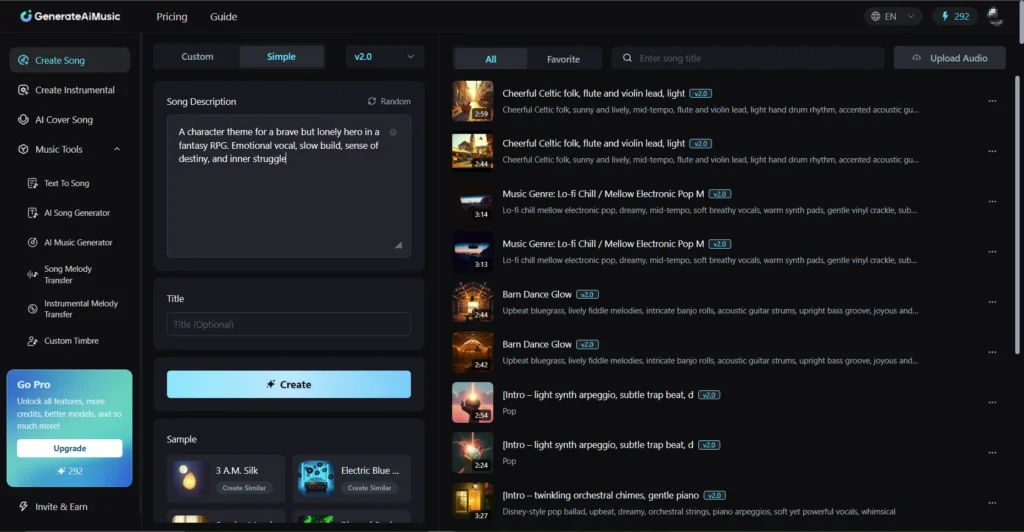
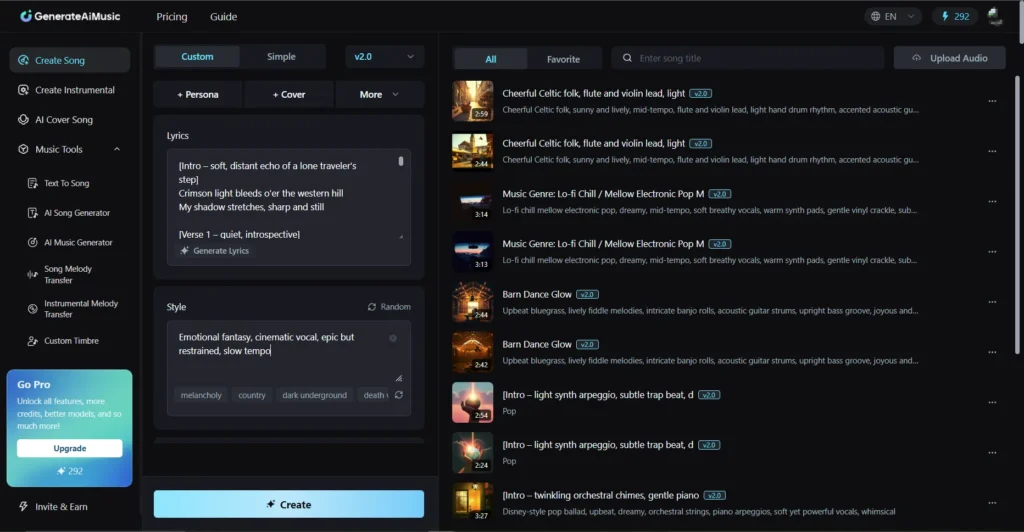
If you already have lyrics prepared, you can also choose Custom mode for more detailed creation. Simply enter your lyrics into the Lyrics input box, select your desired music style in Style, and click Create to generate a complete music piece with vocals.
Prompt Examples
Create Song is ideal for character theme songs, world-building music, or amplifying emotional expression at pivotal plot points. Below are sample prompts for both Simple and Custom modes to help you quickly generate vocal music for key emotional scenes in your game.
Character Theme
Usage Scenarios
Character debut, character-specific storylines, character ending scenes, or significant growth milestones. Use music to amplify the character’s personality and emotional resonance, ensuring players remember this individual.
Simple Mode (Song Description Prompt Examples)
“A character theme for a brave but lonely hero in a fantasy RPG. Emotional vocal, slow build, sense of destiny, and inner struggle.”
Custom Mode (Style Prompt Examples)
“Emotional fantasy, cinematic vocal, epic but restrained, slow tempo.”
World Theme / Opening
Usage Scenarios
Game opening animation, world-building introduction video, and main menu background – use music to quickly establish the world’s atmosphere and immerse players in the game world instantly.
Simple Mode (Song Description Prompt Examples)
“Opening theme with vocal for a vast open-world game. Mysterious, ancient, and hopeful atmosphere, cinematic fantasy style.”
Custom Mode (Style Prompt Examples)
“Cinematic, epic orchestral, fantasy vocal, mid-tempo”
Story Moment
Usage Scenarios
Character sacrifices, plot twists, pivotal decisions, and emotional resolutions at chapter endings must evoke intense emotional resonance in players.
Simple Mode (Song Description Prompt Examples)
“Emotional vocal music for a tragic story moment. Feeling of loss, regret, and quiet hope, slow tempo, cinematic game scene.”
Custom Mode (Style Prompt Examples)
“Emotional cinematic, soft vocal, minimal arrangement, slow build”
Whether starting from scratch to describe a scene or building upon existing lyrics, GenerateAiMusic empowers game creators to rapidly produce emotionally expressive vocal soundtracks that seamlessly integrate music into the narrative and world-building.
Generate Background Sound Effects Without Vocals
Compared to story-driven music, most gameplay scenarios require instrumental background music or sound effects. During combat, exploration, puzzle-solving, and other activities, the music’s role isn’t to be heard, but to complement the rhythm of actions, enhance immersion, and avoid distracting players’ judgment.
Create Instrumental Feature Overview
At this point, you can utilize Create Instrumental to specifically generate instrumental background music and game sound effects. Based on level aesthetics or precise rhythmic requirements, you can directly describe your desired music type within the Style field.
GenerateAiMusic will then output loop-ready, structurally coherent music free from vocal distractions, ensuring the music serves gameplay rather than competing for attention.

Prompt Examples
To help creators get started quickly, we’ve compiled reference prompts for common gameplay types covering combat, exploration, puzzle-solving, and more. (Beyond the prompt wording itself, tempo and energy are key factors influencing music generation: you can embed tempo and energy information directly into prompts to adjust the speed and intensity of the same melody, ensuring the music performs optimally across different scenarios.)
Combat / Action
Usage Scenarios
Boss battles, elite monster fights, and arena combat require music to drive player rhythm and heighten tension.
Style Prompt Examples
“High-energy instrumental battle music, fast tempo, strong rhythm, cinematic action, driving percussion”
Rhythm Adjustment Suggestions
Low Rhythm/Low Energy Version: Suitable for pre-battle build-up or normal monster fights.
High Rhythm/High Energy Version: Ideal for boss battles, chases, or tense events to heighten the sense of operational urgency.
Exploration / Puzzle
Usage Scenarios
Open-world exploration, overworld traversal, and puzzle-solving segments require music that plays on a loop without distracting the player’s attention.
Style Prompt Examples
“Ambient instrumental background music, slow tempo, loop-friendly, calm, spacious, exploration-focused”
Rhythm Adjustment Suggestions
Low Rhythm/Low Energy Version: Suitable for quiet exploration, observing the environment, or solving puzzles.
High Rhythm/High Energy Version: Suitable for light exploration or as a transitional atmosphere before medium-scale combat.
Town / Safe Zone
Usage Scenarios
Safe zones such as main cities, villages, markets, and residential areas should maintain a relaxed and pleasant atmosphere, allowing players to unwind naturally during non-combat situations and appreciate the world’s intricate details.
Style Prompt Examples
“Calm instrumental background music, slow tempo, warm tones, loop-friendly, relaxing, and cozy atmosphere”
Rhythm Adjustment Suggestions
Low Rhythm/Low Energy Version: deal for casual exploration, NPC interactions, or shop browsing.
High Rhythm/High Energy Version: Ideal for light activities or transitions between mini-games.
Applications of AI Music in Games
Creating Character-Exclusive Theme Songs or Line Performances
AI-generated music and sound effects are becoming increasingly vital in game development. Character theme songs and dialogue vocals transcend mere musical embellishment, they are pivotal elements for shaping character identities and amplifying narrative emotions.
With GenerateAiMusic’s Create Song feature, you can rapidly compose melodies, vocal arrangements, and accompaniments, producing game-ready musical works. AI-generated vocal music enables:
Strengthen Character Impression: A dedicated theme song leaves a lasting impression when a character first appears or during pivotal plot moments, helping players quickly grasp character personalities and storylines.
Deepen emotional and atmospheric expression: Line performances can better convey a character’s inner world through emotional vocal delivery, instantly bridging the emotional gap between the characters, plot, and players.
Streamline the creative process: Even without musical composition skills, GenerateAiMusic’s Create Song feature rapidly generates complete vocal tracks, including melody, accompaniment, and vocal performance, saving time and costs while bringing each character’s voice and emotions vividly to life. This creates lasting memories for players within the game world.
Enrich gaming experiences with royalty-free AI-generated sound effects
In game development, background music and sound effects must not only enhance atmosphere but also navigate copyright concerns. AI-generated royalty-free sound effects empower creators to swiftly and flexibly provide high-quality audio for diverse gameplay scenarios.
Enrich gameplay scenarios: AI-generated instrumental background sounds cover combat, exploration, puzzle-solving, and more, ensuring each scene has audio that matches its pacing and ambiance.
Controllable Tempo and Energy: By adding tempo and energy keywords in the Styles box, a single melody can generate multiple versions. For instance, slow-tempo versions suit exploration or puzzles, medium-tempo versions fit light combat, and fast-tempo versions excel in boss battles or chase sequences, allowing music to naturally complement player actions.
Enhanced Immersion: Strategic use of AI-generated BGM and sound effects not only amplifies the game’s atmosphere but also sustains player immersion during extended play sessions, making each scene feel more vivid and organic.
This approach enables developers to build a comprehensive, copyright-safe game audio system, elevating both gameplay expression and emotional resonance.
Conclusion
In game development, music serves not only as an atmospheric foundation but also as a vital tool for character development, plot progression, and gameplay immersion. With GenerateAiMusic, creators can rapidly generate high-quality vocal scores and instrumental background music without requiring professional composition skills, saving both time and costs.
Create Song feature excels at crafting character themes, climactic moments, or world-building sequences, evoking profound emotional resonance at pivotal points. The Create Instrumental feature provides flexible background music for gameplay scenarios like combat, exploration, and puzzle-solving, with adjustable tempo and energy levels to enhance immersion and control responsiveness.
By leveraging AI music effectively, developers can not only build a comprehensive, copyright-safe audio system but also truly integrate music into game storytelling and gameplay, making every melody an integral part of the player’s world experience.





A little discussion goes a long way.
Ask a question, share your experience, or help someone find an answer.
There is room for your perspective.
No discussions match this view yet.
Your voice belongs here
Keep it useful. Keep it kind.